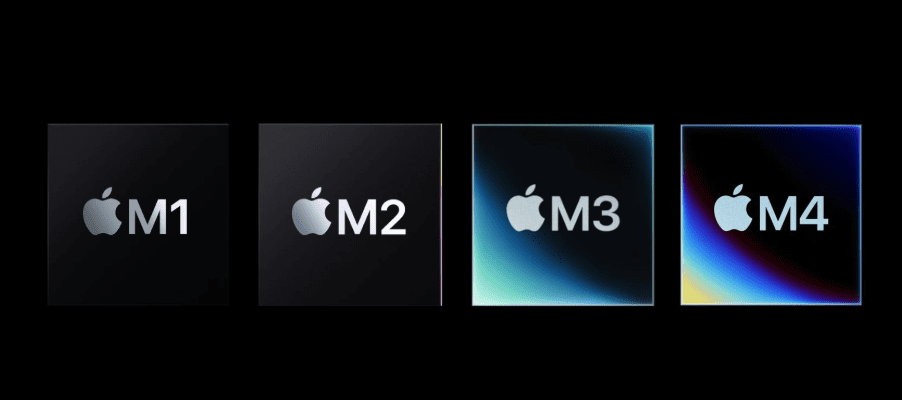
Apple’s MacBook lineup has evolved rapidly with the introduction of its own Apple Silicon chips—starting from the M1 to the latest M4. Choosing between these can be confusing, especially when pricing, performance, and real-world usage all matter. In this article, we’ll help you understand how each model differs and which MacBook Air might suit you best in 2025.
Why the M4 MacBook Air is a Game-Changer
Apple recently launched the MacBook Air with the M4 chip, making it the most powerful and efficient Air yet. What’s more surprising is that it is sometimes available at a lower price than older M-series MacBooks if bought smartly during sales or via second-hand marketplaces.
If your budget is around ₹1,00,000, the M4 MacBook Air is easily the best value option. It offers top-tier performance, incredible battery life, and handles everyday productivity tasks with ease. The Air lineup is already known for its fanless design and portability, but the M4 pushes this even further.
👉 Visit Apple’s Official Site for more details on the MacBook Air.
Understanding M1, M2, M3, and M4 Differences
Here’s a breakdown of how these chips compare in real-life usage:
1. Performance
- M1: Still a great entry-level option. Smooth for basic tasks, light video editing, and general browsing. Very stable thermal management.
- M2: Slight performance bump over M1 but with some reported lag when multitasking with multiple tabs. Storage speed issues have been noticed in some base variants.
- M3: Substantial upgrade. Better storage speeds, graphics performance, and general responsiveness.
- M4: Best of the lot. Highly power-efficient, ultra-fast, and suitable for demanding workloads.
Note: If you’re planning to buy during a sale, M1-based MacBooks can drop below ₹55,000, offering amazing value for casual users.
2. RAM & Storage Experience
While 8GB RAM is standard across all base models, real-world multitasking shows a difference:
- M1 and M3 perform smoothly with multiple browser tabs.
- M2 may show some reload or lag.
- M4 handles everything effortlessly.
3. Keyboard, Trackpad, and Gestures
The MacBook Air lineup offers the best trackpad and keyboard experience to date. Gestures are fluid, intuitive, and perfectly optimized. Compared to Windows laptops, the smoothness and responsiveness stand out significantly.
4. Software Compatibility
macOS now supports most productivity software natively. While gaming isn’t a strong suit for Macs, Apple has optimized a few select titles for Apple Silicon. The Mac App Store also offers games built for this architecture, though the library remains limited.
If gaming is important to you, a dedicated gaming machine might be a better option. But for professionals, students, and creators, these MacBooks are productivity beasts.
5. Audio and Speakers
- M1: Front-firing speakers offer louder audio.
- M2 & M3: Audio is routed through the display hinge area, producing more immersive sound.
- M4: Slightly better audio processing with crisp highs and decent bass.
Compared to most Windows laptops (except maybe Alienware), the speaker quality in MacBooks is unmatched in this weight class.









6. Portability and Weight
One of the most loved features of the Air series is its portability. Whether it’s the 13-inch or 15-inch variant, these laptops feel incredibly light and easy to carry. The 13-inch variant especially strikes the perfect balance for students and professionals on the go.
7. Webcam & Microphone Quality
- M1: 720p camera
- M2 & M3: Upgraded to 1080p, better low-light performance
- All models include high-quality mics that perform well even when the user is seated farther from the screen.
MacBooks also support fun webcam effects like virtual backgrounds, lighting effects, and gesture-based reactions such as thumbs-up or heart animations during calls.
8. Charging, Ports, and Connectivity
- All MacBook Air models come with Thunderbolt 4 ports, supporting display output and charging.
- M2 & M3 support MagSafe charging along with USB-C.
- M1: Slightly behind in Bluetooth and Wi-Fi tech.
- Battery capacities:
- M1: 49.9Wh
- M2/M3: Support 67W and 70W fast charging.
- M4: Adds more efficient power delivery and dual charger options in higher storage variants.
9. Thermal Design
Despite having no internal fans, all models maintain excellent thermal performance due to Apple’s silicon efficiency. Even under heavy loads, these machines remain cool and quiet—no helicopter-like fan noises as seen in many Windows laptops.
10. The Future of Apple Silicon
The M-series chips already consolidate CPU, GPU, and Neural Engine (NPU) into one efficient chip. Rumors suggest that Apple might introduce dedicated GPUs for Macs in the coming years, but for now, Apple Silicon continues to push the boundaries of performance and power efficiency.
Conclusion – Which MacBook Air Should You Choose?
| Chip | Best For | Price (approx.) | Webcam | Speakers | Performance |
|---|---|---|---|---|---|
| M1 | Budget users, students | ₹55,000–₹65,000 | 720p | Good | Basic tasks |
| M2 | Light creative work | ₹70,000–₹80,000 | 1080p | Good | Moderate tasks |
| M3 | Professionals, creators | ₹85,000–₹95,000 | 1080p | Great | Demanding tasks |
| M4 | Power users, future-ready | ₹95,000–₹1,10,000 | 1080p | Best | Exceptional |
If budget is tight, M1 is still a worthy choice in 2025. If you’re after long-term value, the M4 should be your go-to pick.
Disclaimer
This article is based on real-world usage, personal observations, and public information available as of May 2025. Prices and performance may vary based on model configuration and usage scenarios.
Tags
MacBook Air comparison, M1 vs M2 vs M3 vs M4, Apple Silicon MacBook, best MacBook 2025, MacBook buying guide India, MacBook Air M4 review, Apple laptop guide, MacBook performance comparison, student laptop Apple, MacBook for video editing
Hashtags
#MacBookAir #AppleM1 #AppleM2 #AppleM3 #AppleM4 #MacBookComparison #AppleSilicon #TechGuide #LaptopReview #MacOS #MacTips #AppleLaptop #BestLaptop2025








