Microsoft Edge comes pre-installed on Windows 10 and 11 systems. While many users quickly download another browser like Chrome or Firefox, Edge has steadily evolved into a powerful, user-friendly, and customizable browser—especially after its switch to the Chromium engine.
In this article, we’ll explore Microsoft Edge in detail, walking through its features, customization options, performance, and unique offerings like Microsoft Rewards. If you’re wondering whether to stick with Edge or switch to something else, this guide is for you.
🖥 What is Microsoft Edge?
Microsoft Edge is a free web browser developed by Microsoft to replace Internet Explorer. It is built on Chromium—the same engine used by Google Chrome—making it fast, secure, and compatible with modern web standards.
Edge is the default browser in Windows 10 and 11, and it integrates seamlessly with Microsoft services like Bing, Microsoft 365, and Windows Security.
👉 Official Website: Microsoft Edge
✨ User Interface & Design
When you first open Microsoft Edge, you’re greeted with a clean homepage that includes:
- A news feed with current headlines
- Customizable widgets (like weather and stock market updates)
- An integrated Copilot AI assistant (powered by Bing AI)
Key UI Features:
- Favorites bar for quick access to saved websites
- Vertical Tabs option if you prefer tabs on the side
- Sidebar with quick tools and apps
- Easy-to-navigate Settings menu
The browser interface is highly customizable and suitable for beginners. Whether you want minimalism or quick access to features, Edge gives you the flexibility to choose.
⚙️ Settings & Customization
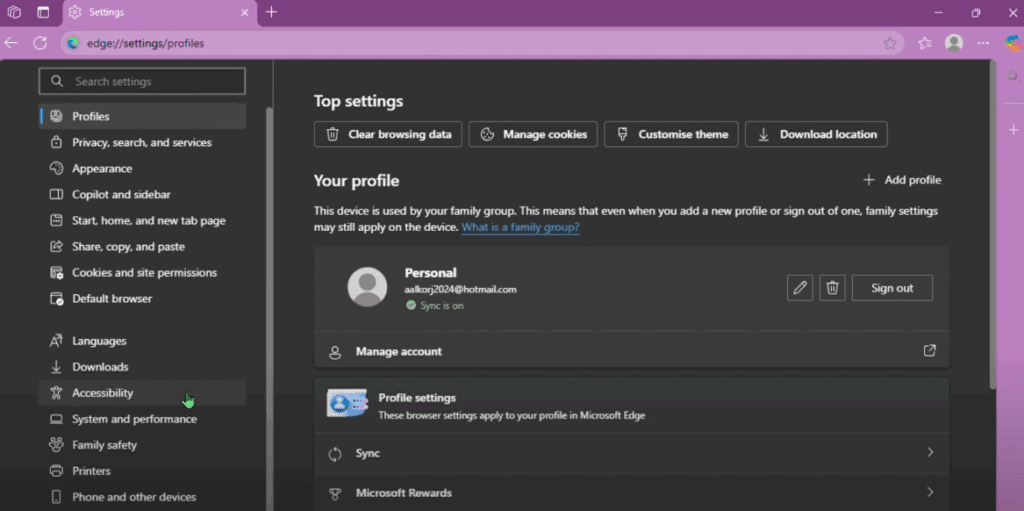
Edge makes configuration simple with an intuitive settings layout. Here’s what you can adjust:
- Profiles: Sign in with your Microsoft account to sync settings, bookmarks, and history.
- Privacy, Search, and Services: Customize tracking prevention, browsing data, and default search engine.
- Appearance: Choose your color theme, customize the home page, and layout.
- Startup Behavior: Decide whether Edge should open a specific page or continue from your last session.
- Language & Accessibility: Set preferred languages and enable assistive features.
- System and Performance: Optimize how Edge uses your system resources.
- Family Safety: Useful if the browser is being used by children.
Tip: Want a clean home page without news?
Go to Settings > Page Settings > Show Content and disable the feed to see your background image only.
💡 Unique Feature: Microsoft Rewards
One of the standout features of Microsoft Edge is Microsoft Rewards.
What is Microsoft Rewards?
It’s a loyalty program by Microsoft where you earn points by:










- Searching with Bing
- Using Microsoft Edge
- Shopping via the Microsoft Store
These points can be redeemed for:
- Gift cards
- Game Pass subscriptions
- Donations to charities
- Sweepstakes entries
Although this alone might not convince everyone to stick with Edge, it’s a nice bonus for users who already use Microsoft services.
🚀 Performance
Microsoft Edge is surprisingly fast. Thanks to its Chromium base:
- Pages load quickly
- Scrolling is smooth
- It handles media playback without issues
However, unlike browsers like Opera GX, Edge doesn’t include built-in RAM/CPU limiters or gaming-specific tools. It’s not targeted toward gamers, but it’s ideal for casual users, students, and professionals.
🔍 Bing Integration & Copilot AI
When you search using Edge’s address bar, it defaults to Bing, but you can change it to Google or any other engine in settings.
Bing’s search experience includes:
- Instant results
- Image and video search
- AI-generated summaries and answers using Copilot
This makes Edge more useful for users who want built-in AI tools without needing extensions.
🌐 Miscellaneous Features
- Temperature and location widgets on the home screen
- Integration with Microsoft 365 for users who use Office tools
- Customizable new tab layouts (minimal, informative, inspirational)
- Built-in PDF reader with annotation tools
- Immersive Reader for distraction-free reading
❓FAQs About Microsoft Edge
Q1: Can I install extensions on Microsoft Edge?
Yes, you can install extensions from the Edge Add-ons Store or even from the Chrome Web Store.
Q2: Is Microsoft Edge better than Chrome?
For casual users and those within the Microsoft ecosystem, Edge offers better integration, lower memory usage, and unique features like Microsoft Rewards. However, Chrome still leads in extension variety and developer tools.
Q3: Is Microsoft Edge safe?
Absolutely. Edge offers features like:
- Tracking Prevention
- Microsoft Defender SmartScreen
- InPrivate Browsing
It’s one of the more secure browsers available today.
Q4: Should gamers use Microsoft Edge?
While it’s good for general browsing, gamers might prefer Opera GX, which includes built-in performance controls and Twitch integration.
✅ Final Verdict
Microsoft Edge has evolved into a powerful, clean, and highly usable browser with:
- Easy customization
- Smooth performance
- Built-in Copilot AI
- Microsoft Rewards for added incentives
It’s especially great for:
- Beginners
- Students
- Professionals using Microsoft tools
For heavy gamers or advanced users needing unique features, alternatives like Opera GX or Chrome might still be better suited.
📌 Tags & Hashtags
Tags: Microsoft Edge, Edge Browser Review, Microsoft Rewards, Chromium Browsers, Windows 11 Tips, Edge Customization, Beginner Web Browsers, Microsoft Tools
Hashtags:
#MicrosoftEdge #EdgeBrowser #BrowserReview #Windows11 #WebBrowsing #MicrosoftRewards #EdgeFeatures #BeginnerFriendlyBrowser
⚠️ Disclaimer
This article reflects the personal review and experience of using Microsoft Edge as of 2025. Features may vary based on updates and operating system versions. Always download software from official sources and stay updated with privacy settings.








