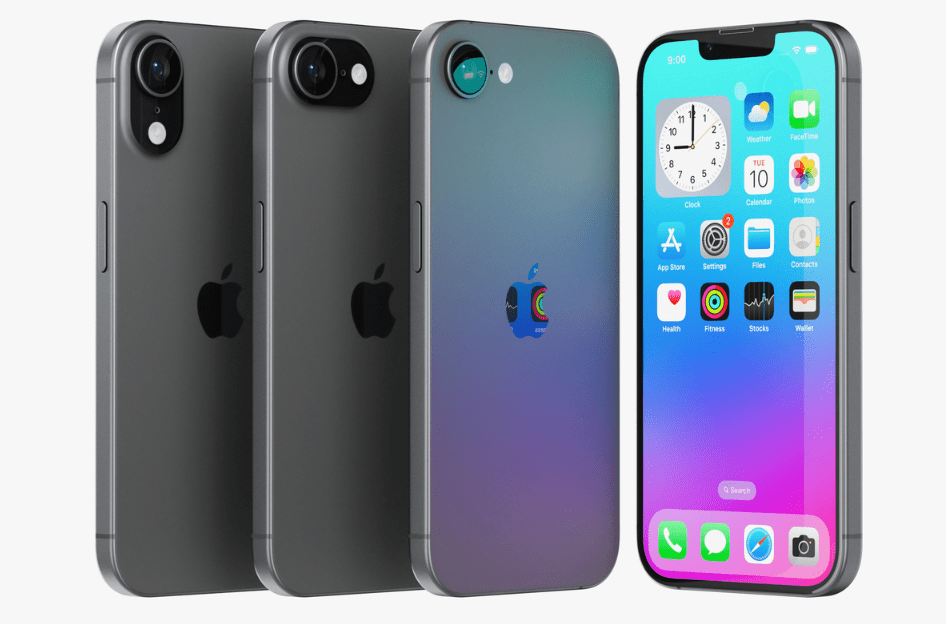
Apple’s latest budget-friendly iPhone, the iPhone 16e, brings modern features at an accessible price. Packed with the A18 chip, a 48MP camera, and USB-C, it’s a significant upgrade for users coming from older iPhones.
In this article, we’ll cover:
✅ Unboxing & first impressions
✅ Key specs & hardware upgrades
✅ iOS 18 features & Apple Intelligence
✅ Camera samples & battery life
✅ What’s missing vs. the iPhone 16/Pro
1. Unboxing the iPhone 16e
What’s in the Box?
- iPhone 16e (6.1″ OLED, Black or White)
- USB-C to USB-C cable
- SIM ejector tool (varies by region)
- Documentation (no Apple stickers!)
First Impressions:
- Sleek matte black finish – Feels premium despite the lower price.
- Same design as iPhone 14 – Flat edges, aluminum frame, Ceramic Shield display.
- Action Button replaces mute switch – Customizable for quick shortcuts.
- USB-C port – Finally replaces Lightning for faster charging & accessory compatibility.
2. Key Specs & Hardware Upgrades
| Feature | iPhone 16e |
|---|---|
| Chip | A18 (4-core GPU) |
| Display | 6.1″ OLED (800 nits, 1,200 nits HDR) |
| Camera | 48MP wide (2x digital zoom) |
| Battery Life | 26 hours (best ever for a 6.1″ iPhone) |
| Ports | USB-C (USB 2.0 speeds), no MagSafe |
| Modem | Apple C1 (first in-house 5G modem) |
| Durability | Ceramic Shield, IP68 water resistance |
Biggest Improvements Over Older iPhones:
✅ 48MP camera – Sharper than iPhone 11’s 12MP sensor.
✅ USB-C – Charge accessories (like AirPods) directly from the phone.
✅ Satellite connectivity – Emergency SOS & iMessage via satellite.
✅ Better battery life – Lasts 9 hours longer than an iPhone 11.
3. iOS 18 & Apple Intelligence Features
Customization Upgrades
- Home Screen Layouts – Place icons anywhere (no more forced grid).
- Lock Screen Shortcuts – Redesigned toggles (flashlight, camera, etc.).
- App Locking – Require Face ID to open sensitive apps (Photos, Notes).
Apple Intelligence (Beta)
- Writing Tools – Rewrite emails, summarize text, generate content.
- Genmoji – Create custom emojis from text prompts.
- Visual Lookup – Point the camera at objects for instant info.
- ChatGPT Integration – Ask Siri complex questions with AI-powered answers.
How to Enable Apple Intelligence:
- Go to Settings → Apple Intelligence.
- Turn on “Require Face ID for apps” for security.
- Use Control Center to access Visual Lookup & AI tools.
4. Camera Samples & Battery Life
48MP Camera Test
- 2x digital zoom (cropped from 48MP) – Surprisingly sharp.
- No Night Mode – Low-light shots are decent but not Pro-level.
- No Ultra-Wide – A downgrade if coming from iPhone 11/12.
Battery Life (26 Hours Video Playback)
- Lasts all day – Even with heavy use.
- USB-C charging – Supports 7.5W wireless charging (no MagSafe).
5. What’s Missing vs. iPhone 16/Pro?
❌ No MagSafe – Wireless charging works, but no magnetic accessories.
❌ No Ultra-Wideband (UWB) – Precision Finding for AirTags won’t work.
❌ 60Hz Display – No ProMotion (120Hz).
❌ Single Camera – No ultra-wide or telephoto.
6. Should You Buy the iPhone 16e?
✅ Get It If:
- You’re upgrading from an iPhone 11 or older.
- You want long battery life & USB-C at a lower price.
- You don’t need ultra-wide photos or MagSafe.
❌ Skip It If:
- You want Pro cameras or 120Hz display (consider a refurbished iPhone 15 Pro).
- You rely on MagSafe accessories.
Final Verdict:
The iPhone 16e is the best budget iPhone yet, offering A18 performance, USB-C, and great battery life. While it lacks some Pro features, it’s a massive upgrade for users coming from older models.
Tags: iPhone 16e, Apple, iPhone review, budget iPhone, iOS 18, Apple Intelligence, smartphone comparison
Hashtags: #iPhone16e #Apple #iPhoneReview #BudgetPhone #iOS18 #TechReview