Apple has officially unveiled iOS 26, and it’s one of the most visually impressive and feature-rich updates in years. From a refined design language to deep customization options and powerful AI-powered tools, this update is packed with innovations that elevate the iPhone experience.
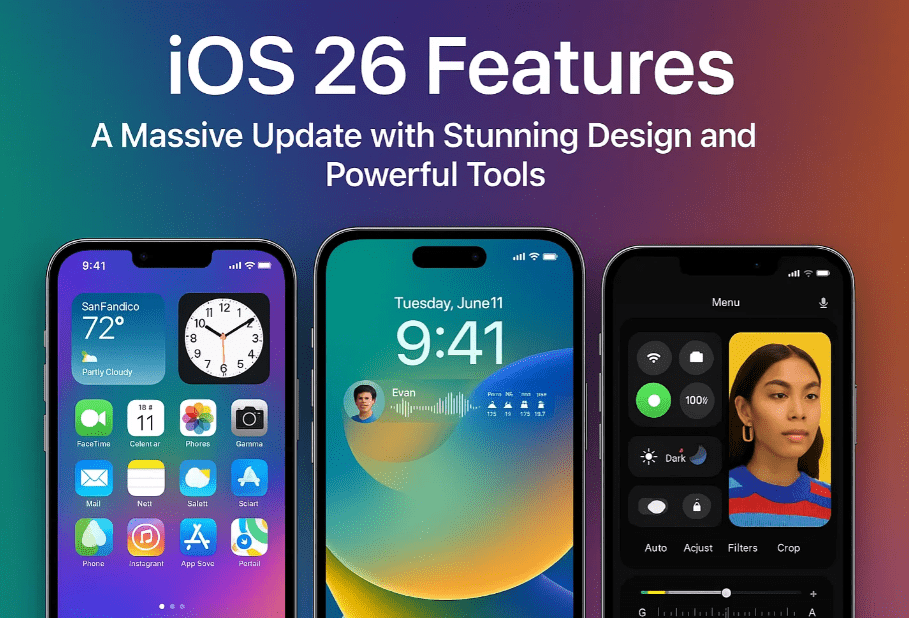
Let’s explore every major update coming to your iPhone with iOS 26 — including UI changes, app redesigns, live translation, visual intelligence, and more.
1. A New Name and a New Look: iOS 26 and the “Liquid Glass” Design
Apple has aligned the iOS version numbers with the calendar year, so we’re moving from iOS 17 straight to iOS 26, reflecting the 2026 release.
The most striking change? The new Liquid Glass design.
Key Highlights:
- Transparent and tinted app icons that blend beautifully into the wallpaper.
- Widgets now support both transparent and tinted styles.
- System elements like Control Center, keyboard, and notifications also adopt the Liquid Glass effect.
- Lock screen enhancements:
- A dynamic clock that adjusts with your wallpaper.
- Spatial scene wallpapers: Convert your photos into 3D-like lock screens that respond to phone movement.
This design overhaul feels modern, immersive, and far more integrated across the system.
2. A Minimal and Intuitive Camera App
The Camera app has been streamlined dramatically, now offering a much simpler user interface.
What’s New:
- Only Photo and Video modes are visible upfront.
- Additional modes (Portrait, Slo-mo, Time-lapse, etc.) are accessible via left/right swipes.
- Settings are now hidden behind an upward swipe for cleaner layout.
- You can apply the 3D spatial effect to any photo, including downloaded ones with depth information — an excellent addition for visual storytelling.
This minimalism gives users power without overwhelming them, maintaining Apple’s core design philosophy.
3. Messages App: Finally, Customization and Smart Features
The Messages app receives much-needed updates that bring it closer to competing messaging platforms like WhatsApp.
Key Features:
- Custom chat backgrounds:
- Use your own photos
- Select from animated Apple backgrounds
- Generate one using Image Playground
- Polls in group chats:
- Smart detection of poll-worthy discussions.
- Real-time updates showing the most-voted options.
- Long-press to see who voted what.
- Group typing indicators: Icons show exactly who is typing in a group — a small but meaningful improvement.
These updates finally give Messages users more control and context in their conversations.
4. Built-In Live Translation in Messages, Phone Calls, and FaceTime
Apple introduces Live Translation across key communication apps — a feature that Android users may already be familiar with, but Apple puts its own spin on it.
How It Works:
- Messages: Incoming messages are auto-translated into your language; your replies are translated for the recipient.
- Phone Calls: Real-time translation of both sides of a voice call.
- FaceTime Captions: Translated captions appear live as the other person speaks, adding accessibility and clarity.
This feature breaks language barriers across platforms and is especially useful for travelers or remote workers.








5. Visual Intelligence: Smarter Screenshots and Context-Aware Actions
Apple enhances screenshots with what can only be called screen intelligence, expanding beyond simple image captures.
New Screenshot Tools:
- Image Search: Find visually similar items online (like Circle to Search on Android).
- Highlight-to-search: Draw on an image to search specifically for what you’ve highlighted.
- Context Actions:
- Screenshot an event poster → Option to “Add to Calendar” with auto-filled details.
- Ask GPT: Ask ChatGPT about content in your screenshot using integrated AI (requires ChatGPT access — visit OpenAI).
Apple’s implementation stands out by combining visual understanding with task automation and AI.
6. Genmojis and Image Playground Get More Fun
If you’ve already used Genmojis, you’ll love these new features:
What’s New:
- Combine two or more emojis into one.
- Edit Genmoji hairstyles for better personalization.
- New styles in Image Playground, including:
- Oil painting
- Other AI-generated art styles
These tools, powered by OpenAI’s ChatGPT, make personalization and creativity more accessible than ever.
When Will iOS 26 Be Released?
As per tradition, Apple is expected to release iOS 26 in September 2025. To check if your iPhone is compatible, visit Apple’s official iOS update page.
Final Thoughts
iOS 26 is not just a design update — it’s a shift toward smarter, more helpful, and more beautiful user experiences. From intuitive camera gestures to AI-powered screenshots and real-time translation, it proves Apple’s commitment to combining utility and aesthetics.
Whether you’re excited about the Liquid Glass look, the upgraded Messages app, or the clever screenshot tools, there’s something in iOS 26 for everyone.
✅ What You’ll Learn in This Article:
- What’s new in iOS 26
- How the Liquid Glass design improves usability
- Key Messages and Camera app updates
- How Live Translation works across apps
- New screenshot and visual intelligence tools
- Genmoji updates and customization options
Tags:
iOS 26, Apple updates, iPhone features, iOS 26 release date, iOS customization, Apple camera update, iOS messages update, live translation iPhone, Genmoji iOS 26, iOS screenshot intelligence, Apple WWDC 2025, Image Playground, ChatGPT integration
Hashtags:
#iOS26 #iPhoneUpdate #AppleWWDC #LiquidGlassDesign #LiveTranslation #Genmoji #ChatGPTonApple #ImagePlayground #AppleCameraUpdate #iOSMessages #VisualIntelligence
Disclaimer:
Some features mentioned in this article, such as ChatGPT integration and Image Playground styles, may require an internet connection, OpenAI account access, or may not be available on all iPhone models. Always check the compatibility list on Apple’s official website before updating.