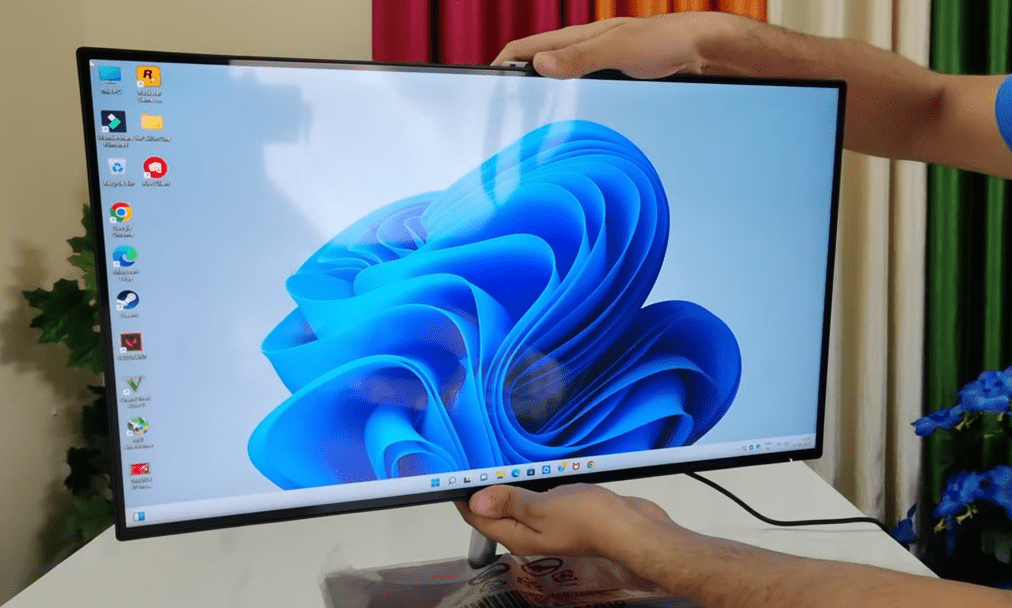
Looking for a sleek, powerful, and space-saving desktop solution? The HP All-in-One PC (2025 Model) might be the perfect choice for home, office, or casual gaming. In this detailed review, we’ll explore its unboxing, design, performance, and features to help you decide if it’s worth the investment.
Unboxing & First Impressions
The HP All-in-One PC arrives in a well-packaged box with all essential accessories included:
✅ Power cord
✅ User manual & setup guide
✅ Wireless keyboard & mouse (HP-branded)
✅ Built-in HD webcam & dual speakers
✅ Stand for adjustable tilt
The build quality feels premium, and the slim bezel design gives it a modern look.
Design & Build Quality
- 23.8-inch Full HD IPS display (almost 24-inch)
- Anti-glare panel (reduces eye strain)
- Slim profile (saves desk space)
- Sturdy stand (adjustable for optimal viewing)
- Weight: ~6.69 kg (solid but manageable)
Ports & Connectivity:
- HDMI port (for external displays)
- USB 3.2 (x1) + USB 2.0 (x2)
- 3.5mm audio jack
- Wi-Fi 6 & Bluetooth 5.0
- No Type-C port (a slight downside)
Display & Audio Quality
- Full HD (1920×1080) IPS panel – Crisp and vibrant colors.
- 250 nits brightness – Decent for indoor use.
- Anti-glare coating – Reduces reflections.
- Dual 5W speakers – Loud and clear (better than most laptops).
🔊 Audio Test:
The speakers deliver rich sound, suitable for movies, music, and video calls.
Performance & Hardware
- Processor: Intel Core i3-12100 (4 cores, 8 threads)
- RAM: 8GB DDR4 (expandable up to 16GB)
- Storage: 256GB SSD (fast boot & load times)
- OS: Windows 11 (pre-installed)
Real-World Usage:
✔ Office Work (Word, Excel, PowerPoint) – Smooth performance.
✔ Web Browsing (Chrome, Edge) – Handles 10+ tabs easily.
✔ Photo Editing (Photoshop) – Works well for basic edits.
✔ 1080p Video Playback – No lag or buffering.
✔ Casual Gaming (GTA V, Candy Crush) – Playable at low settings.
⚠ Limitations:
- Not ideal for heavy gaming/video editing.
- No dedicated GPU (relies on integrated graphics).
Webcam & Connectivity
- 5MP HD webcam – Good for Zoom calls.
- Wi-Fi 6 & Bluetooth 5.0 – Faster and more stable connections.
- Pre-installed Microsoft Office – Ready for productivity.
Final Verdict – Who Should Buy It?
✅ Best For:
- Home users (entertainment, browsing).
- Office professionals (Microsoft Office, emails).
- Students (online classes, assignments).
❌ Not For:
- Hardcore gamers.
- Video editors/3D designers.
Price & Availability
Check the latest price on Amazon or HP’s official website.
Tags:
HP All-in-One PC, desktop review, best all-in-one PC 2025, Windows 11 PC, home office computer










Hashtags:
#HPAllInOne #DesktopReview #Windows11 #TechReview #BestAIO #HomeOfficePC
Disclaimer: Performance may vary based on usage. Always check the latest specs before purchasing. Prices are subject to change.
Would you consider buying this HP All-in-One PC? Let us know in the comments! 🚀








