⚠️ Disclaimer: This article is intended for educational purposes and ethical hacking only. Always ensure you have permission before attempting any penetration test.
Hydra is one of the most widely used tools for performing brute-force attacks on remote authentication services. Whether you’re testing FTP, SSH, RDP, or other login protocols, Hydra can be a powerful part of any penetration tester’s toolkit.
In this guide, we’ll walk through a basic CLI-based brute-force attack using Hydra on a vulnerable machine like Metasploitable. This demonstration is ideal for those new to Hydra who want to understand the basics before diving deeper into its advanced features.
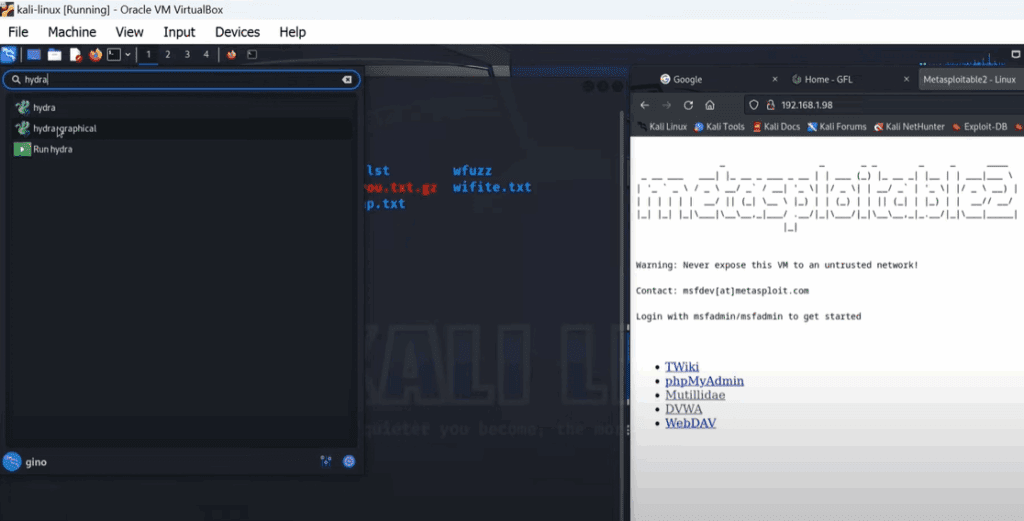
Step 1: Understanding Hydra
Hydra has both a graphical user interface (GUI) and a command-line interface (CLI). For this guide, we will strictly use the CLI version.
To get started, it’s helpful to explore the available options with:
hydra --help
This displays all the flags, options, and supported protocols. For our task, we’ll mainly use:
-Lfor the username list or specific username-Pfor the password list
Step 2: Preparing Your Wordlist
Kali Linux comes with several default wordlists located in:
/usr/share/wordlists/
One of the popular ones is rockyou.txt. However, for this demonstration, we’ll use a custom wordlist named jinenpassword.txt, which contains only a few passwords to keep the process quick and easy to follow.
Creating your own wordlist can be helpful for targeted attacks or faster testing.
Step 3: Running the Hydra Command
To initiate a brute-force attack using Hydra via SSH, follow the steps below. Replace the username, password file, and IP address as needed.
Command:
sudo hydra -L "username" -P jinenpassword.txt ssh://[target_IP]
Example:
sudo hydra -L "msfadmin" -P jinenpassword.txt ssh://192.168.1.100
Explanation:










-L: Specifies the login username or file-P: Specifies the password listssh://: Indicates the SSH protocol[target_IP]: Replace with the IP of your Metasploitable machine
Once executed, Hydra will attempt to log in using each password in your list. The smaller the list, the quicker the process. In this case, with a custom and minimal wordlist, the process is fast.
Step 4: Observing the Results
Hydra will output each attempt and show the successful login credentials if a match is found. In our demonstration, the password was easily cracked due to its simplicity.
Result Example:
[22][ssh] host: 192.168.1.100 login: msfadmin password: msfadmin
This highlights the importance of using strong, complex passwords, especially on publicly accessible services. Weak passwords can be cracked in seconds with tools like Hydra, posing a major security risk.
Step 5: Ethical Reminder and Best Practices
This demonstration is part of a controlled lab environment. Never attempt to brute-force systems without explicit authorization.
For ethical hacking purposes:
- Always test in isolated environments (e.g., Metasploitable, DVWA, or local VMs)
- Use strong passwords in production systems
- Regularly audit and enforce password policies
Conclusion
Hydra is a straightforward and powerful brute-force tool, and with a bit of practice, it becomes a go-to utility for ethical hackers and security researchers.
In this tutorial, you learned:
- How to use Hydra via the CLI
- How to prepare a custom wordlist
- How to execute a brute-force attack on an SSH service
- The importance of strong passwords and ethical hacking boundaries
Tags: hydra, brute force attack, ssh cracking, metasploitable, penetration testing, ethical hacking, kali linux, wordlist, password security, cybersecurity tools
Hashtags: #hydra #bruteforce #ethicalhacking #penetrationtesting #sshcrack #metasploitable #kalilinux #cybersecurity #infosec #passwordsecurity








