Disclaimer: This article is intended strictly for educational and ethical hacking purposes. Do not attempt these techniques on any network that you do not own or have explicit permission to test. Unauthorized access to networks is illegal and punishable under cybersecurity laws.
🔍 What is Fern WiFi Cracker?
Fern WiFi Cracker is a powerful wireless security auditing tool used for penetration testing and assessing vulnerabilities in Wi-Fi networks. It supports attacks against WEP/WPA/WPS-enabled networks using a dictionary-based approach, similar to tools like Hydra or John the Ripper.
In this guide, we will demonstrate how to ethically test the strength of your own Wi-Fi network using Fern WiFi Cracker.
🧰 Tools & Requirements
- A system running Kali Linux or a Linux distro that supports Fern
- Fern WiFi Cracker installed
- A wireless adapter that supports monitor mode
- A wordlist file (e.g.,
rockyou.txt, custom password files)
📝 Step-by-Step Instructions
✅ Step 1: Launch Fern WiFi Cracker
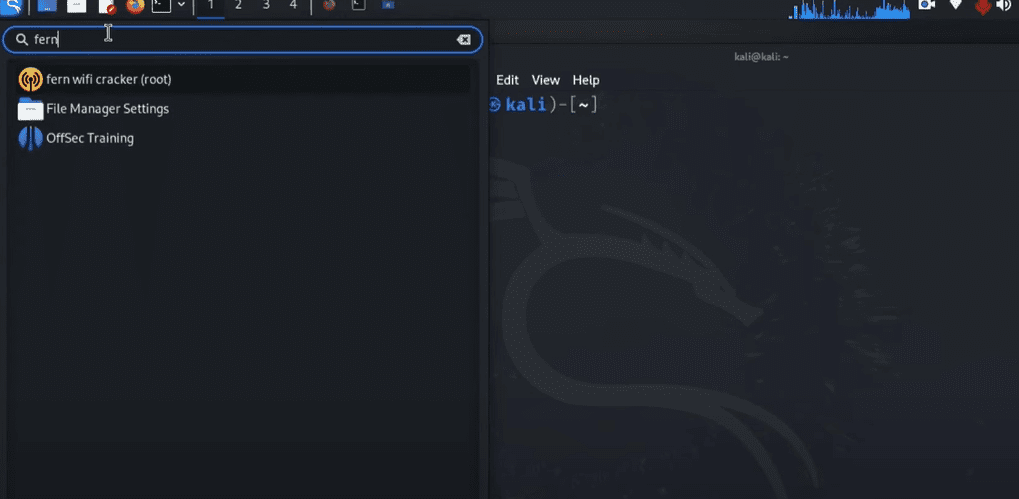
- Open the Applications menu in Kali Linux.
- Type
Fernin the search bar. - Click on the yellow Fern icon to launch the application.
- A green icon will appear, and the main interface will load.
✅ Step 2: Enable Wi-Fi Monitoring
- From the Select Interface dropdown, choose your wireless adapter (typically
wlan0). - Click on the blue Wi-Fi icon to begin scanning for nearby access points.
Note: Only proceed with networks that belong to you or that you have explicit permission to test.
✅ Step 3: Load Your Wordlist
- Click on the Browse button in the wordlist section.
- Navigate to:
/usr/share/wordlists/ - Select your desired wordlist file (e.g.,
rockyou.txtor a custom file likegin-password.txt).
The wordlist is a text file containing a list of potential passwords that Fern will use to brute-force the Wi-Fi credentials.
✅ Step 4: Choose the Target Device
- After scanning is complete, you’ll see a list of nearby devices and networks.
- Choose the network/device you want to test (e.g., your mobile phone).
- From the dropdown, select your own access point.
✅ Step 5: Start the Attack
- Click the Attack button in the top-right corner.
- Fern will send a Deauthentication (DeAuth) packet to disconnect the device from Wi-Fi.
- The device will automatically attempt to reconnect using its saved credentials.
- During this handshake, Fern intercepts the data and begins matching passwords from the wordlist.
🔐 Step 6: Result – Password Recovered
Once Fern finds a match in the wordlist:
- The correct Wi-Fi password will be displayed at the bottom of the interface, typically highlighted in red.
- This confirms that the network was vulnerable to dictionary attacks, and a stronger password is recommended.
🧠 Important Notes
- Always test responsibly. Do not attempt unauthorized penetration testing.
- Long, complex passwords with numbers, symbols, and a mix of uppercase/lowercase characters are much harder to crack.
- This method relies on the wordlist — if the correct password isn’t in the list, Fern won’t be able to find it.
✅ Conclusion
Testing your Wi-Fi network with tools like Fern WiFi Cracker is a great way to learn about cybersecurity and network protection. By understanding how attackers operate, you can better secure your own digital environment.
If Fern was able to crack your password quickly, it’s time to change it to something more secure!
📌 Tags:
fern wifi cracker, wifi security test, ethical hacking, wifi password audit, kali linux tools, wireless hacking, wordlist attack, password recovery, network security, deauth attack, WPA crack, how to test wifi
📢 Hashtags:
#FernWiFiCracker #WiFiSecurity #EthicalHacking #KaliLinux #CyberSecurity #PenetrationTesting #WiFiCrack #LinuxTools #DeauthAttack #WPA #WordlistAttack