Disclaimer:
This article is intended strictly for educational purposes only. The tools and techniques described here are designed for ethical hacking and cybersecurity learning. Never attempt unauthorized access to any network you do not own or have permission to test.
Introduction
Wi-Fi penetration testing is an essential skill in cybersecurity, allowing ethical hackers and security professionals to discover vulnerabilities in wireless networks. Two powerful tools available on Kali Linux for Wi-Fi penetration testing are Fern Wi-Fi Cracker and Wifite. This article will walk you through how to use both tools effectively for testing your own network’s security.
Part 1: Using Fern Wi-Fi Cracker
Step 1: Launching Fern on Kali Linux
- Click on the Kali menu (top left of the screen).
- Type
Fernin the search field. - Click on the Fern logo to launch the application.
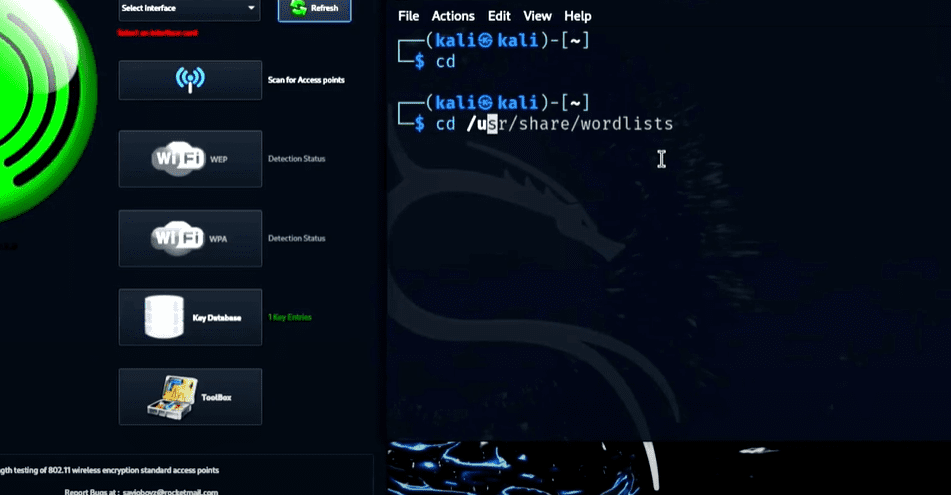
After launching, you will see a large green Fern icon and a user-friendly interface.
Step 2: Preparing the Word List
Fern relies on word lists to guess passwords. These are located in:
/usr/share/wordlists/
One example is the rockyou.txt list, which contains around 14 million commonly used passwords.
You can also create your own custom word list for targeted attacks. In this article, a custom word list named jiny_password.txt is used.
Step 3: Setting Up Wi-Fi Monitoring
- In Fern, go to the interface selection drop-down.
- Choose the Wi-Fi adapter (usually
wlan0). - Click the blue Wi-Fi icon to enable scanning mode.
Fern will begin scanning for broadcasting access points.
Step 4: Targeting WPA Networks
- Click the WPA button in Fern.
- Detected WPA access points will be displayed at the top of the interface.
- Select your target Wi-Fi network.
Step 5: Launching the Attack
- Choose your word list (navigate to the correct folder).
- Select a connected device (e.g., your mobile phone) from the list.
- Click the Attack button.
Fern will begin a de-authentication attack, forcing the device to reconnect. During reconnection, Fern captures the handshake and tries all passwords in the list to crack the Wi-Fi.
If successful, the correct password will appear at the bottom of the screen in red.
Part 2: Using Wifite with Aircrack-ng Suite
Step 1: Start Wifite
You can run Wifite via terminal or the Kali menu. Open a terminal and type:
wifite
If you’re not a root user, you’ll receive a permissions error. Use:












sudo su
to become root.
Step 2: Basic Scanning
To begin a basic scan with default settings and word lists, use:
wifite
This will scan for all available Wi-Fi networks on the 2.4GHz frequency.
Step 3: Preparing the Network Interface
If your Wi-Fi adapter is already in monitor mode (check using ifconfig), it’s ready. If not, stop existing processes using:
airmon-ng stop wlan0mon
Restart the process using:
wifite
Step 4: Using Custom Parameters
Run Wifite with extra options for WPA attacks and a custom word list:
wifite --wpa --dict /path/to/your/wordlist.txt --kill
--wpa: Targets only WPA networks--dict: Specifies the path to your custom word list--kill: Terminates any conflicting processes
Press Enter, and Wifite will begin scanning. Once networks are detected, press Ctrl + C to select the desired network and enter the corresponding number (e.g., 2 for your Wi-Fi).
Wifite will perform a de-authentication attack, capture the handshake, and attempt to crack the password using the specified word list.
Once cracked, the password is displayed on-screen.
Step 5: Restoring Wi-Fi Connection
After you’re done, it’s essential to restore your Wi-Fi adapter:
- Stop monitoring mode:
airmon-ng stop wlan0mon
- Restart the network manager:
service network-manager restart
- Verify the status with:
ifconfig
You should see wlan0 back in normal mode with an assigned IP address.
Conclusion
Both Fern Wi-Fi Cracker and Wifite are excellent tools for Wi-Fi penetration testing on Kali Linux. Fern offers a graphical user interface perfect for beginners, while Wifite provides command-line flexibility favored by advanced users.
Mastering these tools not only enhances your understanding of network security but also prepares you for real-world scenarios in ethical hacking. Remember, always perform penetration testing only on networks you own or have permission to test.
Tags:
kali linux, wifi penetration testing, fern wifi cracker, wifite, ethical hacking, network security, aircrack-ng, wordlists, WPA cracking, cybersecurity
Hashtags:
#KaliLinux #WiFiHacking #FernCracker #Wifite #EthicalHacking #CyberSecurity #NetworkSecurity #Aircrack #PenTesting #LinuxTools








