If you’re encountering the “explorer.exe system call failed” error on your Windows computer, you’re not alone. This issue can appear in any version of Windows from 7 to 11 and usually occurs due to corrupted system files or a malfunction in Windows Explorer.
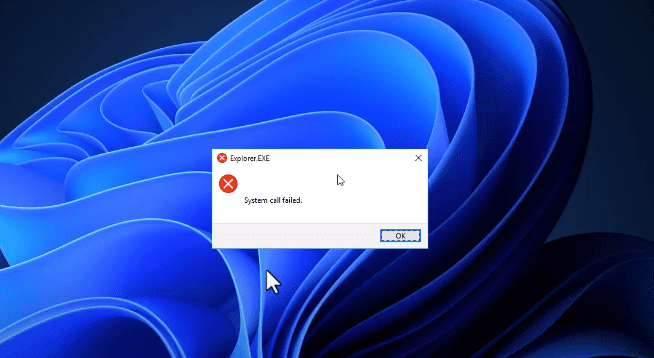
This article will guide you step-by-step on how to fix this problem using two simple methods: restarting Windows Explorer and repairing system files through Command Prompt.
✅ Method 1: Restart Windows Explorer
Sometimes, a simple restart of Windows Explorer can fix temporary glitches causing the error.
Steps:
- Right-click on the taskbar (bottom bar of your screen).
- Select Task Manager from the menu.
- In the Task Manager window, scroll down and locate Windows Explorer under the Processes tab.
- Right-click on Windows Explorer and select Restart.
- Close Task Manager and check if the issue is resolved.
If the error persists, proceed to the next method.
✅ Method 2: Use Command Prompt to Repair System Files
This method uses built-in tools like System File Checker (SFC) and Deployment Imaging Service and Management Tool (DISM) to scan and fix corrupted files.
Steps:
- Open the Search menu and type cmd.
- Right-click on Command Prompt and select Run as administrator.
- Click Yes if prompted by User Account Control.
Run the following commands one by one:
sfc /scannow
Wait for the scan to complete 100%. This may take a few minutes.
DISM /Online /Cleanup-Image /RestoreHealth
This command may also take some time, so be patient.
- Once both commands are completed successfully, close the Command Prompt window.
- Restart your computer.
After rebooting, the “explorer.exe system call failed” error should be resolved.
ℹ️ What These Commands Do
sfc /scannow: Scans all protected system files and replaces corrupted files with a cached copy.DISM /Online /Cleanup-Image /RestoreHealth: Repairs the Windows image used by the operating system.
These are official tools provided by Microsoft and are safe to use on any Windows version.
🛡️ Disclaimer:
This guide is intended for educational purposes. Always ensure you have a backup of important data before running system-level commands or making changes to your operating system.
🏷️ Tags:
Windows error fix, explorer.exe error, system call failed, Task Manager restart, sfc scan, DISM restore, Windows troubleshooting, Windows Explorer crash, cmd repair, Windows command line












📢 Hashtags:
#Windows11 #ExplorerError #SystemCallFailed #WindowsFix #SFCScan #DISMTool #CMDTips #WindowsTroubleshooting #PCRepair #TechHelp








