Are you tired of endlessly searching for reliable websites to download games for your PC or laptop? If yes, you’re in the right place!
In this guide, we’ll share the best platforms where you can download games legally and safely — no cracks, no viruses, and no piracy involved. All the websites listed here are official and trustworthy, and some even offer premium (paid) games for free during special promotions!
So, let’s dive into the best ways to grow your gaming library without putting your system at risk.
1. 🎮 Ubisoft Store (PC & Mobile Games)
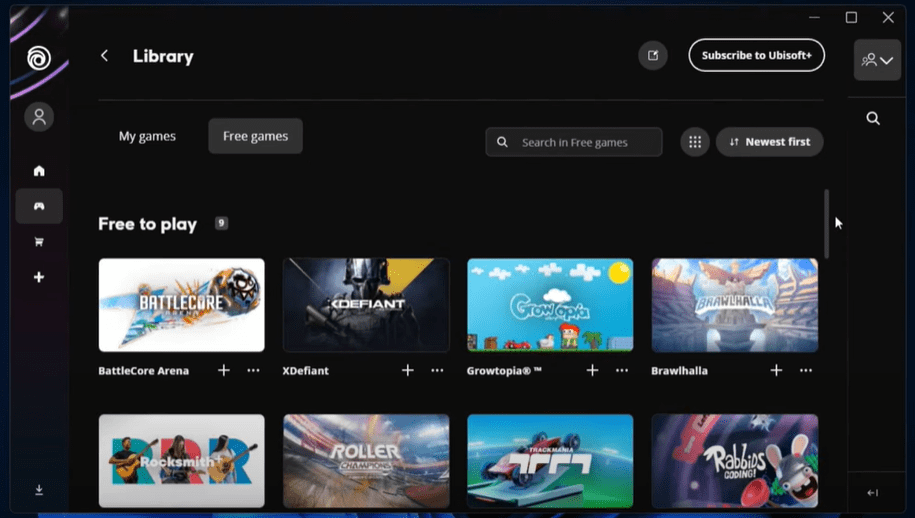
Ubisoft is best known for blockbuster franchises like Assassin’s Creed, Far Cry, and Watch Dogs. While many people think of it mainly for mobile or console titles, the Ubisoft Store also has a large collection of PC games.
What makes Ubisoft special is its exclusive content and loyalty rewards. From time to time, Ubisoft even gives away full PC games for free (for example, Assassin’s Creed Unity was free for all players in the past).
How to Download from Ubisoft Store:
- Go to Ubisoft Store.
- Create a Ubisoft Connect account (free).
- Download the Ubisoft Connect launcher on your PC.
- Browse or search for your favorite titles.
- Add to your library and click Download.
✅ Pro tip: Ubisoft often runs giveaways during holidays, anniversaries, or big events — so keep an eye on their promotions.
2. 🕹️ Epic Games Store
The Epic Games Store has become a giant in the gaming world, rivaling even Steam. It offers a wide selection of free-to-play and paid games, but what really makes it famous are its weekly free game giveaways.
They’ve given away massive titles like GTA V, Control, Hitman, and Civilization VI for free — permanently adding them to players’ libraries.
How to Download from Epic Games Store:
- Head to the Epic Games website.
- Download and install the Epic Games Launcher.
- Create or sign in with your Epic account.
- Check the Free Games section (updated weekly).
- Claim and download — once you claim a game, it’s yours forever.
✅ Pro tip: Set a weekly reminder to check Epic’s store every Thursday. You don’t want to miss limited-time giveaways.





3. 💻 Steam
Steam is the largest and most popular gaming platform on PC. It offers thousands of titles — from indie gems to AAA blockbusters. While most of its catalog is paid, there are hundreds of free-to-play games available at any time.
Another perk? Steam hosts massive seasonal sales (Summer, Winter, Lunar New Year) where you can get premium games at huge discounts, and sometimes even free.
How to Download from Steam:
- Go to Steam.
- Download and install the Steam client.
- Create a Steam account (free).
- Browse categories like Free to Play or watch for Free Weekends.
- Add to your library and click Install.
✅ Pro tip: Use Steam’s wishlist feature. When a game you want goes free or on sale, you’ll get notified instantly.
4. 🪟 Microsoft Store
If you’re using Windows 10 or 11, the Microsoft Store is already installed on your system. It’s Microsoft’s official hub for apps and games, meaning every download here is 100% safe and verified.
The selection is a mix of casual free games (Candy Crush, Asphalt 9) and premium PC titles (Forza Horizon, Halo). While Microsoft doesn’t run as many free promotions as Epic or Steam, it’s still a convenient option.
How to Download from Microsoft Store:
- Open the Microsoft Store app from your Start menu.
- Log in with your Microsoft account.
- Go to the Games section.
- Filter by Free Games or browse premium ones.
- Click Install to download directly.
✅ Pro tip: If you’re subscribed to Xbox Game Pass for PC, you’ll get access to a huge catalog of games through the Microsoft Store at no extra cost.
5. 🎮 EA App (formerly Origin)
Electronic Arts (EA) is behind legendary series like FIFA, Need for Speed, and Battlefield. Their EA App (which replaced Origin) is the official platform to download these titles.
The EA App not only gives you access to premium games but also occasionally runs limited-time free promotions. For instance, The Sims 4 base game was made free permanently for all users.
How to Download from EA App:
- Download the EA App from here.
- Install and log in with your EA account.
- Browse the store for free or paid games.
- Click Download to install directly.
✅ Pro tip: If you subscribe to EA Play, you get access to hundreds of EA games, trials of new releases, and member-only rewards.
🆚 Comparison of Game Download Platforms (2025)
| Platform | Free Games Available | Premium Games | Free Promotions / Giveaways | Launcher Required | Best For |
|---|---|---|---|---|---|
| Ubisoft Store | ✅ Some (limited) | ✅ Yes | Occasionally (events/anniversaries) | ✅ Ubisoft Connect | Ubisoft fans & exclusive titles |
| Epic Games Store | ✅ Weekly Free Games | ✅ Yes | ⭐ Weekly free AAA games | ✅ Epic Games Launcher | Gamers who want big-budget games free |
| Steam | ✅ Large free-to-play library | ✅ Yes | Seasonal sales, free weekends | ✅ Steam Client | Hardcore & casual PC gamers |
| Microsoft Store | ✅ Casual + indie titles | ✅ Yes | Rare (mostly via Game Pass) | ❌ Built-in for Windows | Casual users & Game Pass subscribers |
| EA App (Origin) | ✅ Some (like Sims 4 base game) | ✅ Yes | Occasional limited-time promos | ✅ EA App | EA franchise fans (FIFA, NFS, Battlefield) |
🧹 Final Thoughts
If you want to download games for your PC or laptop legally and safely, these five platforms are your best options in 2025:
- Ubisoft Store → great for Ubisoft exclusives + free giveaways.
- Epic Games Store → weekly free AAA titles.
- Steam → largest library + free-to-play collection.
- Microsoft Store → built-in for Windows users, secure and simple.
- EA App → perfect for EA’s popular franchises and occasional freebies.
✨ The key is to check these platforms regularly. Free promotions are often time-limited, but if you claim them once, they’re yours forever.
Stay smart, stay legal, and happy gaming! 🎮
📌 Tags:
game download, pc games, laptop gaming, epic games, steam games, microsoft store games, free pc games, legal game download, windows gaming, EA App, best gaming platforms
🔖 Hashtags:
#GameDownload #PCGaming #LaptopGaming #EpicGames #Steam #MicrosoftStore #FreeGames #LegalDownload #WindowsGames #GamingPlatforms








