Looking to create a beautiful and festive Christmas video, but unsure which video editing software to use? Look no further—Filmora 13 is the ultimate choice for both beginners and seasoned editors. Packed with holiday-themed effects and cutting-edge AI tools, Filmora 13 makes it easier than ever to produce professional-quality videos for the holiday season.
In this article, we’ll explore the key features of Filmora 13 that make it the perfect tool for creating magical Christmas content—from themed titles and transitions to powerful AI tools that simplify the editing process.
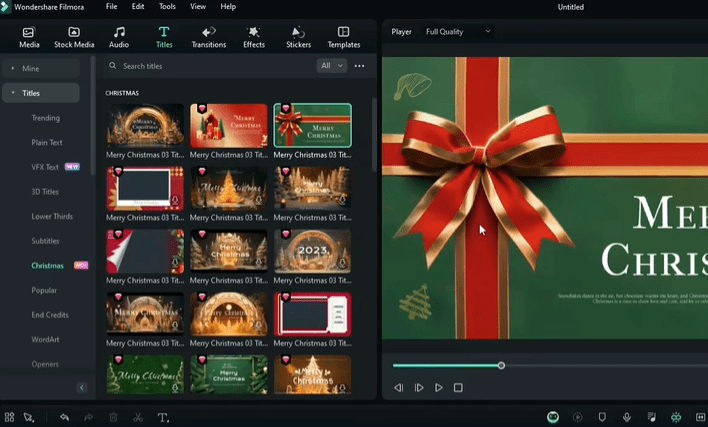
🎄 Festive Christmas Assets in Filmora 13
Filmora 13 offers a wide range of built-in Christmas content to instantly elevate your holiday video:
- Christmas Footage: Browse the media library for a vast collection of festive clips by simply searching “Big Christmas.” From cozy fireplaces to snowy scenes, you’ll find plenty of options to set the tone.
- Christmas Titles and Text Effects: Add joyful messaging with beautifully designed text templates created just for the holidays.
- Christmas Transitions: Smooth, festive transitions add a polished feel between your clips—choose from a variety of snowflakes, wreaths, ornaments, and more.
- Themed Music: Whether you want traditional Christmas tunes or cheerful modern beats, Filmora 13 has you covered. Use the built-in holiday music library or create your own with AI-generated music.
🧠 Next-Level Editing with AI Tools
Filmora 13 is more than just a traditional video editor—it’s powered by advanced AI tools designed to simplify and enhance every part of the editing process. Here’s a breakdown of what you can do:
1. AI Co-Pilot Editing
The AI Co-Pilot serves as your intelligent assistant. Just type what you need help with—like adding a transition or improving color correction—and it will guide you step-by-step through the process.
2. AI Image Generator
Need custom visuals? Head to the AI Image section under stock media to create unique imagery. For example, generate an illustration of Mary, Joseph, and Baby Jesus for a nativity scene—just describe what you want, and Filmora’s AI will do the rest.
3. AI Music Generator
Want custom background music that matches the mood of your video? Use the AI Music Generator to create original tracks. Select the mood (e.g., happy, hopeful), duration, and other settings, and the tool will produce music tailored to your needs.
4. AI Vocal Remover
If you want to use a popular Christmas song but only need the instrumental version, Filmora 13 lets you easily remove vocals. Just import the track, right-click, and use the AI Vocal Remover to separate the vocals from the music. You’ll get three layers: the original, the vocals, and the instrumental.
5. AI Text-Based Editing
Edit your video just by interacting with the transcript! With AI Text-Based Editing, you can:
- Remove all silent segments automatically
- Edit by deleting words in the transcript
- Export directly to the timeline for further refinement
This tool saves time and ensures precision—especially useful for tutorial or vlog-style videos.
6. AI Thumbnail Creator
Finish your video with a professional-looking thumbnail using the AI Thumbnail Creator. The tool analyzes your video, captures highlight frames, and lets you customize them with text, presets, and templates. It’s a great way to boost clicks and engagement on your final product.









🧑💻 A Complete Editing Experience with a Holiday Touch
Whether you’re creating a Christmas family video, a holiday marketing campaign, or a festive vlog, Filmora 13 offers everything you need—from visual assets and audio tools to smart AI assistance. It’s intuitive enough for beginners, yet powerful enough for professionals looking to streamline their workflow.
So go ahead—unleash your creativity, embrace the holiday spirit, and let Filmora 13 do the heavy lifting with its smart features.
🎁 Tell Us What You Think!
Which AI feature are you most excited to try? Let us know in the comments section. Happy editing, and may your holiday videos be merry and bright!
Tags: video editing, Christmas videos, Filmora 13, AI editing tools, holiday content creation, video production, beginner video editor, festive effects, AI music, AI image generator, vocal remover, YouTube thumbnail, Christmas transition, Christmas title template
Hashtags: #Filmora13 #ChristmasVideoEditing #AIEditingTools #HolidayContent #VideoEditingTips #ChristmasEffects #AIMusicGenerator #VideoEditingSoftware #ContentCreation #VocalRemover #YouTubeThumbnails #FilmoraAI #ChristmasMagic








