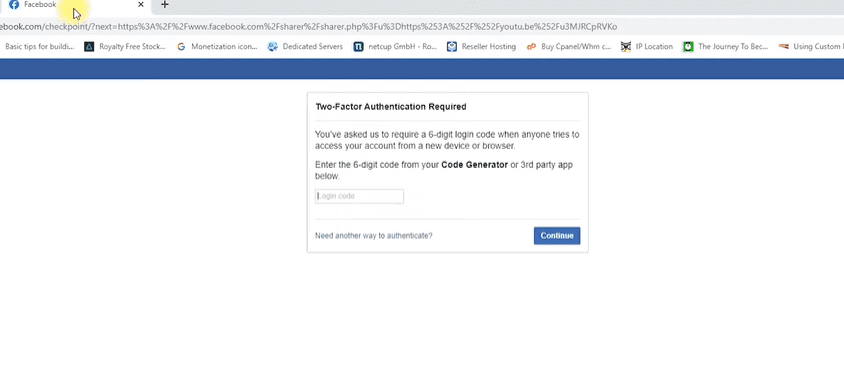
Getting locked out of your Facebook account due to two-factor authentication (2FA) can be frustrating—especially if you can’t find the code generator that Facebook is asking for. If you’re stuck on the login screen and unsure where to get that six-digit code, this article will walk you through a quick and simple way to retrieve it from your mobile phone.
🔐 What is the Facebook Code Generator?
The Code Generator is a security feature within the Facebook mobile app that provides a temporary 6-digit login code. This helps protect your account from unauthorized access by requiring a second form of verification during login.
📱 Step-by-Step: How to Find the Facebook Code Generator
To access your Facebook account using two-factor authentication, you’ll need to follow these steps from your mobile phone:
1. Open the Facebook App on Your Phone
Make sure you’re logged into the Facebook app on your smartphone. This method requires mobile access to retrieve the login code.
2. Navigate to the Menu
- Tap the menu icon (three horizontal lines) in the top or bottom right corner of the app.
3. Go to Settings
- Scroll down and tap on “Settings & Privacy.”
- Then tap “Settings.”
4. Open Password and Security
- Scroll to find the “Password and Security” section (usually the second tab under settings).
5. Locate the Code Generator
- In this section, you’ll find an option labeled “Code Generator.”
- Tap to open it.
6. Use the 6-Digit Code
- You will see a 6-digit security code on your screen. This code refreshes every 60 seconds.
- Enter this code in the two-factor authentication prompt on your desktop or web browser.
7. Log In to Facebook
- Once the code is entered correctly, click “Continue.”
- You’ll now have access to your Facebook account.
8. Save the Browser (Optional)
- If you’re using a trusted device, you can choose to save the browser to avoid entering the code again in the future.
9. Check Notifications
- Facebook will send you a notification or email confirming that a new login has occurred. You can verify whether it was you or not for extra security.
✅ Final Thoughts
Two-factor authentication is a great way to keep your account secure—but only if you know how to use it. Now that you understand where to find Facebook’s Code Generator, you can easily log in even when extra verification is required.
Make sure to keep the Facebook app installed on your mobile device, as it’s the easiest way to generate secure login codes when needed.
If you found this guide helpful, feel free to share it with others who might be locked out of their accounts!
Tags:
facebook login help, two-factor authentication facebook, facebook code generator, facebook security tips, recover facebook access, login code facebook, how to get facebook login code, facebook 2fa guide
Hashtags:
#FacebookLogin #2FA #FacebookHelp #CodeGenerator #AccountRecovery #FacebookSecurity #LoginIssues #TechTips #TipsToFix #SecureFacebook