Welcome back, everyone! Today, we’re going to explore how SSL certificates work in detail. As web developers, we visit numerous websites daily, and we often assume that SSL certificates are just simple tools that secure our connections. But what exactly are SSL certificates? How do they work internally? What is their purpose?
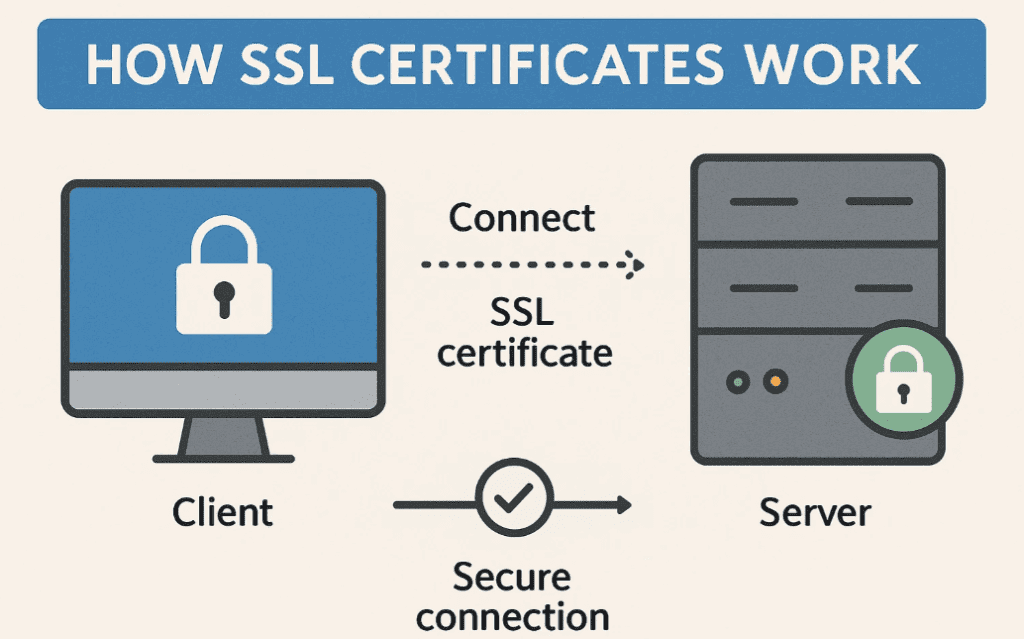
This article will break down SSL certificates from an intermediate to advanced level, focusing purely on understanding rather than implementation. So grab your coffee, sit back, and let’s dive in!
Understanding SSL Certificates
Whenever we visit a website, we notice a certificate for secure websites. For example, if you check your browser’s address bar, you’ll see a padlock icon indicating a secure connection. But what exactly is this certificate?
The Basics: Client-Server Communication
When we talk about internet communication, there are two main components:
- Client (User) – The person browsing the internet.
- Server – The machine hosting the website (e.g., an Nginx or Apache server).
The client wants to communicate with the server. The simplest way is to send a GET request, and the server responds. However, the problem with this approach is that a middleman (hacker) can sniff the request and response, leading to a Man-in-the-Middle (MITM) attack.
The Need for Encryption
To prevent MITM attacks, we need to encrypt the communication. But how?
Symmetric Encryption
- Uses a single key to encrypt and decrypt data.
- Example: If the client encrypts data with a key, the server must have the same key to decrypt it.
Problem:
- If the client sends the key unencrypted, a hacker can intercept it.
- If the hacker gets the key, they can decrypt all future communications.
Asymmetric Encryption (Solution!)
- Uses two keys:
- Public Key – Used for encryption.
- Private Key – Used for decryption.
- The public key can be shared openly, but only the private key can decrypt the data.
How SSL Uses Asymmetric Encryption
- The server generates a public-private key pair.
- The server sends its public key to the client.
- The client generates a symmetric key (for faster encryption).
- The client encrypts the symmetric key using the server’s public key and sends it back.
- The server decrypts it using its private key.
- Now, both have the same symmetric key, and secure communication begins.
Why is this secure?
- Even if a hacker intercepts the encrypted symmetric key, they cannot decrypt it without the server’s private key.
The Role of SSL Certificates
But wait—what if a hacker tricks the client by providing a fake public key?
The MITM Attack Scenario
- The hacker intercepts the server’s public key and replaces it with their own.
- The client encrypts the symmetric key with the hacker’s public key.
- The hacker decrypts it using their private key, steals the symmetric key, and forwards a fake key to the server.
- Now, the hacker can read all encrypted data.
How SSL Certificates Prevent MITM Attacks
To verify the authenticity of the public key, we use SSL certificates.
How SSL Certificates Work
- The server generates a Certificate Signing Request (CSR) containing its public key.
- A Certificate Authority (CA) (e.g., Let’s Encrypt) verifies the server’s identity and issues a signed SSL certificate.
- The certificate includes:
- The server’s public key.
- A digital signature from the CA.
- When a client connects:
- The server sends its SSL certificate.
- The client checks if the certificate is signed by a trusted CA.
- The client verifies the signature using the CA’s public key.
- If valid, the client trusts the server’s public key.
Why is this secure?










- A hacker cannot fake a CA-signed certificate.
- The browser warns users if a certificate is invalid.
Self-Signed Certificates (For Testing)
You can create self-signed certificates for local development using tools like OpenSSL. However:
- Browsers will warn that the certificate is not trusted.
- Only use them in development environments.
🔗 Learn how to create self-signed certificates here
Final Thoughts
SSL certificates ensure secure, encrypted communication between clients and servers by:
- Using asymmetric encryption to exchange keys securely.
- Leveraging trusted CAs to prevent MITM attacks.
Next time you see that padlock icon, you’ll know the complex security mechanisms working behind it!
Tags
SSL Certificate , Web Security , HTTPS , Encryption , Cyber Security , Web Development , TLS , Public Key Cryptography
Hashtags
#SSL #CyberSecurity #WebDev #Encryption #TechExplained
Disclaimer: Self-signed certificates are not recommended for production. Always use certificates from trusted Certificate Authorities (CAs) like Let’s Encrypt, DigiCert, or Sectigo for live websites.
Let me know in the comments if you found this explanation helpful! If you’d like more in-depth tech breakdowns, drop your suggestions below. 🚀
Happy secure browsing! 🔒








