Choosing the right storage drive for your device can be confusing with so many options available—HDD, SSD, mSATA, M.2 SATA, and M.2 NVMe. Each has different speeds, form factors, and compatibility.
In this guide, we’ll break down the differences between these storage types, explain their performance, interfaces, and best use cases, and help you decide which one is right for your needs.
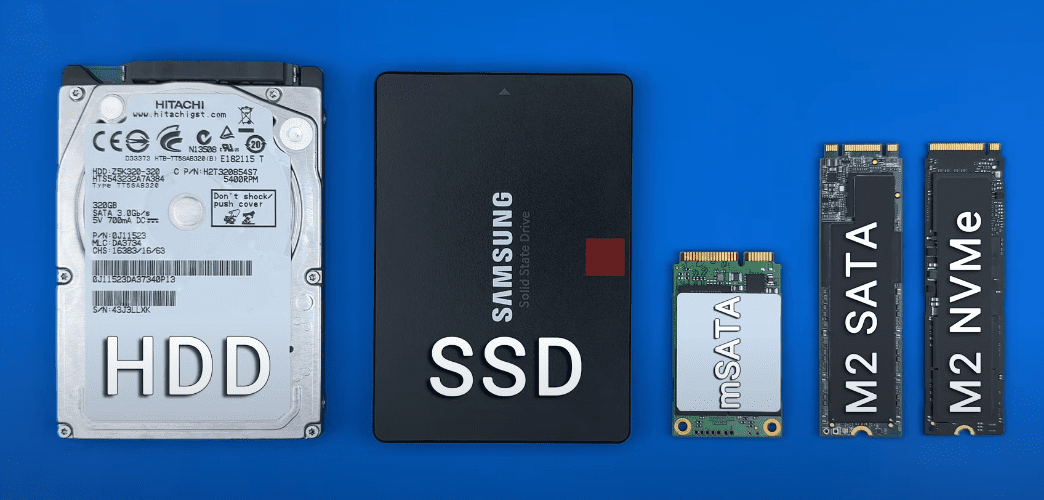
1. Understanding Storage Form Factors
The form factor refers to the physical size and shape of the storage device, determining how it fits into your computer.
Common Form Factors:
- 2.5-inch (HDD/SSD) – Used in laptops and desktops.
- 3.5-inch (HDD only) – Found in desktops and servers.
- mSATA (Mini-SATA SSD) – Compact, used in thin laptops and embedded systems.
- M.2 (SSD only) – Slim, versatile, supports SATA and NVMe interfaces.
2. Storage Interfaces: SATA vs. NVMe
The interface determines how data is transferred between the drive and your system.
| Interface | Max Speed | Used In |
|---|---|---|
| SATA III | 550 MB/s | 2.5″ SSDs/HDDs, mSATA, M.2 SATA |
| NVMe (PCIe Gen 3) | 3,500 MB/s | M.2 NVMe |
| NVMe (PCIe Gen 4) | 7,000 MB/s | M.2 NVMe |
| NVMe (PCIe Gen 5) | 14,000 MB/s | M.2 NVMe (latest) |
🔹 SATA is older and slower but widely compatible.
🔹 NVMe is faster and designed for modern SSDs.
3. HDD vs. SSD: Key Differences
| Feature | HDD (Hard Disk Drive) | SSD (Solid State Drive) |
|---|---|---|
| Speed | 80-160 MB/s | Up to 14,000 MB/s (NVMe) |
| Durability | Prone to damage (moving parts) | No moving parts, shock-resistant |
| Noise | Audible spinning | Silent |
| Power Use | Higher | Lower |
| Cost (per GB) | Cheaper | More expensive |
| Best For | Bulk storage, backups | OS, gaming, fast performance |
✅ SSDs are faster, more durable, and energy-efficient.
✅ HDDs are cheaper for large storage needs.
4. mSATA SSD: Compact but Outdated
- Same speed as SATA SSDs (550 MB/s) but in a smaller form factor.
- Used in older ultrabooks and mini-PCs.
- Largely replaced by M.2 SSDs.
5. M.2 SATA vs. M.2 NVMe: What’s the Difference?
| Feature | M.2 SATA | M.2 NVMe |
|---|---|---|
| Interface | SATA III | PCIe (Gen 3/4/5) |
| Max Speed | 550 MB/s | Up to 14,000 MB/s |
| Key Type | B+M key | M key |
| Best For | Older laptops, budget upgrades | Gaming, video editing, high-performance PCs |
⚠ M.2 SATA and NVMe look similar but are NOT interchangeable!
- M.2 SATA works in SATA slots.
- M.2 NVMe requires PCIe support.
6. NVMe Generations: Gen 3 vs. Gen 4 vs. Gen 5
| Generation | Max Speed | Best For |
|---|---|---|
| PCIe Gen 3 | 3,500 MB/s | General use, gaming |
| PCIe Gen 4 | 7,000 MB/s | 4K/8K editing, high-end PCs |
| PCIe Gen 5 | 14,000 MB/s | Future-proofing, enterprise use |
🔹 Backward compatible (Gen 4 SSD works in Gen 3 slot at Gen 3 speeds).
7. SSD Memory Types: SLC, MLC, TLC, QLC
| Type | Bits per Cell | Durability | Best For |
|---|---|---|---|
| SLC | 1 | 100,000 cycles | Servers, enterprise |
| MLC | 2 | 10,000 cycles | Workstations, pros |
| TLC | 3 | 3,000 cycles | Consumer SSDs (most common) |
| QLC | 4 | 1,000 cycles | Budget storage |
🔹 3D NAND / V-NAND improves speed and lifespan by stacking memory cells vertically.
8. How to Extend SSD Lifespan
✅ Use a heatsink (reduces controller temps by 15-20%).
✅ Avoid filling beyond 80% capacity (maintains speed).
✅ Check TBW (Terabytes Written) rating before buying.
9. Best SSD Brands (Reliability & Performance)
- Samsung (Best overall)
- Western Digital (WD Black/SanDisk)
- Crucial (Micron)
- SK Hynix
10. How to Choose the Right SSD for Your Device
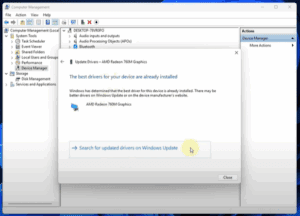
- Check your current drive (Device Manager → Disk drives).
- Determine compatibility (SATA or NVMe?).
- Pick the right form factor (2.5”, M.2 2280, etc.).
- Choose memory type (TLC for most users).
- Select a reputable brand (Samsung, WD, Crucial).
Final Recommendations
- For Gaming / Fast Performance → M.2 NVMe (PCIe Gen 4).
- For Budget Upgrades → 2.5″ SATA SSD or M.2 SATA.
- For Servers / High-End Work → SLC/MLC SSDs.
📥 Need SSD recommendations? Check the links below for top-rated drives!







Tags:
SSD, HDD, NVMe, SATA, M.2 SSD, Storage Upgrade, PC Build, Laptop Upgrade
Hashtags:
#SSD #HDD #NVMe #PCBuild #TechGuide #StorageUpgrade
Disclaimer: Performance may vary based on hardware. Always check compatibility before purchasing. Some links may be affiliate links.








