Digital marketers and web analysts are continuously seeking efficient ways to bypass browser restrictions, privacy limitations, and ad blockers that interfere with website tracking. Two powerful tools stand out in the analytics space: Google Tag Gateway and Server-Side Tagging (SST). While both aim to enhance data tracking accuracy, their capabilities differ—especially when it comes to third-party tags like Facebook Pixel.
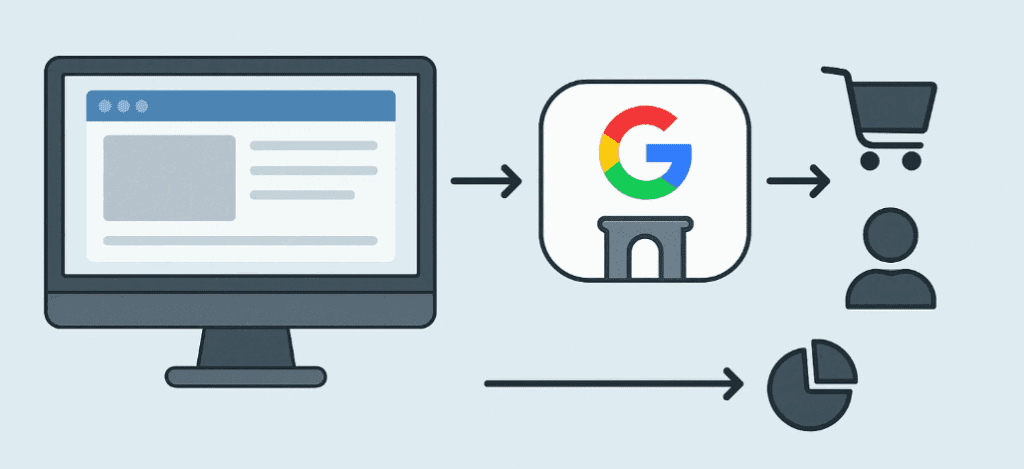
In this article, we will break down how Google Tag Gateway works, how it compares to full Server-Side Tagging, and whether it is a viable solution for Facebook Pixel tracking.
Understanding Google Tag Gateway
Google Tag Gateway is a new feature from Google that allows you to route Google product tags such as GA4 and Google Ads through your own domain—thus converting third-party requests into first-party ones.
Key Benefits of Google Tag Gateway:
- Converts tracking requests to first-party context using your domain (e.g.,
analytics.yourdomain.com) - Prevents Google Analytics 4 and Google Ads requests from being blocked by ad blockers or browser privacy features
- Quick setup using Cloudflare integration
- No server maintenance required
Limitations:
- Only supports Google products (GA4, Google Ads, Google Tag Manager)
- Does NOT support third-party tags like Facebook Pixel, LinkedIn Ads, or TikTok Pixel
- Cannot customize event transformation or enrich data
What is Full Server-Side Tagging?
Server-Side Tagging refers to routing all your tracking tags—including Google, Facebook, LinkedIn, and more—through a server you control. Google offers server-side tagging via GTM Server Container, but platforms like Meta (Facebook), TikTok, and others require more custom setup.
How Server-Side Tagging Works:
- A client browser sends data to your own server endpoint (e.g.,
tag.yoursite.com) - Your server processes the request and forwards it to third-party platforms
- You can enrich, transform, or block data as needed before sending it
Key Benefits:
- Works with ALL major tracking platforms, including Facebook Pixel
- Better data privacy compliance (GDPR, CCPA)
- Improves website load time by offloading tag logic from the client
- Allows event deduplication, data enrichment, and advanced user identification
Drawbacks:
- More complex setup (requires server hosting like Google Cloud, AWS, or Vercel)
- Requires technical expertise to implement and maintain
- Incur server and cloud infrastructure costs
Facebook Pixel and the Tag Gateway Limitation
Facebook Pixel relies on sending HTTP requests to facebook.com. When used directly in a browser, these requests are often blocked due to:
- Ad blockers
- Safari’s Intelligent Tracking Prevention (ITP)
- Firefox’s Enhanced Tracking Protection
- Privacy regulations that treat third-party domains strictly
Why Google Tag Gateway Won’t Help:
Google Tag Gateway only reroutes requests from Google tags through your domain. It won’t touch Facebook Pixel or any non-Google product. As a result, if you’re running Facebook Ads, using Tag Gateway won’t help you measure or optimize your campaigns reliably.
Tag Gateway vs Full Server-Side Tagging: Side-by-Side Comparison
| Feature | Google Tag Gateway | Full Server-Side Tagging (SST) |
|---|---|---|
| Supports Facebook Pixel | ❌ No | ✅ Yes |
| Supports Google Analytics/Ads | ✅ Yes | ✅ Yes |
| Requires custom server setup | ❌ No (uses Cloudflare) | ✅ Yes (GCP, AWS, or other servers) |
| Ad blocker bypass for all platforms | ❌ Google tags only | ✅ All supported platforms |
| Privacy compliance (GDPR/CCPA) | ✅ Limited | ✅ Advanced (with data control) |
| Tag customization & data enrichment | ❌ No | ✅ Yes |
| Maintenance overhead | ✅ Low | ❌ Medium to High |
| Best for | Basic Google Ads & GA4 tracking | Multi-platform ad & analytics strategy |
When Should You Use Google Tag Gateway?
Choose Google Tag Gateway if:
- Your tracking needs are limited to Google platforms
- You need a quick setup with low maintenance
- You want basic ad-blocker resistance for GA4 and Google Ads
When Should You Use Full Server-Side Tagging?
Choose Full SST if:
- You want to track Facebook, LinkedIn, TikTok, and other third-party tags
- You require complete control over tracking data
- You aim for advanced analytics and marketing attribution
- You operate in privacy-sensitive regions (EU, California)
Conclusion
While Google Tag Gateway simplifies first-party tracking for Google services, it is not a replacement for full Server-Side Tagging. If your digital marketing strategy involves platforms like Facebook Ads, then you must implement full SST to ensure accurate and reliable tracking.
For serious marketers, investing in Server-Side Tagging is essential for long-term scalability and data resilience—especially as browser and regulatory restrictions tighten.
Disclaimer
This article is for informational purposes only. Always consult your legal and technical teams before implementing any form of data tracking, especially under data privacy laws such as GDPR or CCPA.





Tags:
google tag gateway, server-side tagging, facebook pixel, GTM server container, ad blockers, privacy tracking, digital marketing, google analytics 4, GA4, cloudflare setup
Hashtags:
#GoogleTagGateway #ServerSideTagging #FacebookPixel #DigitalMarketing #GTM #GA4 #Cloudflare #DataPrivacy #WebAnalytics #AdBlockerBypass







