Google has always been known for innovation, and now they’ve dropped a massive update that could redefine how we use our PCs and laptops. The news? Google is merging Android and Chrome OS, and this time, it’s not a rumor—it’s real, and development is already underway.
So what does this mean for users like us? Could Android finally become a true desktop-class operating system? Can it challenge Windows or macOS in performance and usability? Let’s break it all down in this detailed blog post.
🧠 First, What is Chrome OS?
If you’re new to the idea of Chrome OS, here’s a quick explanation:
Chrome OS is Google’s lightweight desktop operating system primarily designed for Chromebooks. It’s cloud-centric, minimal, and optimized for web browsing, Google apps, and Android applications. There’s also Chrome OS Flex, which is an official version of Chrome OS made to run on regular PCs and Macs.
You can read more and try Chrome OS Flex officially from Google here:
🔗 https://chromeenterprise.google/os/chromeosflex
📱 The Merge: Android Meets Chrome OS
Let’s pause and acknowledge this: Google is working on a unified platform where Android and Chrome OS function seamlessly as one. While Android apps already run on Chrome OS, this new update hints at a deeper system-level integration—possibly sharing the same base OS or kernel.
This could potentially:
- Make Android apps behave like true desktop apps.
- Improve sync between phones and Chromebooks/desktops.
- Provide a more Mac-like ecosystem with tight integration.
🤔 Is it just a UI change or a full merge?
From what we’ve seen so far, it’s more than just UI. It’s about unifying the experience, app behavior, and system capabilities.
💻 Chrome OS Desktop Experience: A Quick Glimpse
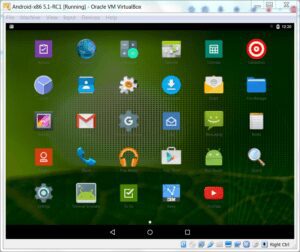
If you’ve never used Chrome OS before, imagine this:
- A clean, Android-like interface, but with taskbars, windows, keyboard shortcuts, and full web browser capabilities.
- You get Chrome browser with extension support, just like on Windows or Mac.
- Multiple tab browsing, access to Play Store apps, and even the ability to run games.
✅ What works well on Chrome OS (even now):
Let me walk you through a few examples:
- Chrome browser supports extensions—so your productivity setup (Grammarly, ad blockers, password managers) works as expected.
- YouTube runs in desktop mode, not just the mobile app layout.
- Web surfing is smooth and can handle multiple tabs—just like a regular laptop.
- Play Store is available, so you can install nearly all Android apps and games.
- The interface gives you a hybrid feel: Android apps + desktop freedom.
🎮 What about gaming?
Yes, casual Android games work fine. However, don’t expect PC-grade gaming performance—this OS isn’t built for high-end GPU workloads (yet).







🛠️ Limitations of Chrome OS (As of Now)
As exciting as Chrome OS is, it does come with a few limitations—especially for pro users.
Here’s a quick look:
- ❌ You can’t run full Windows software like Adobe Premiere Pro or Visual Studio.
- ❌ Chrome OS is not officially available for desktops (outside of Chrome OS Flex, which doesn’t support Play Store).
- ❌ Heavy offline tools (CAD software, PC-only games) won’t work.
🧪 But wait, what if you want Android on PC?
There are unofficial methods (like Brunch framework or FydeOS) that allow you to install full-fledged Chrome OS on non-Chromebook PCs—with Play Store support. But these require a bit of technical effort.
🔄 Benefits If Chrome OS and Android Fully Merge
Let’s say Google pulls it off and creates a unified OS that’s desktop-ready and Android-native. Here’s how it could benefit us:
✅ 1. Stronger Ecosystem
Just like Apple’s Mac and iPhone sync beautifully, your Android phone and Chrome OS desktop would be able to:
- Instantly share files.
- Open mobile apps on desktop.
- Sync notifications, clipboard, messages, and more.
✅ 2. Alternative to Windows/Mac
With Chrome OS + Android, you get:
- Faster boot times.
- Simpler UI.
- All essential apps (Docs, Drive, YouTube, Gmail, etc.).
- Desktop browsing with Android apps together.
✅ 3. Better Flex OS Support
If Google brings this update to Chrome OS Flex, then users with old laptops will get a free, fast, and app-rich OS with Play Store access. That would be a game-changer.
⚖️ Should You Ditch Windows for Chrome OS?
Let’s take a balanced view.
| Use Case | Chrome OS | Windows |
|---|---|---|
| Web browsing | ✅ Excellent | ✅ Excellent |
| Android apps | ✅ Native | ⚠️ Via emulator |
| Office work | ✅ Good (with Google Docs & MS 365 Web) | ✅ Excellent |
| Video editing (Pro level) | ❌ Not ideal | ✅ Full software support |
| Gaming (PC-level) | ❌ No | ✅ Yes |
| Speed & security | ✅ Fast & secure | ⚠️ Needs manual maintenance |
Verdict:
Use Chrome OS as a secondary OS or install it on old PCs via Chrome OS Flex. But don’t fully ditch Windows yet—especially if you rely on professional software.
❓ Frequently Asked Questions (FAQs)
Q: Can I install full Chrome OS on a PC?
Not officially, but you can try Brunch framework or FydeOS for a full Chrome OS-like experience with Play Store.
Q: Will Chrome OS Flex get Android app support?
Currently, no. Chrome OS Flex does not support Play Store or Android apps. But future updates might bring improvements if the merge happens.
Q: Can I dual-boot Chrome OS and Windows?
Yes, with custom methods, it’s possible to dual-boot. But official support is limited.
🚨 Disclaimer
This article covers current trends and updates as of mid-2025. Any unofficial installations of Chrome OS or Android on PC require technical knowledge and may void warranties. Always back up your data and proceed at your own risk.
Official Chrome OS Flex is available here:
🔗 https://chromeenterprise.google/os/chromeosflex
💭 Final Thoughts
The merging of Android and Chrome OS has the potential to reshape how we use our desktops and laptops. If Google truly unifies these platforms, it could deliver the simplicity of Android with the power of a desktop experience—a serious contender to both Windows and macOS.
While full Chrome OS isn’t yet officially available for regular desktops with Play Store support, things are moving fast. And if this new unified OS becomes real and polished, it might finally be time for Android lovers to enjoy their ecosystem on a full desktop.
Let’s wait and watch. Till then, Chrome OS Flex is a good playground to explore Google’s vision.
🔖 Tags:
Chrome OS, Android on desktop, Google OS updates, Chrome OS Flex, Windows alternative, Android desktop experience, lightweight OS, Chromebook features, Chrome OS vs Windows
#Hashtags:
#ChromeOS #AndroidPC #GoogleUpdate #ChromeOSFlex #WindowsAlternative #TechNews #AndroidOnDesktop #dtptips
Got thoughts or predictions on this update? Let us know in the comments! Would you switch from Windows to a unified Android-Chrome OS if it offered everything you need?
Stay tuned for more exciting tech updates!