Gigabyte has entered the 18-inch gaming laptop arena with the Aorus Master 18—packing 4 RAM slots, 4 cooling fans, a massive Mini-LED display, and enough RGB to power a rave.
But does bigger truly mean better? Let’s dive into its performance, thermals, display quality, and real-world gaming benchmarks to find out.
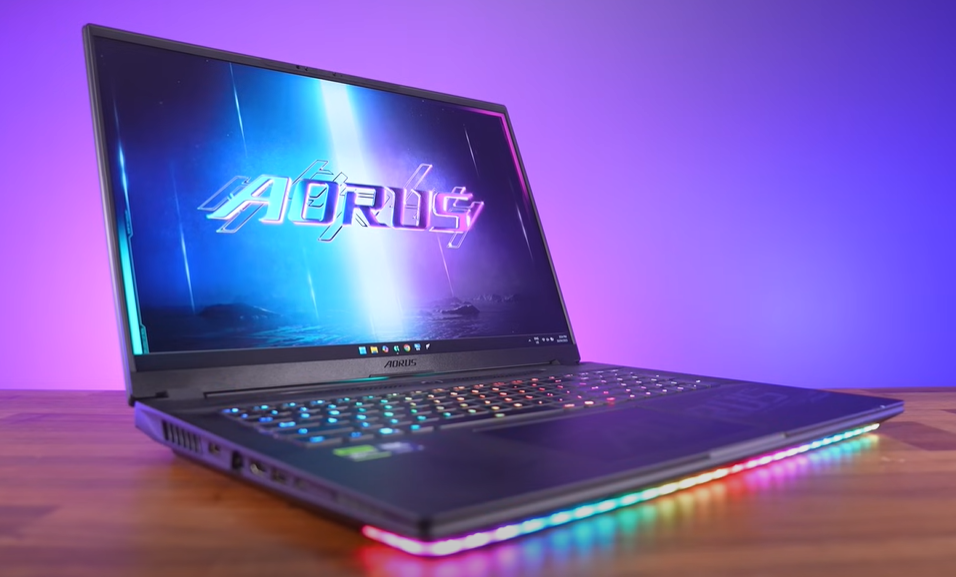
Design & Build: A Behemoth with RGB Flair
✅ 18-inch Chassis – More room for upgrades, cooling, and a giant Mini-LED screen.
✅ RGB Overload – Front light bar, rear “Aorus” projection, and lid logo lighting.
✅ Sturdy Construction – Less flex than the smaller Aorus Master 16.
❌ Heavy & Bulky – 7.6 lbs (3.5 kg), rising to 10 lbs (4.5 kg) with the 400W charger.
❌ Plastic Build – Not as premium as some competitors.
Specs & Performance: RTX 5090 Powerhouse
Key Specifications
- CPU: Intel Core Ultra 9 275HX
- GPU: NVIDIA RTX 5090 (175W TGP)
- RAM: 64GB DDR5-5600 (4 slots, upgradable)
- Storage: 2x 1TB PCIe Gen 4 SSDs (+1 free Gen 5 slot)
- Display: 18″ QHD+ Mini-LED, 240Hz, 700 nits (HDR)
Performance Highlights
🔥 #1 in Cyberpunk 2077 (4K Ultra) – 17% faster than RTX 4090 laptops.
🔥 Excellent Cooling – Mid-80°C temps under full load.
🔥 Wi-Fi 7 Speeds – Fastest we’ve tested.
Upgradeability: A Tinkerer’s Dream
🛠️ 4 RAM Slots – Supports up to 128GB DDR5-4400 (when all slots are populated).
🛠️ 3 M.2 Slots – 1x Gen 5 + 2x Gen 4 (supports double-sided drives).
🛠️ Upgradable Wi-Fi 7 – Though it requires disassembly.
⚠️ Annoying Ribbon Cable – Connects the RGB light bar (easy to damage during upgrades).
Display: Gigabyte’s First Mini-LED Panel
✅ 700 nits (HDR) – Bright and vibrant.
✅ Pantone-Validated – Excellent color accuracy out of the box.
✅ 240Hz Refresh Rate – Smooth for competitive gaming.
❌ Slower Response Time (~8ms) – Typical for Mini-LED (OLED is faster).
❌ Halo Effect – Visible in dark scenes.
Thermals & Noise: Cool, But Loud
❄️ Vapor Chamber + 4 Fans – Keeps temps low (CPU: ~85°C, GPU: ~75°C).
🎛️ 5 Performance Modes:
- Power Saving – Quiet but weak.
- Game Mode (AI Boost) – Best for max FPS.
🔊 Fan Noise:








- Game Mode = Loud (50+ dB) – One of the noisiest 18-inch laptops.
- Balance Mode = Better compromise.
Gaming Benchmarks: RTX 5090 vs. Last Gen
| Game (QHD+ Ultra) | Aorus Master 18 (RTX 5090) | RTX 4090 Laptops |
|---|---|---|
| Cyberpunk 2077 | 98 FPS | 84 FPS |
| Control (RT On) | 112 FPS | 96 FPS |
| Alan Wake 2 | 76 FPS | 65 FPS |
💡 Verdict: ~15-20% faster than RTX 4090 laptops—but not a massive leap.
Battery Life: Mediocre
🔋 99Wh Battery:
- ~4 hours (YouTube playback)
- ~1.5 hours (gaming)
Typical for large gaming laptops, but weaker than AMD alternatives.
Should You Buy the Aorus Master 18?
👍 Pros:
✔ Unmatched upgradeability (4 RAM slots, 3 M.2 slots).
✔ Excellent cooling (vapor chamber + 4 fans).
✔ Bright, color-accurate Mini-LED display.
✔ Strong GPU performance (RTX 5090).
👎 Cons:
❌ Very heavy & bulky (not portable).
❌ Loud fans under load.
❌ Expensive ($4,400 for RTX 5090 model).
Final Verdict:
If you want a desktop replacement with max upgradability and big-screen gaming, the Aorus Master 18 delivers.
But if portability matters, consider the Aorus Master 16 (OLED) or wait for a price drop.
🔗 Check Current Prices: Gigabyte Aorus Master 18 | GamingLaptop.Deals
#GamingLaptop #Aorus #RTX5090 #MiniLED #Gigabyte #PCGaming #TechReview #UpgradeableLaptop #Hardware #GamingPerformance








