Working in the terminal doesn’t always have to be serious business. If you’re looking to have some fun or show off a “hacker mode” on your screen, there are several quirky and entertaining commands you can run in your Linux terminal. These tools not only look cool but are also great for adding a bit of personality to your shell environment.
Here’s a roundup of fun and fancy Linux terminal tools you can try today — from matrix-style animations to rainbow-colored ASCII art and talking cows. Let’s dive in!
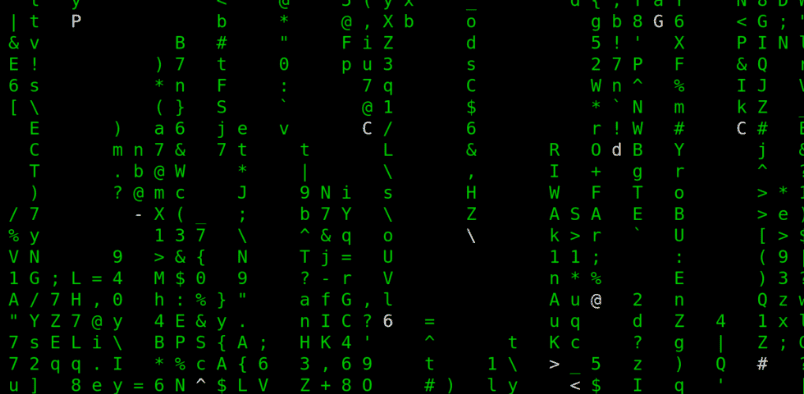
1. cmatrix – The Matrix Rain Effect
Ever wanted your terminal to look like a scene from The Matrix? The cmatrix command creates a digital rain effect just like the one seen in hacker-themed Hollywood movies.
Install:
sudo apt install cmatrix
Run:
cmatrix
You can also add options like:
cmatrix -b -l -u 10
-bfor bold characters-lfor Linux mode-uto set update delay
2. hollywood – Terminal Overload Simulation
If you want to feel like a super hacker with tons of terminal windows updating rapidly, try hollywood. It creates a simulation of several terminal programs running simultaneously.
Install:
sudo apt install hollywood
Run:
hollywood
It’s especially fun on multi-monitor setups. Run this on one terminal while working on the other – total hacker vibes!
🔗 Hollywood on Ubuntu Packages
3. cowsay – A Cow That Talks
This fun little utility prints a cow (or other characters) saying anything you want.
Install:
sudo apt install cowsay
Example:
cowsay "Linux is fun!"
You can also use different characters and styles.
4. fortune – Random Quotes & Sayings
Just like a fortune cookie, this command outputs random, funny, or wise sayings each time you run it.









Install:
sudo apt install fortune
Example:
fortune
It’s more fun when piped with cowsay:
fortune | cowsay
5. figlet – ASCII Text Art Generator
figlet transforms your plain text into large, artistic ASCII fonts.
Install:
sudo apt install figlet
Example:
figlet Hello World
You can also explore different font styles. Fonts are usually stored in:
/usr/share/figlet
Change fonts like this:
figlet -f slant "Linux Rocks"
6. lolcat – Rainbow Coloring in Terminal
lolcat adds colorful rainbow effects to any terminal output. Combine it with other commands for beautiful, animated terminal art.
Install:
sudo apt install lolcat
Example with figlet:
figlet "Linux" | lolcat
Or combine with fortune and cowsay:
fortune | cowsay | lolcat
7. tty-clock – A Terminal Clock
tty-clock is a digital clock that runs in your terminal. It’s simple, clean, and a cool utility to display real-time.
Install:
sudo apt install tty-clock
Run:
tty-clock
You can also try:
tty-clock | lolcat
Bonus Tip: Combine Them All!
Want to take things up a notch? Combine all these fun tools together for a personalized, colorful, and lively terminal.
Example combo:
fortune | cowsay | lolcat
figlet "Linux Fun" | lolcat
Final Thoughts
These commands don’t serve critical system functions, but they’re an excellent way to break the monotony and enjoy the terminal. They can also impress your friends or audience if you’re presenting or recording something techy.
Whether you’re looking to prank your friends, add flavor to a presentation, or just have some geeky fun, these Linux terminal tools will definitely put a smile on your face.
Tags:
terminal fun, linux commands, cmatrix, hollywood linux, cowsay, fortune command, figlet, lolcat, tty-clock, linux tricks, fun linux tools, ascii art, hacker terminal look
Hashtags:
#LinuxTips #TerminalFun #Cmatrix #HollywoodCLI #Cowsay #FortuneCommand #Figlet #Lolcat #LinuxForFun #AsciiArt #HackTheTerminal
Disclaimer:
These tools are designed for entertainment and personalization only. They don’t provide any real-world security or system functionality enhancements. Use them responsibly and only on your personal or authorized systems.








