When Microsoft officially ended support for Windows 10 on October 14, 2025, it marked not just the end of an era—but the beginning of a bold new phase. For years, Windows has been evolving quietly, moving from a traditional desktop operating system to something smarter, more intuitive, and interconnected. Now, with Windows 11’s AI-powered Copilot, we’re witnessing the biggest transformation since Windows 95 changed personal computing forever.
This isn’t just another version upgrade. It’s the start of a new kind of Windows — one that listens, observes, understands, and assists you in ways that feel personal. So, before you start waiting for Windows 12, here’s the truth: the future of AI Windows has already arrived.
💡 1. Windows 10 Support Ends — A New Beginning
Let’s begin with the obvious change that triggered this transformation.
After years of service, Windows 10 reached its end of life. Microsoft has stopped releasing updates, security patches, and bug fixes, leaving millions of users vulnerable to cyberattacks and outdated software. It was a dependable operating system—stable, familiar, and efficient—but it belonged to a pre-AI world.
With that curtain closed, Windows 11 stepped into the spotlight. It’s not merely an aesthetic redesign; it’s an operating system built to think and assist, thanks to a new generation of AI tools integrated directly into its foundation.
And at the heart of this evolution lies Microsoft Copilot.
🤖 2. Meet Copilot — Windows’ Built-In AI Companion
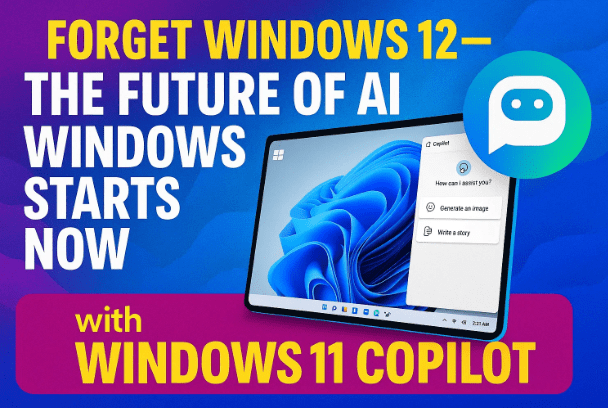
So far, we’ve all used assistants like Siri, Google Assistant, or Alexa to get simple answers or control our smart devices. Microsoft is now doing something much more ambitious — integrating an AI companion directly into the core of Windows itself.
The result is Copilot for Windows 11, your always-ready digital partner.
You can interact with it through voice, text, or visual prompts, and it’s woven deeply into the operating system.
You can say things like:
- “Hey Copilot, organize my desktop files.”
- “Summarize this PDF.”
- “Turn on Focus Mode and dark theme.”
Copilot understands your intention and executes commands that used to require manual steps. And that’s just the beginning.
🎙️ 3. “Hey Copilot” — Natural Voice Interaction Arrives
Now, let’s move to the next step: voice-first computing.






Microsoft is making Copilot feel more natural than ever. Just like saying “Hey Siri” or “Ok Google”, you’ll soon be able to say “Hey Copilot” to wake your Windows assistant hands-free.
This feature transforms how you use your PC:
- Dictation & note-taking – Speak your notes directly into any app.
- Quick search – Ask questions about files, settings, or the web.
- Accessibility boost – Voice interaction is a huge relief for users with motor or visual impairments.
With every update, Copilot gets better at recognizing your intent, tone, and even contextual tasks.
🧠 4. Copilot Vision — The Power of Screen Awareness
So far, we’ve done a good job understanding what Copilot does when you tell it to — but what if it could understand what you see?
That’s where Copilot Vision comes in.
This next-generation feature lets Copilot analyze your entire screen — text, apps, and visuals — and respond intelligently to whatever’s happening.
Imagine these scenarios:
- You’re stuck on a PowerPoint slide, and you ask, “How can I make this layout more professional?” Copilot analyzes your presentation and suggests real-time design changes.
- You’re in Excel, confused about a formula. Copilot reads your data and provides the correct formula instantly.
- You’re gaming, and you ask, “How do I beat this boss?” Copilot recognizes your game screen and offers tactical suggestions.
In short, Copilot Vision turns Windows into an aware, context-sensitive environment, where the AI doesn’t just listen — it sees what you’re doing.
⚡ 5. Copilot Actions — Turning Commands into Real Work
Let’s move to the next major evolution — Copilot Actions, a system that allows you to perform complex tasks with a single natural prompt.
Say:
- “Sort all my vacation photos into folders by date.”
- “Find the answer to this question inside my PDF notes.”
- “Draft a professional reply to this Outlook email.”
Instead of opening multiple apps or writing scripts, Copilot performs all the steps behind the scenes.
It integrates with Windows Explorer, Office apps, and local files seamlessly.
And here’s the best part — Microsoft promises that most of these processes happen on-device, meaning your data doesn’t have to leave your computer.
That brings us to one of the most critical discussions today — privacy.
🔒 6. On-Device AI and Privacy: Keeping Your Data Yours
AI tools usually depend on the cloud, which means your data often gets sent to servers for processing. But Microsoft is changing that paradigm with Copilot+ PCs, which perform AI computations locally using a special chip called an NPU (Neural Processing Unit).
So, what’s the difference?
| Feature | Copilot (Standard) | Copilot+ (On-Device AI) |
|---|---|---|
| Processing Location | Cloud servers | Your PC’s NPU |
| Privacy | Data sent to Microsoft’s cloud | Data stays on your device |
| Speed | Internet-dependent | Instant response |
| Availability | Any Windows 11 PC | Only AI-enabled PCs |
| Security | Standard | Stronger, since no cloud sync needed |
With on-device AI, your local files, notes, and sensitive data remain securely offline while still being accessible to Copilot commands. This is a massive step forward for users who value privacy and speed in equal measure.
🧩 7. Copilot Integrations — Beyond Microsoft Apps
Now that we understand the difference between cloud-based and on-device AI, let’s look at where Copilot is spreading.
At first, Copilot was designed for Microsoft’s ecosystem — Edge, Outlook, OneDrive, PowerPoint, Excel, Word, and Teams. But Microsoft has bigger plans.
Soon, you’ll be able to connect Copilot to third-party platforms such as:
- Gmail – Search and summarize emails.
- Google Drive – Find specific documents or notes.
- Slack and Trello – Track progress or extract summaries.
This cross-ecosystem expansion turns Copilot into a universal productivity bridge, capable of navigating multiple workspaces at once.
For professionals juggling between personal and corporate tools, this means less tab switching — and more focus.
🎮 8. Copilot in Gaming — Your Smart Game Assistant
So far we’ve covered productivity, but what about fun?
Microsoft’s next big leap is AI-assisted gaming.
Imagine playing an open-world game where you’re lost in a quest, and you can simply say:
“Copilot, where should I go next?”
The system analyzes your game state and offers directions or tips, much like a built-in guide.
In future updates, Copilot might even analyze boss fight patterns or recommend in-game strategies — a dream come true for gamers who prefer exploration without constant Googling.
This fusion of gaming and AI shows that Microsoft isn’t just thinking about office work — it’s redefining entertainment on PCs.
🌍 9. Agentic AI — The Next Generation of Automation
Let’s move forward to something even bigger — Agentic AI, one of Microsoft’s most ambitious research areas.
Unlike traditional assistants that react to commands, Agentic AI can execute entire sequences of tasks autonomously.
For example:
- You could say, “Build me a small website that matches this image layout.”
- Or, “Create a summary of these five PDFs and turn it into a PowerPoint presentation.”
Agentic AI will read, analyze, and complete the task without constant supervision.
It’s almost like having a digital employee on your computer — one that follows your instructions, pulls from your local files, and builds end results automatically.
Microsoft calls this the next evolution of Windows Copilot, where your system becomes a true co-worker, not just an assistant.
🧩 10. AI Hardware Revolution — NPUs from Intel, AMD, and Qualcomm
Now that we’ve seen how much Copilot depends on on-device processing, let’s explore the hardware side.
Every major chip manufacturer is racing to include dedicated AI processors:
- Intel has introduced the Core Ultra lineup with integrated NPUs.
- AMD launched Ryzen AI chips.
- Qualcomm unveiled the Snapdragon X Elite and X Elite Extreme, offering up to 80 TOPS (Tera Operations Per Second) — double what Windows currently requires for Copilot+.
This collaboration between Microsoft and chipmakers ensures that future laptops and desktops will be AI-ready by design.
If your system meets the requirements (roughly 40+ TOPS of NPU power), you’ll experience all the advanced Copilot features locally — from real-time translation to image editing and screen summarization — without relying on the internet.
🗓️ 11. Windows 11’s Lifespan and the Wait for Windows 12
So far, we’ve explored how Windows 11 is rapidly evolving, but what about Windows 12?
Is it still coming?
According to industry speculation and Microsoft’s roadmap, Windows 12 isn’t expected before late 2026 or 2027.
That’s because Windows 11 still has plenty of life left — it’s becoming the foundation for Microsoft’s AI future.
In a way, Windows 11 is already Windows 12 in disguise, because the upgrades coming to it—Copilot Vision, Agentic AI, on-device automation—are exactly what the next generation of Windows would have offered.
🔄 12. Real-World Scenarios — How You’ll Actually Use It
Let’s bring all these features together with some relatable examples.
- Students: Ask Copilot to summarize notes, write essays, or prepare presentations.
- Developers: Use it to debug scripts or auto-generate code snippets.
- Office professionals: Let Copilot draft emails, schedule meetings, or extract data from reports.
- Designers: Describe a layout verbally, and Copilot can generate a presentation or webpage based on your tone and theme.
- Gamers: Get in-game help, real-time performance tuning, or AI-generated guides.
Each use case reduces friction and expands what a computer can do without requiring extra software.
🔮 13. The AI-Powered Future of Windows: What Lies Ahead
So far, we’ve done a great job exploring how Copilot is reshaping Windows 11 today.
But where is it all headed?
Microsoft’s long-term goal is clear:
To make Windows the world’s most personal and intelligent operating system — one that learns from you, understands context, and adapts instantly.
In the near future, we might see:
- Offline voice translation and dubbing in real time.
- Automatic subtitle generation for movies without captions.
- Smart photo editing (“Remove logo”, “Change sky color”, “Enhance contrast”) using voice prompts.
- Complete task automation — from data entry to content creation — without external apps.
And most fascinating of all, many of these features could soon work offline, meaning your laptop becomes a fully capable AI workstation — no internet required.
❓ Frequently Asked Questions (FAQ)
Q1. What happens if I stay on Windows 10?
Your system will continue working, but you won’t receive security updates or new features. Over time, apps and browsers may stop supporting it, increasing security risks.
Q2. Can I get Copilot on my current Windows 11 PC?
Yes, you can! Open the Copilot icon from the taskbar or press
Win + C. However, advanced features like Copilot Vision and on-device AI require newer hardware with NPUs.
Q3. What is the difference between Copilot and Copilot+?
Copilot works through Microsoft’s cloud; Copilot+ processes everything locally through your PC’s NPU, ensuring faster, more private operations.
Q4. Will Windows 12 replace Windows 11 soon?
Not anytime soon. Windows 11 will continue receiving major updates for years, effectively serving as Microsoft’s AI platform before Windows 12 officially launches.
Q5. Do I need the internet to use Copilot?
Basic tasks like app launching or system control work offline on Copilot+ PCs, but web searches and some cloud integrations still require internet connectivity.
🧭 Final Thoughts
Microsoft isn’t waiting for Windows 12 to launch a revolution. It’s happening now, right inside Windows 11.
From Copilot Vision and on-device AI to Agentic automation and NPU-powered performance, the new Windows is smarter, faster, and more aware than any operating system before it.
This isn’t just an update — it’s the birth of the AI-native operating system era.
Whether you’re a gamer, a creator, a student, or a professional, the way you interact with your computer will never be the same again.
Official Source:
🔗 Microsoft Copilot for Windows
Disclaimer:
Features and release timelines mentioned in this article are based on Microsoft’s current announcements and early insider builds. Actual availability may vary depending on region, hardware configuration, and update cycles.
#Windows11 #MicrosoftCopilot #AIPoweredWindows #Windows12 #TechNews #NPUs #WindowsUpgrade #AIComputing #MicrosoftAI #FutureOfTech