Home › Forums › Windows Tips › How to install Sagem Morpho 1300/1300e2 Device in Windows Laptop
Tagged: Segam Morpho 1300
- This topic has 1 reply, 5 voices, and was last updated 3 days, 17 hours ago by
Priya Rao.
-
AuthorPosts
-
-
7th January 2017 at 10:03 pm #389
Rakesh Bhardwaj
KeymasterHow to install Sagem Morpho 1300/1300e2 Device in Windows Laptop
 हेलो फ्रेंड्स आपको
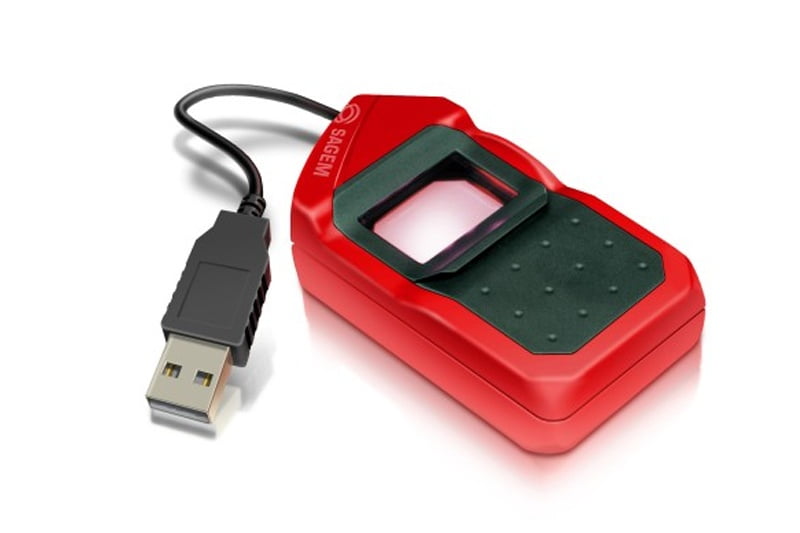
डेस्कटॉप पब्लिशिंग टिप्स के टूटोरियल कैसे लग रहे हैं मैं आशा करता हूं कि आपको यह ट्यूटोरियल्स पसंद आ रहे होंगे तो दोस्तों आज मैं थोड़ा जो आज का टॉपिक है वह डेक्सटॉप पब्लिशिंग टिप्स से थोड़ा हटकर है मैं आज बात करने जा रहा हूं कि हम Segam Morpho 1300 डिवाइस को windows के अंदर किस प्रकार से इंस्टॉल करते हैं यह डिवाइस आजकल सभी मोबाइल शॉप पर बहुत आम है और इसको फिंगर प्रिंट के द्वारा नई सिम लेने के लिए प्रयोग किया जाता है लेकिन इस डिवाइस को विंडोज के अंदर इंस्टॉल करना बहुत ही मुश्किल होता है क्योंकि इसका सेटअप जो है वह बहुत ही आसानी के साथ नहीं मिलता है अब नीचे दी गई वीडियो में मैंने इसके सेट अप के बारे में कि आप इसको windows में किस प्रकार से इंस्टॉल कर सकते हैं पूरा विस्तार से बताया है और नीचे देख वीडियो के माध्यम से आप इसको विंडोज के सिस्टम के अंदर बड़े आराम से इंस्टॉल कर सकते हैंSubscribe to Desktop Publishing Tips
अब आपको यह वीडियो कैसी लगी इसके डिवाइस ड्राइवर को आप नीचे दिए गए लिंक के द्वारा डाउनलोड कर सकते हैं इसमें मैंने 64 बिट और 32 बिट दोनों के अलग-अलग Version सेव कर दिए हैं और इसके अलावा इसकी सपोर्टिंग फाइल्स भी मैंने लिंक के माध्यम से आपको प्रोवाइड कर दी हैं
Download Segam Morpho 1300 / 1300 e2 download drive 64 bit
Download Segam Morpho 1300 / 1300 e2 download drive 32/86 bit
Download Download Segam Morpho 1300 / 1300 e2 support filesSegam Morpho 1300/1300e2 installation guide
YOUTUBE page https://www.youtube.com/channel/UCZQiS35nsYCsxDkhCqqeRaQ
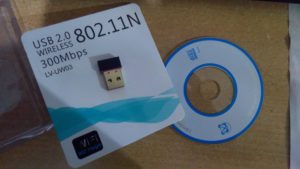
इसके अलावा दोस्तों मैं आपको एक दिन और बताने जा रहा हूं यदि आपने अभी LV-UW03 802.11N Wireless Wi-Fi USB Card जिंदा है और आप को इंस्टॉल करने में प्रॉब्लम हो रही है आप नीचे दी गई वीडियो में देख सकते हैं कि आप इस डिवाइस को किस प्रकार से इंस्टॉल कर सकते हैं इसके अलावा यदि आपके सिस्टम में डीवीडी ड्राइव नहीं है और आप इसका ड्राइवर फ्री डाउनलोड करना चाहते हैं तो उसे भी आप नीचे दिए गए लिंक के माध्यम से डाउनलोड कर सकते हैं|
Driver Download कुछ करने के लिए इस लिंक पर जाएं… You can read complete process at the link here: Download and Install Driver for LV-UW03 802.11N Wireless Wi-Fi USB Card
चलिए एक्टिव के बारे में और बात करते हैं यदि आप सिस्टम पर काम करने जा रहे हैं और जैसे ही आप इंटरनेट खोलते हैं तो आपके सामने स्क्रीन पर एक मैसेज आता है अब दोस्तों इस लाइन का क्या मतलब है और इस मैसेज को किस प्रकार से Fix किया जा सकता है यदि आप नीचे दिए गए वीडियो में विस्तार से जान सकते हैं|
यदि आप इसके बारे में विस्तार से पढ़ना चाहते हैं तो आप इस लिंक पर जा सकते हैं….FIXED: Your Connection is not Secure / Missing Network Icon in Windows PC हिंदी में
I think you may interested in this video also…..
For more visit on this page….
-
15th February 2017 at 1:07 pm #449
tridib
Participanthi . thanks for the driver. May i know how i implement the said driver in my web application in java .
-
29th November 2025 at 12:43 pm #27194
KernelKnight
Member@Rakesh Bhardwaj I think you might need to check if your Windows laptop has the right drivers for the Sagem Morpho 1300/1300e2 device. Sometimes Windows doesn’t automatically find the correct driver, so maybe try visiting the official Sagem Morpho website or the device manufacturer’s support page to download the latest driver. Also, make sure your laptop’s USB ports are working properly because the device might not get detected if there’s an issue there.
-
4th December 2025 at 3:46 pm #27472
Rohan Verma
ParticipantTo install the Sagem Morpho 1300/1300e2 device on your Windows laptop, you first need to download the appropriate drivers from the official Morphos or Sagem website. Ensure your Windows version is compatible, then connect the device via USB and run the driver installation setup as administrator. After installing, you might need to restart your computer and check device manager to confirm the scanner is recognized properly. Also, make sure any biometric software or SDK provided by the manufacturer is installed if you want to capture or manage fingerprints directly.
-
10th December 2025 at 11:05 am #27917
Priya Rao
ParticipantI think for the Sagem Morpho 1300/1300e2, maybe you need to check if the USB drivers are compatible with your Windows version? Sometimes older devices don’t have proper drivers for the latest Windows, so maybe try running the installer in compatibility mode or look for an older driver on the official site. Also, check if the device is properly recognized in the device manager before installing any software.
-
-
AuthorPosts
- You must be logged in to reply to this topic.