Converting video files can often be a slow and frustrating task—especially when dealing with large files or formats that don’t play nicely with your devices. One of the most common conversion needs is changing MOV files to MP4, and today we’re looking at a software that makes this process incredibly fast and easy.
This article dives into a feature-rich, modern video converter tool that boasts conversion speeds up to 60x faster than standard converters. Here’s everything you need to know about it—including how to use it and why it might just be the last converter you’ll ever need.
🔧 Key Features of the Video Converter
This software isn’t just a converter. It’s an all-in-one solution that allows you to:
- Convert videos into various formats
- Download videos from the web
- Edit your video content
However, for this article, we’ll focus exclusively on the conversion functionality—specifically converting MOV to MP4 efficiently.
🎨 Interface and Usability
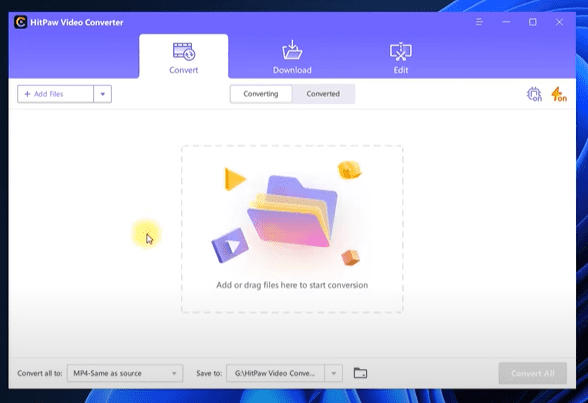
The converter comes with a clean and modern design. The interface is intuitive, visually appealing, and divided into clearly labeled sections like Convert, Download, and Edit.
To convert a video:
- Simply drag and drop your MOV file into the workspace.
- The software detects the input file and shows its details (e.g., size and format).
- You can choose whether to keep all audio tracks or remove them. Additional audio tracks can also be added, which is a great bonus for creators.
⚙️ Conversion Settings
After adding your video, here’s how to set it up for conversion:
- Choose Output Format:
SelectMP4as the destination format. - Smart Fit Option:
Choose Smart Fit to match the output quality with the original, ensuring no loss of detail or resolution. - Output Folder:
Set a specific output directory to keep your files organized.
⚡ Speed Optimization Options
Two major features are available to accelerate conversion:
- Lossless Conversion:
This ensures ultra-fast conversion without compromising quality. It’s especially useful if you’re only changing the format and not editing the content. - Hardware Acceleration (GPU Support):
Enable this to take full advantage of your computer’s graphics card (CUDA-compatible) for significantly faster performance.
With both options enabled, the software achieved remarkable results—even converting a 4GB video in around 4 minutes!
🧪 Performance Test: Real-World Results
Here’s what we observed when testing different scenarios:
- Standard 79MB MOV to MP4:
Converted in under a minute with full audio track retention. - Large 4GB MOV file:
Converted in approximately 4 minutes with both acceleration and lossless options enabled.
Disabling hardware acceleration and lossless mode noticeably increased conversion time, demonstrating the impact of these performance features.










🎁 Free 1-Month License (Limited Offer)
As a bonus, there’s a limited-time giveaway offering a free 1-month license to try the software. Here’s how to claim it:
- Only the first five users will receive the license.
- To qualify:
- Share this article (or any post from Tips to Fix) on your social media
- Subscribe to the Tips to Fix platform
- Email proof (e.g., screenshots) of the above steps to the support team
This trial lets you experience the full power of the software with no restrictions for an entire month.
🛍 Bonus: Get 30% Off
If you’re interested in purchasing the full version, there’s also a 30% discount available. Look for the coupon code in the description or offer section of the site.
✅ Final Thoughts
This video converter stands out with:
- Exceptional speed
- Easy drag-and-drop interface
- Support for all major formats
- GPU acceleration
- Lossless conversion mode
Whether you’re converting short clips or full-length movies, this tool makes the job fast and hassle-free. If you regularly work with video formats like MOV, this software is an essential addition to your toolkit.
Tags:
mov to mp4 converter, fast video converter, best video converter software, convert mov files, gpu accelerated video conversion, hardware acceleration converter, video conversion tips, video converter review, lossless video converter, convert large videos fast
Hashtags:
#VideoConverter #MOVtoMP4 #FastConversion #VideoEditingTools #LosslessConversion #GPUAcceleration #TipsToFix #VideoToolReview #MP4Converter #TechTips








