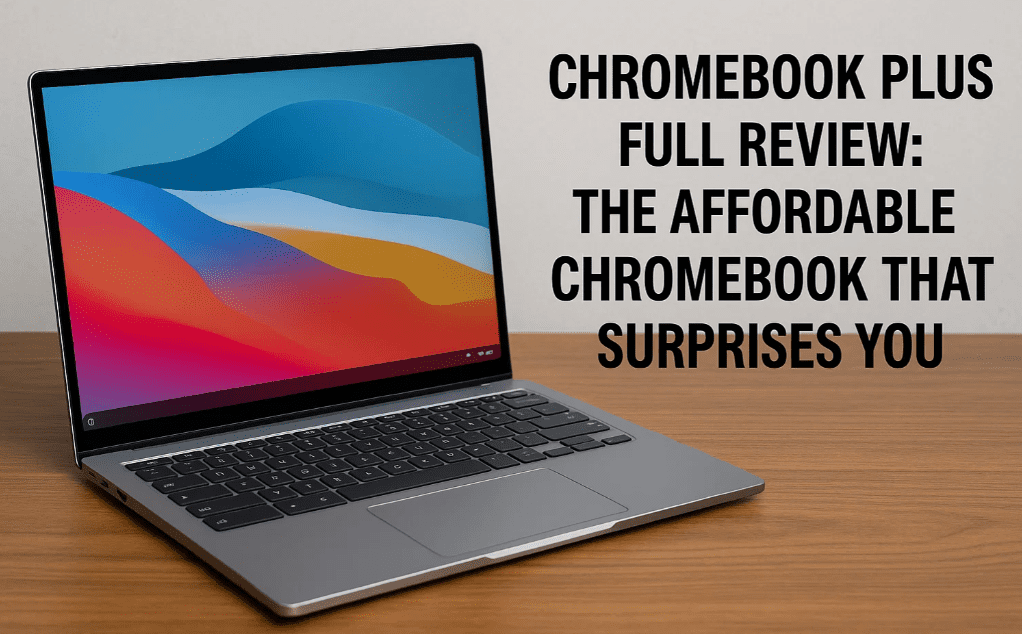
If you’ve been scrolling through budget laptops recently, you’ve probably seen the name ComBook Plus pop up. From a distance, it might look like just another Chromebook, but after thoroughly testing it, I can confidently say—it’s not your average entry-level machine. It brings a refreshing blend of performance, battery life, and practicality at a price that undercuts most tablets.
So, is it worth buying? Who is it meant for? And how does it hold up in daily use? Let’s break everything down in detail—from Chrome OS to display quality, build, keyboard, performance, and even light gaming.
What is Chrome OS?
Let’s start with the core of this device—Chrome OS. It’s a secure, lightweight operating system developed by Google that primarily runs on Chromebooks. Unlike Windows, it boots up quickly, consumes less power, and is designed to run web and Android apps efficiently.
What makes Chrome OS unique is:
- It’s free – Unlike Windows, there’s no licensing cost.
- Security – Built-in sandboxing, verified boot, and a TPM chip.
- No need for antivirus software, making it hassle-free for students and older users.
- Runs both Android apps and Linux apps if needed.
- Seamless integration with your Google account, offering cross-device sync, app continuity, Find My Phone support, and even notification mirroring.
And yes, apps like Photoshop Web, WhatsApp Web, Zoom, Canva, and Office 365 (web versions) work perfectly fine on this device.
Perks of Chromebook Plus
This specific model also falls under the Chromebook Plus branding, which means it’s eligible for Google’s special offers.
- 1-year free subscription to Google One Premium (worth ₹3,400).
- Access to enhanced AI-powered features in Gmail and Docs.
- Full compatibility with Google Workspace.
- Smooth multitasking, better performance standards, and guaranteed ChromeOS updates.
✅ This offer is valid on devices purchased before January 31, 2025.
Display Quality
Surprisingly, the ComBook Plus sports a 14-inch Full HD IPS display, with a peak brightness of around 342 nits. At this price point, that’s impressive.
- Resolution: 1920×1080
- Brightness: Excellent for indoor use; okay for shaded outdoor environments.
- Color Gamut:
- 62% sRGB
- 46% DCI-P3
- 45% NTSC
While it’s not suitable for color-accurate design work, it’s more than good enough for content consumption, office work, and online classes.
And yes—it supports Widevine L1, so you can stream Netflix, Prime Video, and Disney+ Hotstar in Full HD—unless you enable Developer Mode, which downgrades the security level and limits streaming to SD (L3).
Build & Design
- Material: Polycarbonate body
- Finish: Dual-tone silver with ComBook Plus branding on the lid
- Weight: Lightweight and portable (~1.4 kg)
- Flex: Some lid and keyboard flex is noticeable, but acceptable for the price
- Ventilation: Exhaust vents at the rear, no fan noise since the processor is power-efficient
Despite its lightweight build, it feels well-balanced in hand. You’ll need two hands to open the lid, but the hinge is solid and smooth.





Keyboard & Trackpad
The keyboard has decent key travel and spacing, making it quite comfortable for typing.
- No backlighting (missed opportunity)
- Replaces Caps Lock with a launcher key to open the app drawer
- Top row has shortcut keys for volume, brightness, and window management
- The trackpad is square-shaped, supports multi-gesture navigation, and responds accurately
Gestures like three-finger swipe for multitasking and app switching work flawlessly, just like on Windows.
Ports & Connectivity
This is where ComBook Plus shines for its price.
Left Side:
- 1x USB 3.1 Gen1 Type-C (charging + display out)
- 1x USB 3.2 Gen1 Type-A
- 1x MicroSD card reader
- 1x 3.5mm headphone/mic combo jack
Right Side:
- 1x USB 3.1 Gen1 Type-C (charging + display out)
- 1x USB 3.2 Gen1 Type-A
- 1x Kensington lock slot
✅ Both Type-C ports support charging.
⚠️ Type-C to Type-C display out isn’t supported—you’ll need a Type-C to HDMI adapter.
Storage expansion via MicroSD works well, even with 1TB cards.
Performance & Benchmarks
Under the hood:
- Processor: Intel Core i3 N305 (8-core efficient chip, no hyper-threading)
- RAM: 8GB (non-upgradable)
- SSD: 256GB NVMe (full-sized M.2 2280 with ~600MB/s read & 500MB/s write)
- Wi-Fi: 6E
- Bluetooth: 5.2
- Security: TPM chip for secure boot and user data protection
For day-to-day work—like browsing, document editing, video streaming, and light photo editing—it holds up extremely well. We opened over 15 Chrome tabs, streamed videos in some, edited Docs in others—no lag.
Benchmarks (run via Developer Mode):
- Antutu Score: ~82,000
- Geekbench Multi-core: Around 2,800
Gaming Experience
Don’t expect AAA gaming here—but casual gaming is surprisingly good.
What works well:
- Android games like Clash of Clans, Candy Crush, Asphalt, etc.
- PPSSPP Emulator for PSP games like GTA: Vice City Stories
- RetroArch (side-loaded) worked fine with NES and SNES ROMs
What doesn’t:
- Genshin Impact didn’t load past the splash screen
- Heavy Android games may struggle or not run at all
Keyboard remapping works great for emulator gaming. And yes, you can connect external gamepads via Bluetooth.
Can You Install Windows?
No. The ComBook Plus does not support Windows installation. Its firmware and drivers are tailored for Chrome OS. But you can dual-boot or emulate Linux if needed.
Battery Life & Charging
Battery backup is phenomenal, thanks to Chrome OS and the efficient processor.
- Typical usage: 10–12 hours
- YouTube streaming: ~8 hours continuous
- Idle/sleep drain: Less than 1% over 16 hours
- Charging time: ~1 hour 12 minutes (65W Type-C fast charger included)
The sleep mode works like a smartphone—close the lid and it locks; open the lid and it resumes instantly. Boot time is 8–10 seconds max.
Final Verdict – Should You Buy the ComBook Plus?
Absolutely, if:
- You’re a student, casual user, or someone looking for a reliable second laptop
- You mostly use Google services, browse the web, watch content, and type documents
- You want a tablet-like experience with the benefits of a laptop (keyboard, larger screen, ports)
It’s better than an Android tablet, thanks to the keyboard, screen size, and overall usability. At ₹20,000 to ₹21,000 (depending on the sale), it’s hard to beat for its price.
🛒 Check out the latest price and availability here: https://amzn.to/3Ig4xgN
🔖 Tags & Hashtags
Tags: Chromebook Plus review, ComBook Plus specs, Chromebook for students, Chrome OS vs Windows, budget laptops India, casual gaming laptop, low-cost laptop review, Chrome OS features
Hashtags:
#ComBookPlus #ChromebookPlus #ChromeOS #BudgetLaptop #LaptopForStudents #TechReview #AndroidAppsOnLaptop #LaptopUnder25000
Let us know in the comments—what do you think of the ComBook Plus? If you’re already using one, what’s your experience been like?
