If you’re in the market for a small, affordable, yet powerful mini PC, the Chewy Arbox might just be the perfect fit. Packed with modern specs, upgrade potential, and versatile connectivity, this Ryzen-powered machine offers performance without taking up precious desk space. Let’s dive into the details of this impressive mini computer.
What’s in the Box?
The Chewy Arbox mini PC comes neatly packaged with everything you need to get started:
- Mini PC Unit
- VESA Mount (with screws for easy monitor or wall mounting)
- 120W Power Adapter (19V, 6.32A with a barrel connector)
- UK Power Cord (other regions get their respective plugs)
- Warranty Card
Design and Ports
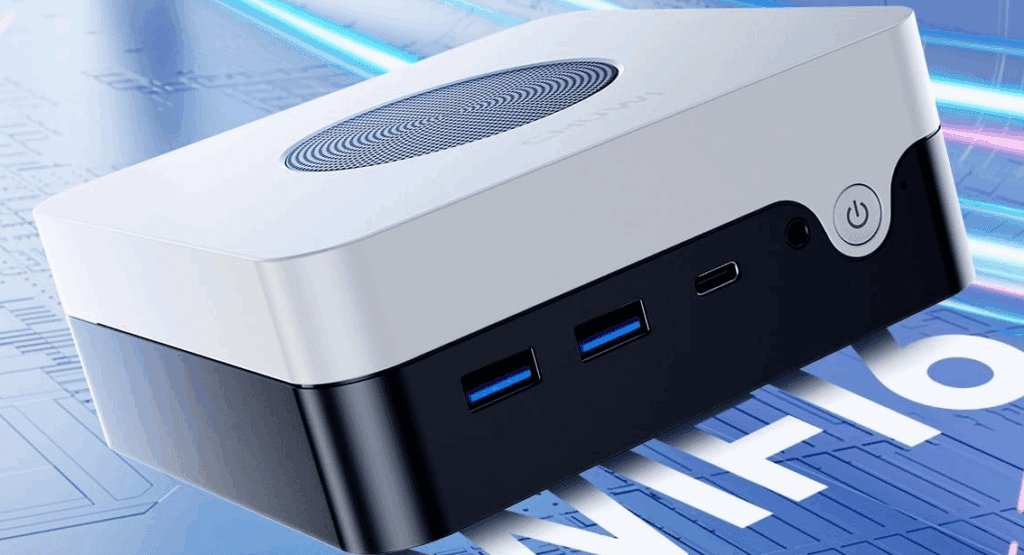
The Arbox features an aluminum chassis, helping with heat dissipation and giving it a premium feel. The dimensions are compact at 154 x 152 x 45 mm, and it weighs only 740 grams, making it ideal for small workspaces or media setups.
Front Panel:
- Power Button
Side:
- Kensington Lock
- 2 x USB 3.2 Gen 2
- 1 x USB-C 3.2 Gen 2 (full-featured)
Rear Panel:
- DC Input
- USB 4 Type-C
- 3.5mm Audio Jack
- HDMI 2.1
- DisplayPort 1.4
- 2 x USB 2.0
- 2 x 2.5Gb Ethernet Ports
Display Support:
This mini PC can run up to four displays simultaneously:
- 3 monitors at 4K 144Hz
- 1 monitor via HDMI 2.1 at 4K 60Hz
Specifications
CPU and Graphics:
- AMD Ryzen 7 8745HS
- 8 cores / 16 threads
- 4.9 GHz Max Turbo
- Zen 4 architecture
- 16MB L3 Cache
- 65W TDP
- Radeon 780M GPU
- RDNA 3 architecture
RAM and Storage:
- 16GB DDR5 RAM (5600 MHz) — dual-channel, upgradeable to 64GB
- 512GB PCIe 3.0 SSD — upgradeable via dual M.2 2280 slots (PCIe 4.0 supported)
Wireless and Networking:
- Wi-Fi 6
- Bluetooth 5.1
- Dual 2.5Gb Ethernet ports
Operating System:
Internal Layout and Upgrade Options
Accessing the inside is simple. The bottom panel includes holes in the rubber feet to unscrew the casing without peeling anything off. Inside, users will find:
- Dual M.2 SSD slots (PCIe 4.0)
- Dual SO-DIMM slots for DDR5 RAM
- Large cooling fan for airflow
- Clean motherboard layout for DIY upgrades
Performance Benchmarks
Here’s how the Chewy Arbox fares in real-world and synthetic tests:
CrystalDiskMark (Storage Speed):
- Read: ~2932 MB/s
- Write: ~2553 MB/s
Geekbench 6:
- Single-Core Score: 2,476
- Multi-Core Score: 9,837
- GPU Score: 24,519
3DMark:
- Time Spy Score: 1,858
- Night Raid Score: 17,839
Thermals and Cooling
Despite running demanding benchmarks, the system exhibited:
- No thermal throttling
- No overheating
- Peak temperature: 95.1°C (under Cinebench stress test)
The well-designed fan and aluminum chassis efficiently manage heat, keeping performance stable.
Media and Gaming Performance
This mini PC handled:
- 4K HDR videos (400 Mbps HEVC 10-bit) flawlessly with zero lag
- Plex server tasks for 4K streaming
- AAA games at 1080p with smooth frame rates
- Retro and casual games without any issues
The GPU and CPU combination, while not high-end, is more than capable of delivering playable experiences for moderate gaming and streaming.
Price and Verdict
Priced at just £331, the Chewy Arbox is a budget-friendly powerhouse. Considering its specs, expandability, and build quality, it punches above its weight in the mini PC market.










If you’re looking for:
- A mini PC for work, media, light gaming, or server use
- A device with solid connectivity and display versatility
- A unit that stays cool and quiet
Then the Chewy Arbox should be high on your shortlist.
Visit the official website here:
Tags: mini pc, Chewy Arbox, Ryzen 7 mini pc, Radeon 780M, mini desktop review, budget mini pc, Windows 11 mini pc, mini pc benchmarks, small form factor pc, compact desktop computer, mini pc gaming
Hashtags:
#MiniPC #ChewyArbox #Ryzen7 #CompactPC #PCBuild #Windows11 #BudgetPC #MiniDesktop #TechReview #GamingPC #HomeOfficePC







