When it comes to building a budget gaming PC, the term “budget” can mean different things to different people. Some might think of cutting every possible corner, but that often leads to performance compromises and a lack of future-proofing.
Instead, this guide focuses on the best possible budget gaming PC in 2025—maximizing performance per dollar while ensuring a compromise-free experience. We’ll cover component selection, assembly, benchmarks, and performance insights—all without breaking the bank.

Why This Build?
In today’s market, component prices are volatile, especially for GPUs. However, by carefully selecting each part, we can build a powerful, future-proof system that looks great and performs even better.
Key Goals:
✅ Maximize performance per dollar
✅ No major compromises
✅ Great aesthetics & cooling
✅ Upgrade-friendly for the future
Components Breakdown
1. CPU: AMD Ryzen 5 7600
- 6 cores, 12 threads – Perfect for gaming and light productivity.
- AM5 platform – Ensures future upgradeability.
- Great value – Outperforms similarly priced Intel alternatives.
Why not Ryzen 7 or 9?
For pure gaming, the Ryzen 5 7600 offers the best price-to-performance ratio. Higher-end CPUs (like the Ryzen 7 or 9) are overkill unless you’re into heavy multitasking or content creation.
🔗 Check current pricing: AMD Ryzen 5 7600
2. GPU: Intel Arc B850
- 12GB VRAM – More future-proof than Nvidia’s 8GB options.
- Strong 1440p performance – Handles modern games smoothly.
- Good ray tracing for the price – Surprisingly capable.
Alternative: If the B850 is unavailable, consider the B570, but expect slightly lower performance.
🔗 Check current pricing: Intel Arc GPUs
3. Motherboard: ASRock A620M-HDV/M.2
- Micro-ATX form factor – Compact but functional.
- Supports DDR5 & PCIe 4.0 – No PCIe 5.0, but irrelevant for gaming.
- Budget-friendly – Half the price of higher-end boards.
Limitations:
- No Wi-Fi (use Ethernet or a Wi-Fi adapter).
- Basic VRMs – Not ideal for high-wattage CPUs like the Ryzen 9.
🔗 Check current pricing: ASRock A620M-HDV
4. RAM: Corsair Vengeance RGB 32GB (2x16GB) DDR5-6000 CL30
- 32GB capacity – More future-proof than 16GB.
- Fast speeds (6000MHz, CL30) – Optimized for Ryzen 7000.
Can you save money here?
Yes—if strictly gaming, 16GB DDR5-5600 is acceptable, but 32GB is recommended for modern titles.








🔗 Check current pricing: Corsair Vengeance RGB
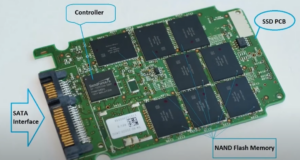
5. Storage: ASRock FA200 1TB NVMe SSD
- PCIe 4.0 speeds – Fast load times.
- No DRAM cache – Slightly slower for heavy workloads, but great for gaming.
Downside? The green PCB looks cheap—but hidden under a heatsink, it’s fine.
🔗 Check current pricing: ASRock FA200
6. CPU Cooler: Arctic Freezer A36 ARGB
- Dual-fan design – Excellent cooling for the price.
- Easy installation – Works on both Intel & AMD.
- RGB lighting – Adds aesthetic flair (optional).
Stock cooler alternative? The Ryzen 5 7600 includes a basic cooler, but the A36 is quieter and more efficient.
🔗 Check current pricing: Arctic Freezer A36
7. Case: Lian Li Dan A3 (Wooden Edition)
- Micro-ATX compact design – Saves space.
- Premium build quality – No “cheap plastic” feel.
- Great airflow – Mesh front panel.
Alternative budget cases:
- Cooler Master Q300L (~$50)
- ASUS Prime AP201 (better cable management)
🔗 Check current pricing: Lian Li Dan A3
8. PSU: MSI A650BN (650W, Bronze, Non-Modular)
- Reliable for budget builds – Enough power for this setup.
- Non-modular cables – Slightly messier, but hidden in this case.
Ideal upgrade: A modular PSU (like the Corsair Shift series) for cleaner cable management.
🔗 Check current pricing: MSI A650BN
Assembly & Performance
Step-by-Step Build Guide
- Install CPU & RAM – Place the Ryzen 5 7600 into the motherboard and secure the Arctic Freezer A36 cooler.
- Insert SSD – Mount the ASRock FA200 into the M.2 slot.
- Mount Motherboard – Secure it inside the Lian Li Dan A3 case.
- Install GPU – Slot the Intel Arc B850 into the PCIe x16 slot.
- Connect PSU – Wire up all components (CPU, GPU, motherboard, storage).
- Cable Management – Tidy up cables for airflow and aesthetics.
Gaming Benchmarks (1440p & 1080p)
| Game | 1440p (Avg FPS) | 1080p (Avg FPS) |
|---|---|---|
| Call of Duty: Warzone | 80-100 FPS (Ultra) | 120-140 FPS (Ultra) |
| Fortnite | 130-150 FPS (High) | 180-200 FPS (High) |
| Diablo IV | 85-120 FPS (Ultra) | 150-160 FPS (w/ XeSS FG) |
| Hitman 3 | 130 FPS (Ultra) | 160 FPS (Ultra + RT) |
Thermals & Noise
- CPU Temp (Gaming): ~78°C (peak)
- GPU Temp (Gaming): ~60°C
- Noise Level: Nearly silent (thanks to the Arctic cooler & mesh case).
Final Thoughts
This budget gaming PC delivers excellent 1440p performance without major compromises. The Intel Arc B850 GPU is a standout, offering 12GB VRAM and solid ray tracing, while the Ryzen 5 7600 ensures smooth gameplay.
Should You Build This?
✅ Yes, if:
- You want great 1440p performance on a budget.
- You prefer future-proofing (AM5, DDR5, 12GB VRAM).
- You like aesthetic builds (wooden case, RGB).
❌ Consider alternatives if:
- You need Wi-Fi (get a motherboard with Wi-Fi).
- You prefer Nvidia/AMD GPUs (check pricing fluctuations).
🔗 Want a cheaper version? Check our budget build guide for a no-frills alternative.
Tags & Hashtags
Tags:
budget gaming pc, best gaming pc 2025, Intel Arc B850, Ryzen 5 7600, AM5 build, 1440p gaming, budget PC build
Hashtags:
#GamingPC #BudgetGaming #PCBuild #IntelArc #AMDRyzen #1440pGaming #TechGuide
Ready to Build?
All components are linked above for the latest prices. Drop a comment if you have questions!
🚀 Happy building! 🚀








