Imagine creating a fully functional, beautiful website—without writing a single line of code, hiring designers, or struggling with complex builders. Thanks to AI, this is now possible!
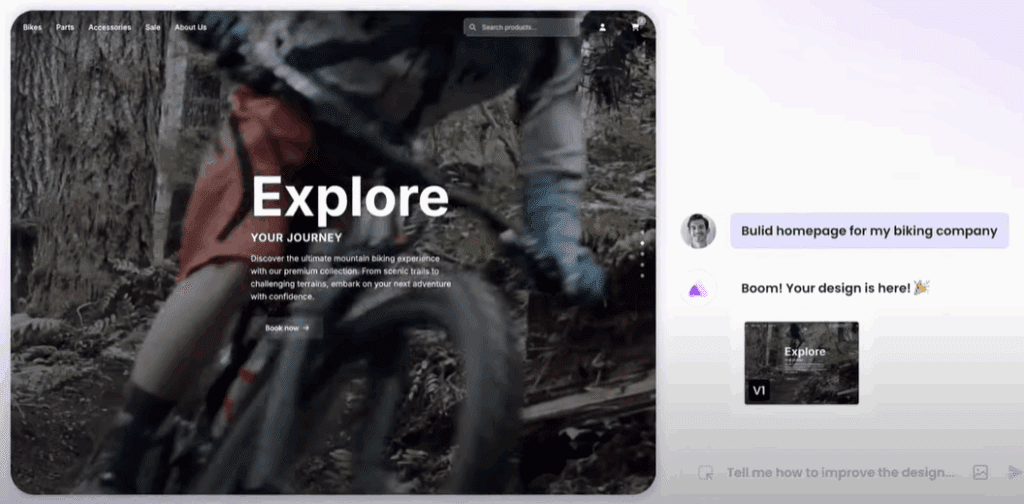
In this guide, I’ll walk you through how to build a custom website in minutes using Ready AI, a revolutionary tool that turns simple text prompts into professional web designs. Whether you need a portfolio, business landing page, or e-commerce store, AI can do it all—faster and easier than ever before.
Why Use AI to Build Your Website?
✔ No coding or design skills required – Just describe what you want.
✔ Instant custom layouts – No generic templates.
✔ Responsive & optimized – Works on all devices.
✔ Content suggestions – AI helps structure your site.
✔ Easy edits – Tweak designs with simple prompts.
Step-by-Step: Building a Website with Ready AI
1. Sign Up & Create a New Project
- Go to Ready AI (link in description).
- Click “Get Started” and create an account.
- Select “New Project” and choose your framework (HTML, React, etc.).
- Name your project (e.g., “Digital Product Shop”).
2. Define Your Website with a Simple Prompt
- Describe your site in plain English.
- Example: “A landing page for my AI courses, prompt bundles, Canva templates, and stock videos.”
- AI will suggest sections (hero banner, testimonials, CTA buttons).
3. Customize Design & Layout
- Choose color scheme (light/dark mode, primary colors).
- Upload inspiration images (optional).
- Modify structure (e.g., “Add a contact form”).
4. Generate & Refine Your Website
- AI creates two design variations instantly.
- Edit any element (text, images, layout) with prompts.
- Example: “Add feature images for each product category.”
- Replace images (upload your own or regenerate AI visuals).
5. Add More Pages (E-Commerce, Blogs, etc.)
- Click “Continue to Generate” to create:
- Product pages
- Checkout flows
- Blog sections
6. Export & Publish
- View & copy HTML/React code.
- Share a preview link with clients or teammates.
- Download & host your site on any platform.
Why Ready AI Stands Out
🚀 Faster than drag-and-drop builders (no manual tweaking).
🎨 Truly custom designs (not just templates).
🤖 AI-powered content & image suggestions (saves hours).
💡 Perfect for non-techies & developers alike.
Who Should Use AI Website Builders?
✔ Entrepreneurs – Launch a business site in minutes.
✔ Freelancers – Create portfolios without coding.
✔ E-commerce sellers – Build product pages instantly.
✔ Agencies – Speed up client projects.
Final Thoughts
Gone are the days of struggling with WordPress, Wix, or hiring expensive developers. With Ready AI, you can:
✅ Design a website in minutes.
✅ Customize every detail with simple prompts.
✅ Export code or share live previews.
Have you tried building a website with AI? Share your experience in the comments!
Tags:
AI website builder, no-code website, Ready AI, AI web design, create website with AI, e-commerce AI, landing page generator, AI tools
Hashtags:
#AIWebsiteBuilder #NoCode #WebDesign #ReadyAI #AITools #NoCodeDevelopment #LandingPage #EcommerceWebsite #AIDesign #TechInnovation