Building a great gaming PC on a tight budget isn’t as simple as it used to be. A $1000 budget, which once could buy a fairly high-end rig, now barely stretches far enough to get you something console-competitive — especially with the rising cost of new components.
So what’s the workaround?
The answer might be: time travel — metaphorically speaking. Instead of chasing only the latest components, what if we go back a few generations and pick parts that offer better value for money?
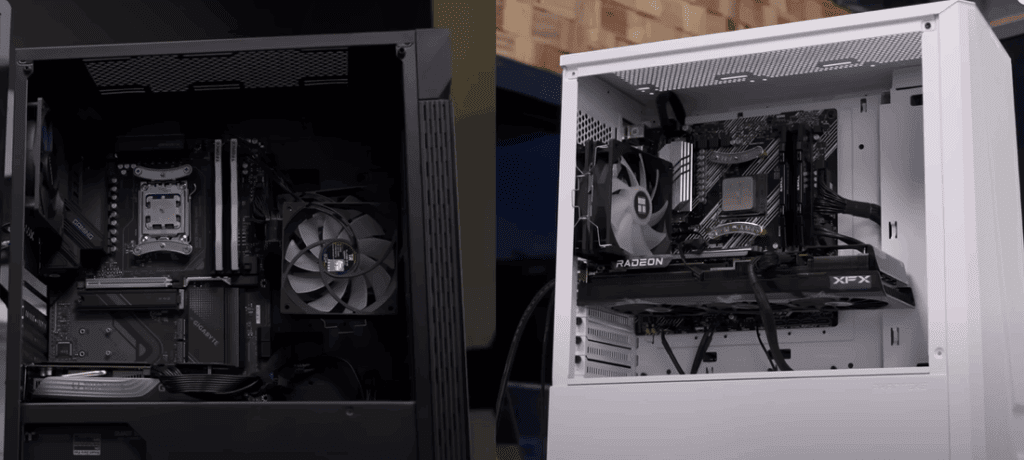
To find out just how much performance you might be sacrificing (or gaining), we built two complete gaming systems:
- System A: Uses only the latest, current-generation components.
- System B: Dives into past generations to find the best bang for the buck.
Let’s break down the builds, compare performance, and share what we learned — so you can decide whether newer always means better.
The Philosophy Behind the Builds
Team New-Gen (System A):
- CPU: AMD Ryzen 7 9600X (Zen 5)
- Motherboard: Gigabyte X870 Gaming Plus Wi-Fi 6
- RAM: 16GB DDR5 (T-Force Delta RGB)
- GPU: Zotac Twin Edge RTX 4060
- Case: Phanteks Eclipse G3A
- PSU: Corsair CX650W
- Storage: PCIe Gen 4 SSD
Team Value (System B):
- CPU: AMD Ryzen 7 5700X3D (Zen 3 + 3D V-Cache)
- Motherboard: ASUS Prime B550M-A
- RAM: 16GB DDR4
- GPU: XFX Speedster Radeon RX 7800 XT
- Case: Budget case with limited airflow
- PSU: Thermaltake Smart 600W (eventually upgraded due to issues)
- Storage: PCIe Gen 4 SSD
Both builds used the Thermalright Phantom Spirit air cooler — a great value option that’s effective and quiet.
The Key Trade-offs
1. Performance vs Future-Proofing
The Ryzen 9600X might be newer and support DDR5/PCIe Gen 5, but the older 5700X3D offers more cores, extra gaming cache, and massive cost savings. Those savings allowed us to spend significantly more on the GPU — arguably the most important part for gaming.
Meanwhile, the AM5 platform (used in the new-gen build) is supported until at least 2027, while the AM4 platform (used in the older build) is effectively a dead end.
2. GPU Power Matters Most
Team Value managed to squeeze in a Radeon 7800 XT, a far more powerful card than the RTX 4060 in the new-gen system. While the 4060 offers features like DLSS 3 and better power efficiency, the raw performance from the 7800 XT is hard to beat — especially at 1440p.
3. Case, Cooling & Airflow
Budget cases often come with poor ventilation and fewer fans. This had a direct impact on GPU thermals. The Phanteks case in the newer build had better airflow, and the temperature differences were noticeable during gameplay.
Benchmark Results: What We Learned
🖥️ Cinebench & Productivity Tests
- Newer system pulled slightly ahead thanks to higher single-core performance.
- Older system still held up well due to more cores.
🎮 Gaming Tests (1440p Focus)
In titles like Final Fantasy XVI and Apex Legends:










- The 7800 XT crushed the 4060, delivering significantly higher FPS and better 1% lows.
- Even with upscaling (DLSS or FSR), the performance gap remained wide.
- GPU temperature on the older system stayed cooler, thanks to better airflow.
🛠️ Stability & Compatibility
- The older system initially faced issues with RAM overclocking (EXPO).
- Budget power supply failed to boot the older system — a reminder not to cheap out on PSUs.
Conclusion: Which Build Wins?
If you’re building a $1000 gaming PC today, you have two choices:
- Buy all-new parts and get modern features (like Wi-Fi 6, DDR5, PCIe Gen 5, Frame Generation, and future upgrade paths).
- Opt for a well-balanced older-gen build that prioritizes GPU power, saves money, and delivers better in-game performance today.
In our testing, the older-generation build was clearly the better gaming performer thanks to a more powerful GPU and smart budget allocation. But it’s important to remember that:
- Newer hardware isn’t always faster where it matters most (like gaming).
- Old doesn’t mean obsolete — you can build a very capable PC using older-generation parts, often brand new and on clearance.
- Flexibility wins — restricting yourself to only the latest tech could mean sacrificing performance for future-proofing you may never need.
Helpful Links
- AMD Ryzen CPUs
- Zotac RTX 4060
- XFX Radeon RX 7800 XT
- Phanteks Eclipse Cases
- Thermalright Phantom Spirit
Tags & Hashtags
Tags: gaming PC build, budget PC build, Ryzen 5700X3D, Ryzen 9600X, RTX 4060, Radeon 7800 XT, DDR5 vs DDR4, PCIe Gen5, AM5 motherboard, best GPU under $1000, old vs new PC parts, gaming benchmarks, custom PC, PC hardware tips, budget GPU, high performance PC, PC cooling, PC airflow
Hashtags: #GamingPC #BudgetBuild #PCBuildGuide #Ryzen5700X3D #Ryzen9600X #RTX4060 #Radeon7800XT #DDR5 #PCGaming #BuildYourOwnPC #BestGPU #OldVsNew #CustomPC #PCBuildTips #PCBenchmarks








