There’s a certain quiet excitement that comes with a browser update, especially when that browser is one of the fastest-moving privacy-first projects out there. Brave 1.85 rolled out last night in my region, and while the update installed almost silently in the background, the changes inside it are anything but quiet. They reflect a browser steadily polishing its identity — equal parts privacy shield, AI assistant, and clean everyday workspace.
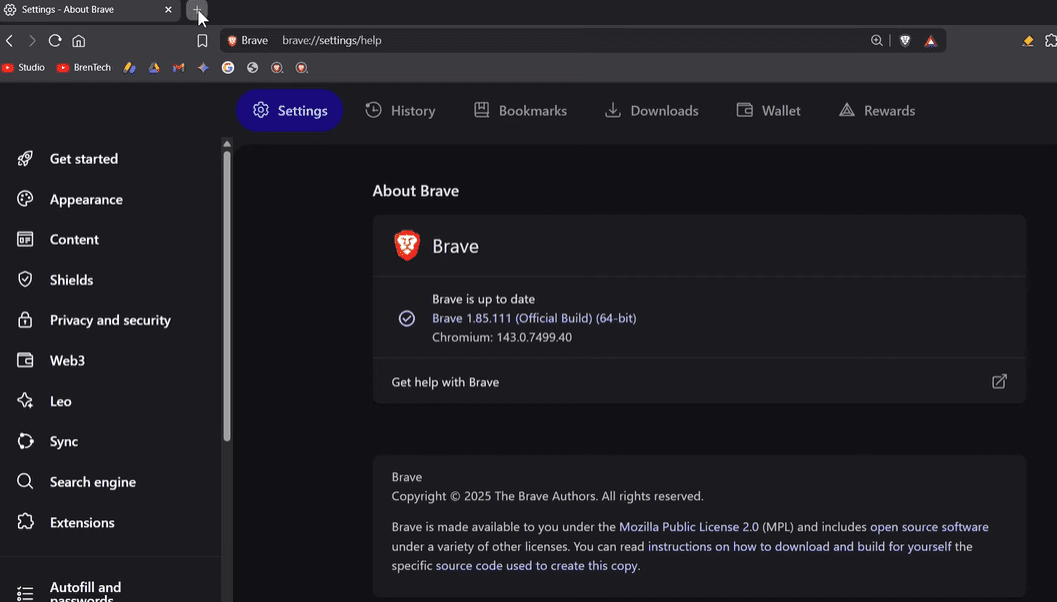
Once the update completed, Brave reported version 1.85.1 running on the fresh Chromium 143.0.7499.40 platform. And whenever the Chromium base shifts, we also know something else happens behind the scenes: the weekly security patches arrive, keeping the entire browser ecosystem one step ahead of threats. This cycle included 13 security fixes, with several high-severity issues addressed, such as type confusion and use-after-free exploits. These are common vectors attackers love to target, so knowing they are being patched consistently is reassuring.
But let’s move beyond the security foundation and explore what Brave brings to the table in this new chapter.
Brave Wallet & Leo AI — Subtle but Meaningful Enhancements
Before we dive into visuals and interface changes, it’s worth taking a moment to appreciate two major pillars of Brave: the built-in Wallet and Brave Leo, the AI assistant.
A quick warm-up before diving deeper
Both features evolve quietly from one release to the next, but version 1.85 gives them a noticeable bump, especially Leo. If you rely on Brave for crypto or for lightweight AI tasks, these updates matter more than they appear at first glance.
Improvements rolling out to Brave Wallet
Brave Wallet receives two updates and a couple of fixes, strengthening the reliability of crypto operations inside the browser. The update details are concise, but the intention is clear: Brave continues to refine the Wallet as a serious on-browser tool, not a side feature.
Brave Leo AI gets a surprisingly large upgrade
This is where things get more interesting. Brave Leo now includes:
- Skills support — enabling task-like interactions
- Task URLs (URs)
- The ability to attach bookmarks to conversations
- A way to attach browsing history using the extensions widget
- Better handling of GitHub files
These enhancements may seem small individually, but together they push Leo closer to a more functional, workspace-friendly chatbot. It’s slowly becoming something people can rely on for ongoing tasks, not just one-off replies.
The New Tab UI — A Small Detail That Somehow Feels Big
Sometimes the smallest UI adjustments are the ones that unexpectedly shape how a browser feels. This time, it’s the Brave Favicon icon appearing directly on the new tab button in the tab strip.
When you open a new tab, instead of the generic plus icon, you now see Brave’s lion head symbol peeking through. It’s subtle, it’s clean, and it adds a sense of identity to the top of the browser.
And then we come to bookmarks — specifically the bookmark folder icons.







From outlined folders to classic yellow folders
Brave normally uses outlined folder icons, which match its minimalist style. But many users, especially those on Windows, prefer the familiar yellow folder look.
To address this, Brave added a new flag:
brave://flags → “Use legacy folder icon”
Switching this flag from Default to Enabled brings back the yellow folder design.
A browser restart is required — and after that, your bookmarks quietly transform into their classic look.
It’s a small touch, but it makes Brave feel more native on Windows systems.
Appearance Settings Get a New “Rounded Corners” Option
Before we jump in, it’s worth mentioning that this feature is rolling out gradually. Brave says only 15% of users will see it initially. If you don’t see it yet, nothing is wrong — it simply hasn’t reached your browser build.
Exploring the new toggle
Inside Settings → Appearance, Brave has added:
Show rounded corners on main content areas
By default, Brave uses a squared layout for its main content frame. But turning this toggle ON softens the entire interface. Elements look rounder, smoother, and more modern.
Turn it OFF again, and the classic sharp-edged look returns instantly.
It’s a purely visual preference — but one that subtly alters how the browser feels during long browsing sessions.
Performance, Stability & Under-the-Hood Improvements
Every browser update contains hidden adjustments that never make headlines, yet these are often the changes that matter most to everyday use.
In Brave 1.85, several such improvements stand out.
Strengthened built-in ad blocking
Brave Shields — the heart of Brave’s privacy reputation — has been improved again. Each update evolves the engine that blocks tracking, ads, and unwanted scripts, keeping your browser leaner and faster.
Across all Chromium-based browsers, Brave continues to deliver one of the strongest built-in blockers without requiring extensions.
Better performance for Brave News
If you use Brave News, images now load more efficiently thanks to revised storage methods for large visuals. The result is a smoother feed that consumes fewer resources.
Security fixes
Beyond Chromium’s weekly security patches, Brave itself includes two additional browser-level fixes — reinforcing its layered security model.
Split View Improvements on macOS
Split view users on macOS will notice something subtle but important. Brave has updated the rounded-corner padding inside split view mode, giving the UI better spacing and more refined alignment.
It’s not a feature overhaul — it’s more like tidying up a desk you use every day. Small, but meaningful.
Vertical Tabs Get Multiple UI Fixes
Vertical tabs continue to be a favorite among productivity-focused users. And in this release, Brave refines them with two notable adjustments:
- Improved margin spacing between vertical tabs and page content when the sidebar expands on hover
- A fix for dragging and dropping tabs into groups when the target group contained only one tab
These refinements make vertical tabs feel more stable and predictable, especially for users who keep dozens of tabs open across multiple groups.
Theme Color Handling, Crash Fixes & More
Rounding out the update, Brave includes:
- Improved color scheme handling for themes
- A crash fix related to Brave News feed when the update flag was disabled
None of these features show up visually, but they improve reliability behind the scenes.
Official Download Link
If your browser hasn’t updated yet or you’re installing it fresh:
Brave Browser (Official Download):
https://brave.com/download/
(Direct link from the official Brave website, no alternatives or promotions.)
Final Thoughts
Brave 1.85 doesn’t try to revolutionize the browser — instead, it quietly strengthens everything people already like about it. The UI feels a little more personal. Leo AI becomes a little more capable. Security gets another layer of polish. And features like vertical tabs and split view continue to mature.
In a world where browsers often change too quickly or too dramatically, Brave’s approach feels measured and thoughtful. Each improvement finds its place naturally, without overwhelming the experience.
If you use Brave daily, you’ll likely appreciate the subtle refinements immediately. And if you’re new to Brave, this update makes the browser feel more welcoming than ever.
#BraveBrowser #BrowserUpdate #PrivacyBrowser #Chromium143 #TechGuide