If you’re a gamer or power user, you know how frustrating it can be when your laptop overheats. Laptop cooling pads promise to solve this problem—but do they actually work?
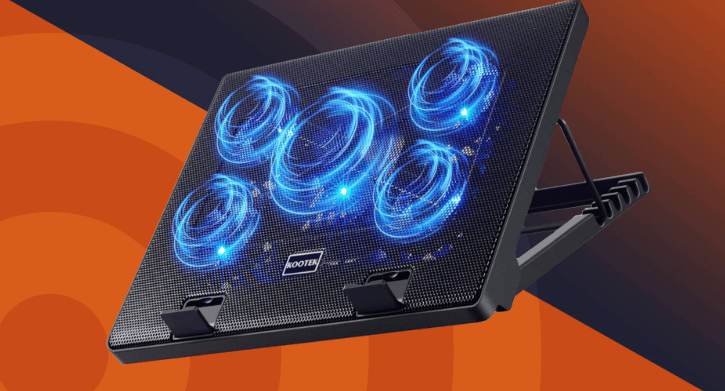
We tested five popular cooling pads ranging from $9 (₹750) to $24 (₹2,000) to see which one performs best. Here’s our detailed breakdown.
Testing Methodology
To ensure fair results, we:
✔ Used a high-end gaming laptop (Intel i9-12th Gen + RTX 3070 Ti)
✔ Monitored CPU & GPU temps using MSI Afterburner
✔ Tested with GTA V (graphics-heavy benchmark)
✔ Measured surface temperature with a heat gun
✔ All tests done in an AC-cooled room
Cooling Pads Tested
1. Zebronics NC5500D – $9 (₹750) – Budget Pick
✅ Features:
- Dual fans
- Adjustable stand
- Built-in phone holder (surprisingly useful)
- USB-powered
🔥 Performance:
- GPU Temp: Dropped from 86°C to 80°C
- CPU Temp: Dropped from 90°C to 85°C
- Surface Temp: 39.6°C (vs. 41.6°C without pad)
💡 Verdict:
- Best value for money
- Surprisingly effective for the price
- Lightweight but sturdy
2. Ant Esports NC270 – $12.50 (₹1,050)
✅ Features:
- Five fans (4 large + 1 small center fan)
- RGB lighting (single color)
- Adjustable height
🔥 Performance:
- GPU Temp: 78°C (vs. 86°C stock)
- CPU Temp: 77°C (vs. 90°C stock)
- Surface Temp: 39°C
💡 Verdict:
- Better cooling than Zebronics
- RGB is basic
- Slightly heavier









3. Cosmic Byte Meteorite – $16.80 (₹1,400)
✅ Features:
- Six fans (all same size)
- Braded cable (more durable)
- Fully adjustable stand
🔥 Performance:
- GPU Temp: 77°C
- CPU Temp: 79°C
- Surface Temp: 41°C
💡 Verdict:
- Best build quality in mid-range
- No major temp drop vs. cheaper options
- Good for larger laptops
4. Kreo Tundra – $20.40 (₹1,700)
✅ Features:
- Four small fans + 1 large center fan
- Side RGB lighting (customizable colors)
- Scroll wheel for fan speed control
🔥 Performance:
- GPU Temp: 75°C
- CPU Temp: 80°C
- Surface Temp: 42°C
💡 Verdict:
- Best RGB lighting
- Fan positioning may not suit all laptops
- Overpriced for cooling performance
5. Cosmic Byte Cyclone – $24 (₹2,000) – Premium Pick
✅ Features:
- Five fans (4 small + 1 large)
- Full RGB customization
- Heavy-duty build
🔥 Performance:
- GPU Temp: 78°C
- CPU Temp: 77°C
- Surface Temp: 42°C
💡 Verdict:
- Best for aesthetics
- Bulky & heavy
- Not significantly better than cheaper options
Final Verdict: Do Cooling Pads Work?
✅ Yes, but with limits:
- Average temp drop: 5-10°C
- Best for laptops with poor stock cooling
- No major FPS boost (tested in GTA V)
Which One Should You Buy?
- Budget Pick: Zebronics NC5500D ($9) – Best value
- Mid-Range: Ant Esports NC270 ($12.50) – Better cooling
- RGB Enthusiasts: Kreo Tundra ($20.40) – Best lighting
- Premium Choice: Cosmic Byte Cyclone ($24) – Best looks
Tags
Laptop Cooling Pads, Best Cooling Pads 2024, Gaming Laptop Cooling, Zebronics Cooling Pad, Ant Esports Cooling Pad, Cosmic Byte Cooling Pad
Hashtags
#LaptopCooling #GamingLaptop #CoolingPadReview #TechGuide #BudgetTech
Disclaimer: Results may vary based on laptop model, room temperature, and workload. Always check compatibility before purchasing.








