The ASUS ROG Strix Scar 16 (2024) is here—and it’s breaking performance records while offering unprecedented upgradeability (without a screwdriver!).
But with a starting price of $3,300, is it worth the hype—or just an overpriced RGB light show?
This in-depth review covers performance, thermals, display quality, and real-world gaming benchmarks to help you decide.
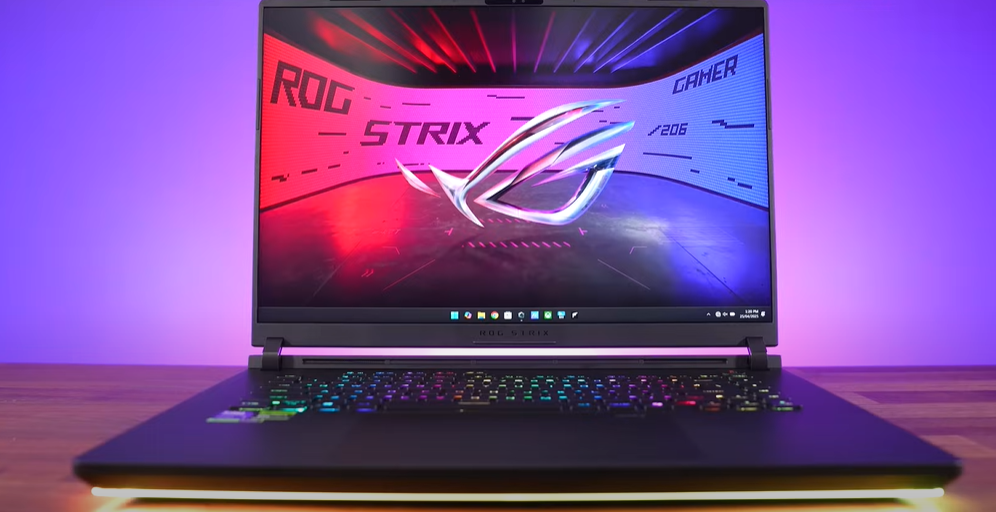
Design & Build: A Gamer’s Dream (With RGB Overload)
✅ 360° RGB Light Bar – Because more RGB = more FPS, right?
✅ Tool-Free Upgrades – No screwdriver needed for RAM/SSD swaps (a first for gaming laptops).
✅ Sturdy Build – Metal lid, minimal flex, and one-handed opening.
❌ Heavy & Thick – 6.1 lbs (2.8 kg), making it one of the heaviest 16″ gaming laptops.
❌ Awkward Port Layout – Most ports are on the left side, bad for left-handed gamers.
Specs & Performance: Breaking Records
Key Specifications
- CPU: Intel Core Ultra 9 275HX
- GPU: NVIDIA RTX 5090 (175W TGP)
- RAM: 64GB DDR5-5600 (upgradable to 6400)
- Storage: 2TB PCIe Gen 4 SSD (+1 free Gen 5 slot)
- Display: 16″ QHD+ Mini-LED, 240Hz, 1200+ nits
Performance Highlights
🔥 #1 in Cinebench Multi-Core (beating all competitors)
🔥 Lowest System Latency (best for competitive gaming)
🔥 2000+ nits brightness (with Optimus off—though possibly a bug)
Upgradeability: The Best We’ve Ever Seen
🛠️ No Tools Needed – Slide a latch to access:
- 2x DDR5 RAM slots
- 2x PCIe Gen 5 M.2 slots (supports double-sided drives)
- Wi-Fi 7 card (though it requires disassembly)
First gaming laptop with a Q-Latch system—no screws for SSD swaps!
Display: The Brightest Mini-LED Yet (With Quirks)
Mini-LED Modes
1️⃣ One Zone – Acts like a standard LCD (best for response times).
2️⃣ Multi-Zone Balanced – Recommended for daily use.
3️⃣ Multi-Zone Strong – Best for HDR gaming/movies.
✅ 1200 nits (SDR), up to 2000 nits (bug?) – Brightest laptop panel tested.
✅ Pantone-calibrated, 100% DCI-P3 – Stunning colors.
❌ Halo Effect – Visible in dark scenes (but can be disabled).
Thermals & Noise: Cool Under Pressure
❄️ Vapor Chamber + Liquid Metal Cooling – Keeps temps low.
🎛️ 4 Performance Modes:












- Silent (35W GPU) – Quiet but weak.
- Performance – Best balance.
- Turbo/Manual – Max power (CPU hits 80W, GPU 175W).
🔊 Fan Noise:
- Performance mode = Best balance.
- Turbo mode = Loud but cooler than competitors.
Gaming Benchmarks: RTX 5090 vs. Last Gen
| Game (1440p Ultra) | Scar 16 (RTX 5090) | Last-Gen RTX 4090 |
|---|---|---|
| Cyberpunk 2077 | 98 FPS | 92 FPS |
| Black Myth Wukong | 84 FPS | 82 FPS |
| Alan Wake 2 (RT On) | 76 FPS | 72 FPS |
💡 Verdict: ~5-10% faster than RTX 4090 laptops—but not a huge leap.
Battery Life: Meh
🔋 90Wh Battery:
- ~5 hours (YouTube playback)
- ~1.5 hours (gaming)
Not great compared to AMD-powered alternatives.
Should You Buy the ASUS ROG Strix Scar 16?
👍 Pros:
✔ Unmatched upgradeability (tool-less design).
✔ Best-in-class performance (CPU & GPU).
✔ Insanely bright Mini-LED display.
✔ Cool & quiet under load.
👎 Cons:
❌ Very expensive ($3,300+ for RTX 5090).
❌ Heavy & bulky for a 16″ laptop.
❌ Mini-LED brightness bug (may get fixed).
Final Verdict:
If you want the most powerful, upgradeable 16″ gaming laptop—and don’t mind the weight & price—the Scar 16 is a beast.
But if you prefer portability, consider the Razer Blade 16 (OLED) or wait for a sale.
🔗 Check Current Prices: ASUS ROG Strix Scar 16 | GamingLaptop.Deals
#GamingLaptop #ASUS #ROGStrix #RTX5090 #MiniLED #TechReview #PCGaming #UpgradeableLaptop #Hardware #GamingPerformance








