Apple has once again raised the bar when it comes to inclusive technology. Their latest announcement unveils a host of groundbreaking accessibility features across their entire ecosystem, including iOS, macOS, iPadOS, watchOS, and VisionOS. These enhancements aim to support users with visual, auditory, and mobility impairments more seamlessly than ever before.
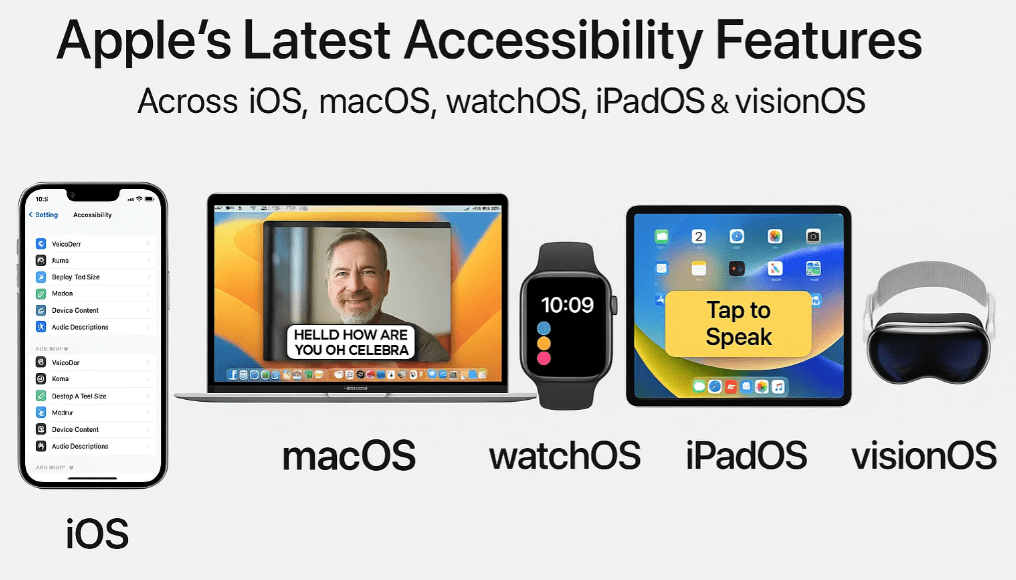
This article covers all the key updates and what they mean for users who depend on accessibility tools for everyday digital interaction.
1. Accessibility Nutrition Labels in the App Store
Apple introduces Accessibility Nutrition Labels—a new way for users to evaluate an app’s accessibility features before downloading. This update eliminates the guesswork that often accompanied app downloads. Now, developers will list what accessibility features their apps support, such as VoiceOver, Dynamic Type, Switch Control, and more.
📌 No more hit-or-miss: Users can now make informed decisions without downloading apps blindly.
2. Magnifier App Coming to macOS
Previously available on iOS, the powerful Magnifier app will now make its way to macOS. Users will also be able to use their iPhone as an external camera, enhancing the macOS magnification experience.
This cross-device functionality helps users access magnification tools with more flexibility and convenience, especially for reading fine print or analyzing physical objects.
3. Accessibility Reader – A Cross-Platform Text Enhancement Tool
Apple’s Accessibility Reader will soon be available systemwide on iOS, iPadOS, macOS, and VisionOS. It’s designed to help users customize the way text appears, making content more legible. Users can adjust font size, color, spacing, and even use spoken content features.
Additionally, it supports real-world text interaction such as reading from books or restaurant menus, which is especially beneficial for individuals with low vision.
4. Braille Access Transforms Apple Devices into Notetakers
A significant win for the Braille community, Braille Access will convert iPhones, iPads, and Apple Vision Pro devices into full-fledged Braille notetakers. This feature enhances productivity and communication for users who rely on Braille, turning their devices into powerful accessibility tools.
5. Live Listen & Live Captions on Apple Watch
Two essential hearing accessibility tools—Live Listen and Live Captions—are coming to the Apple Watch.
- Live Listen: First introduced on iPhones in 2018, this feature uses the device’s microphone to stream audio directly to AirPods.
- Live Captions: Now available on the Apple Watch, this feature provides real-time transcriptions of conversations right on your wrist, ideal for users who are hard of hearing.
This combination makes Apple Watch a smart hearing assistant on the go.










6. Personal Voice Upgrade: Create Your Voice Faster
Apple’s Personal Voice feature, which lets users record their own voice for text-to-speech purposes, has received a major upgrade.
Improvements:
- Previously required over 100 spoken prompts.
- Now, users only need to record around 10.
- Processing time reduced from overnight to just a few minutes.
This feature is particularly useful for users with conditions that may affect their speech over time, such as ALS.
7. Accessibility Sharing on Shared Devices
One of the most practical updates is Accessibility Sharing—a feature that lets users temporarily share their accessibility settings with another device.
Examples:
- Using a friend’s iPhone with your preferred settings.
- Temporarily configuring an iPad at a self-checkout kiosk in a grocery store.
This empowers users to instantly personalize shared or public devices without needing a lengthy setup.
8. Apple Vision Pro Gets a Major Accessibility Upgrade
Perhaps the most anticipated update: Apple Vision Pro is getting several major accessibility enhancements, especially for users who are blind or have low vision.
🔍 Zoom Everything in View
Previously, zooming only worked within app windows. Now, thanks to expanded camera integration, users can zoom their entire environment—bringing the real world into clearer view through the Vision Pro’s cameras.
🧠 Live Recognition with VoiceOver
Using on-device machine learning, the Vision Pro will:
- Identify and describe objects.
- Read documents.
- Recognize text in real time.
This adds a layer of AI-powered awareness to the device, greatly helping users who are blind or visually impaired.
🛠️ API Access for Developers
Apple is opening the camera API to approved third-party apps like Be My Eyes and Seeing AI, enabling them to deliver live, hands-free assistance using the main Vision Pro camera. This was previously not possible, and users were limited to a black screen.
What’s Coming Later in the Year
Apple has teased even more features to be rolled out later in the year:
- Mobility Impairment Tools: Including head tracking, eye tracking, and a new simplified media player app for Apple TV.
- Continued Expansion: More updates across all Apple platforms to make technology even more inclusive.
Final Thoughts
Apple’s commitment to accessibility continues to be industry-leading. These upcoming updates empower users with visual, hearing, and mobility impairments to interact with the world more independently and efficiently.
Whether it’s transforming your Apple Watch into a real-time captioning tool or turning your Vision Pro into a powerful visual interpreter, the future of accessible technology looks bright—and very inclusive.
Disclaimer
Some features mentioned in this article may be available only on newer Apple devices or specific operating systems. Be sure to check Apple’s official website for device compatibility.
Tags
apple accessibility, visionos, ios 18 features, macos accessibility, apple vision pro updates, iphone personal voice, live captions apple watch, magnifier macos, braille notetaker ios, accessibility sharing apple
Hashtags
#AppleAccessibility #iOS18 #VisionOS #macOS #AppleWatch #BrailleSupport #PersonalVoice #LiveCaptions #MagnifierApp #VoiceOver #AppleVisionPro #InclusiveTech #BeMyEyes #SeeingAI








