Google has officially rolled out Android 16, and although it arrived quietly, it brings one of the most significant visual and functional updates the Android operating system has seen in years. If you’re using an Android phone, get ready—your smartphone experience is about to change completely.

Material 3 Expressive: A Bold New Look
This update introduces Material 3 Expressive, a design overhaul that focuses on personalization, vibrant colors, new motion physics, and smoother animations. Every aspect of the interface—from the quick settings to app icons—has been refined to feel more dynamic, immersive, and engaging.
What’s New in Android 16?
🔸 Vibrations and Haptics Reimagined
Google has completely revamped how vibrations feel on your device. Instead of the typical thuk-thuk, you now get richer, more nuanced haptics. It’s not just noise; it’s a feeling.
🔸 Dynamic Colors and Personalized Themes
Android 16 adapts colors and themes based on your photos, wallpapers, and preferences. Everything—from app icons to system UI—feels tailored just for you.
🔸 Fluid Animations & Shape Morphing
This release brings in shape-morphing animations. Buttons and elements now smoothly transform when interacted with, adding a modern, almost playful UI experience.
🔸 Rounded Edges and Blur Effects
Sharp UI elements have been replaced with smooth, rounded edges. Google has also introduced blur effects throughout the OS—something previously absent from Android. You’ll notice this especially in areas like the Quick Settings panel, giving a more refined and iOS-inspired feel.
🔸 Enhanced Quick Settings Panel
While visually appealing, the new layout is a bit more complex. For instance, toggling mobile data now requires multiple steps, which could be improved in future updates.
🔸 Improved Google Photos and Other Apps
Several core apps like Google Photos and Clock have undergone a complete redesign. The Photos app, in particular, now resembles Apple’s gallery application—organized, vibrant, and intuitive.
🔸 Bubble and Shape-based Motion Effects
Every swipe, press, and transition comes with bubbly, smooth animations. The notification drawer, app switcher, and lock screen all show off these polished touches.
🔸 Progress Indicators on Lock Screen
Taking inspiration from iOS and Samsung’s One UI, Android 16 introduces progress indicators for downloads and actions, visible directly on the lock screen and always-on display.
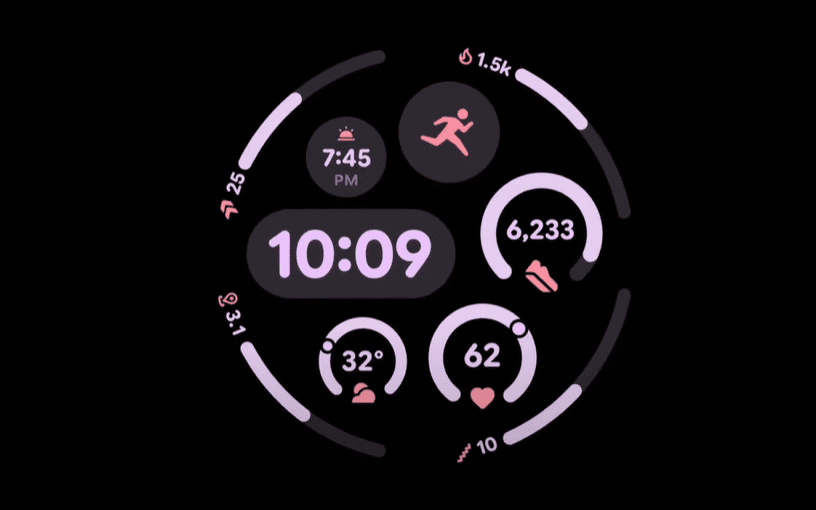
AI Takes Center Stage: Gemini is Now Built-In
Android 16 deeply integrates Google Gemini, the company’s latest AI assistant. You can point your camera at an object and ask Gemini what it is. Whether it’s identifying a cinema-grade camera like the Sony FX3 or helping with everyday questions, Gemini is now embedded across smartphones, smartwatches, and smart TVs.









Gemini is designed to act like a context-aware, always-available assistant across your devices—not just in your phone.
Inspired By iOS and Samsung—But That’s Okay
Some users may feel Android 16 borrows heavily from iOS and Samsung’s One UI—and they wouldn’t be wrong. Features like dynamic progress bars, blur effects, shape transitions, and the overall UI layout echo what’s already seen in other ecosystems.
However, cross-pollination of ideas isn’t new. In fact, Android has historically adopted popular features from custom ROMs developed by independent developers. The result? A better, more enjoyable experience for everyone.
Pixel Today, Everyone Tomorrow
Right now, these features are rolling out primarily on Pixel devices. But over the next few months, they will arrive on smartphones that run stock Android like those from Motorola, Nothing, and others.
When Will Android 16 Be Available to All?
- 📅 Developer Beta: Already live (not recommended for general users due to bugs).
- 📅 Main Event Launch: Scheduled for May 20–21, when in-depth AI and UI features will be unveiled.
- 📅 Public Beta: Expected to begin during or immediately after the event.
- 📅 Stable Release: Targeting the first week of June, but this could shift—so expect a 1-month buffer for wider rollout.
Final Thoughts
Android 16 is not just an incremental update—it’s a transformative leap. With expressive design, intuitive animations, and integrated AI, it brings a lively, modern feel to the Android experience.
Whether you see it as copying or innovation, one thing is clear: Google is aiming to make your device more personal, smarter, and simply more enjoyable to use.
Tags:
Android 16, Google Gemini, Material You, Material 3, Android UI update, Android animation, Google Photos redesign, AI in Android, Android beta, Android design changes
Hashtags:
#Android16 #MaterialYou #GoogleGemini #AndroidUpdate #Pixel #AndroidUI #AIinAndroid #MobileTech #GooglePhotos #AndroidBeta
Disclaimer:
This article is based on early release and beta versions of Android 16. Features mentioned here are subject to change in the final public release. Users are advised not to install Developer Betas on primary devices due to potential bugs and performance issues.








