If you’ve used Internet Download Manager (IDM) before, you know how efficient and powerful it is when it comes to downloading large files quickly and with ease. However, IDM is only available as a 30-day trial, after which you need to purchase a license to continue using it. For those looking for a free, powerful, and reliable alternative to IDM, look no further than AB Download Manager.
In this article, we’ll explore the features of AB Download Manager, how to install it, how it works, and why it’s one of the best free download managers available for Windows and Linux.
Why Choose AB Download Manager?
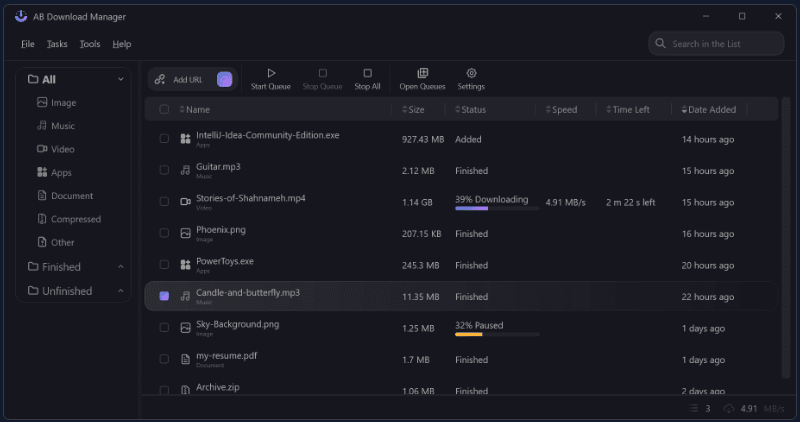
AB Download Manager is a free and safe download manager that mirrors many of IDM’s features. It has a simple modern interface, fast download speed, browser integration, a download scheduler, and much more. The software has been tested and scanned on VirusTotal, showing no security flags by any vendor, ensuring it’s safe and clean to use.
You can visit the official website here:
👉 https://abdownloadmanager.com/
Key Features of AB Download Manager
- Fast Download Speeds: Enjoy significantly faster downloads compared to native browser downloading.
- Browser Integration: Integrates smoothly with Chrome and Firefox.
- Download Scheduler: Set and manage download schedules easily.
- Speed Limiter: Control bandwidth usage by limiting download speeds.
- Batch Downloads: Download multiple files at once with ease.
- Modern UI: Clean and intuitive user interface.
- Dark and Light Mode: Switch between appearance themes.
- No Trial or License Required: It’s completely free with no limitations or activation required.
How to Download and Install AB Download Manager
- Visit the official website:
Go to https://abdownloadmanager.com/ and click on the “Get App” button. - Choose your platform:
You can select either Windows or Linux. For this guide, we’ll proceed with Windows. - Download the installer:
Click on the EXE file to start downloading. Optionally, a ZIP version is also available. - Install the application:
- Run the downloaded
.exefile. - Click Next through the installer.
- Keep all options checked and click Install.
- Click Finish once installation is complete.
- Run the downloaded
How to Add AB Download Manager Extension to Chrome or Firefox
To enable automatic capture of downloads from your browser:
- In AB Download Manager, go to Tools > Browser Integration.
- Choose your browser (Chrome or Firefox).
- You will be redirected to the browser’s extension page.
- Click on “Add to Chrome” or “Add to Firefox” and confirm.
- After installation, pin the extension using the browser’s puzzle icon so it’s easily accessible.
Exploring the AB Download Manager Dashboard
After installation, launch the app to explore the features:
- File > New Download: Start a download manually by pasting a URL.
- Clipboard Import: Auto-detect copied links.
- Batch Downloads: Add multiple links at once.
- Task Menu: Manage download queue and deletions.
- Tools > Settings: Customize appearance (dark/light), language, notification sound, and startup behavior.
- Download Engine Settings: Configure thread count, speed limits, proxy, and more.
- Browser Integration Settings: Enable or disable as needed.
Real-World Usage Example
Let’s say you want to download the Windows 11 ISO from the official Microsoft website.
- Navigate to the download page.
- Right-click on the Download button.
- You’ll see a new option: “Download with ABDM”.
- Click it, and AB Download Manager will automatically detect the download URL.
- Confirm and click Download. The file will start downloading with improved speed.
No Activation or Payment Required
One of the best things about AB Download Manager is that it’s 100% free—no license key or trial expiration. There’s no watermark, no feature locked behind a paywall, and no prompts to activate or upgrade.
Final Thoughts
If you’re tired of IDM’s limitations or trial period, AB Download Manager is a fantastic and completely free alternative. With great features like high-speed downloads, browser integration, and a modern UI, it truly stands out as one of the best download managers available today.
Try it out and supercharge your downloading experience.
👉 Download AB Download Manager Now: https://abdownloadmanager.com/








Tags:
download manager, IDM alternative, AB Download Manager, free software, Windows utilities, Linux tools, download speed booster, internet tools, tech tools, software guide
Hashtags:
#ABDownloadManager #IDMAlternative #FreeSoftware #DownloadManager #TechTools #WindowsSoftware #LinuxApps #ProductivityTools #InternetTools #SoftwareReview
Disclaimer:
This article is for informational purposes only. Always download software from the official website to avoid potential security risks. The author is not affiliated with AB Download Manager and does not receive any compensation for recommending it.








