⚠️ Disclaimer: This guide is intended strictly for ethical hacking and penetration testing in controlled environments with explicit permission. Do not attempt this on unauthorized systems.
When it comes to penetration testing, simply identifying open ports is not enough. To conduct a thorough assessment, ethical hackers must dig deeper and identify vulnerabilities and configuration weaknesses that can be exploited. That’s where Nmap’s Scripting Engine (NSE) becomes a vital tool.
This article walks through the process of using Nmap to scan for vulnerabilities on a test environment like Metasploitable, saving your findings for later analysis and reporting.
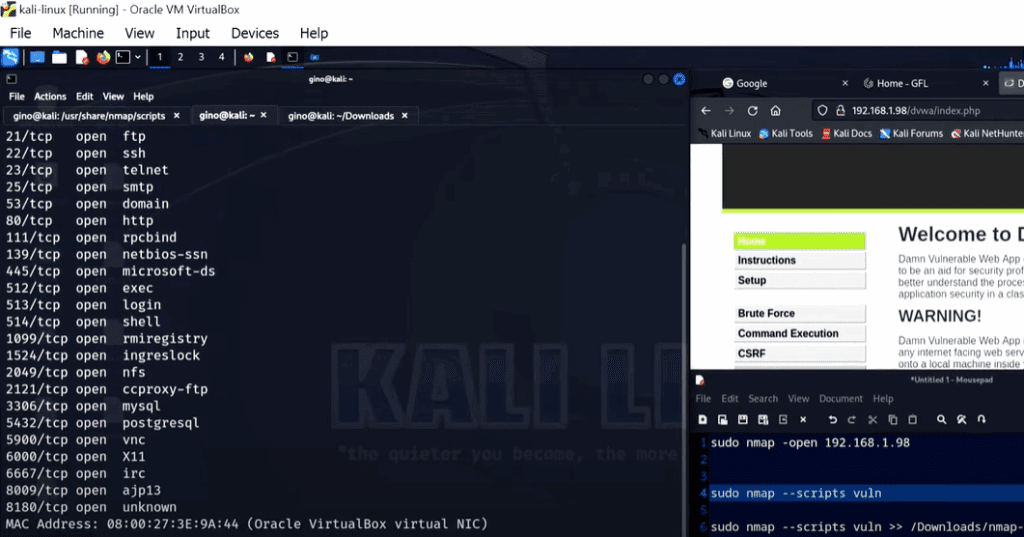
Step 1: Basic Port Scanning
Start by scanning the target (in this case, a Metasploitable machine) for open ports using the --open parameter with Nmap.
Command:
nmap --open [target_IP]
This will return only the open ports — filtering out the closed ones — and gives a quick overview of services running on the target. However, this is just the beginning.
Step 2: Leverage the Nmap Scripting Engine (NSE)
To go beyond basic port scanning, use NSE scripts, which allow Nmap to run advanced detection routines such as service enumeration, brute-force attacks, and vulnerability scanning.
You can find a vast list of these scripts inside the /usr/share/nmap/scripts/ directory on Kali Linux. These scripts are categorized based on functionality — for example, authentication, brute force, discovery, exploit, and vulnerability.
Step 3: Full Vulnerability Scan with --script vuln
In this tutorial, we use the --script vuln parameter to run all vulnerability detection scripts against the target.
Command:
nmap -sV --script vuln [target_IP] >> nmap-vuln-results.txt
-sV: Enables version detection--script vuln: Runs all scripts in the vulnerability category>> nmap-vuln-results.txt: Redirects the output to a file for analysis
The resulting scan provides detailed information about potential vulnerabilities, CVE numbers, and known exploits — a goldmine of data for penetration testers.
Step 4: Analyze the Scan Results
Open the output file using a simple command like:
cat nmap-vuln-results.txt
You’ll see:











- Services detected on various ports
- Vulnerabilities found
- CVE IDs (Common Vulnerabilities and Exposures)
- Exploit summaries
This information can now be used to cross-reference databases and learn more about each vulnerability.
Step 5: Researching Vulnerabilities Online
Use the CVE IDs from your scan to explore detailed information using trusted vulnerability databases. Websites like:
Search for each CVE to find:
- Severity levels
- Associated exploits
- Patching instructions
- Affected operating systems and services
For example, the vsftpd vulnerability detected in Metasploitable will show up with full detail, helping you understand how it was exploited and how it can be mitigated.
Step 6: Organizing Your Findings Using CherryTree
Good housekeeping is a crucial part of being an ethical hacker. Documenting scan results and generating readable, structured reports is vital for client communication and future audits.
One recommended tool for this is CherryTree, a hierarchical note-taking application available on Kali Linux.
Features:
- Tree structure for categories (e.g., by target or tool)
- Sub-categories for each test or scan
- Supports rich text and attachments
You might create a tree like:
Kali LinuxNmap ScansMetasploitable Vuln ScanService Enumeration
Once your scan results are saved in CherryTree, you can easily revisit them when preparing reports or explaining findings to a client.
Conclusion
Using Nmap’s scripting engine transforms a simple port scanner into a powerful vulnerability assessment tool. With a well-documented approach, ethical hackers can perform deeper scans, discover critical flaws, and support organizations in strengthening their defenses.
This article has shown:
- How to scan for open ports
- How to run all vulnerability scripts using NSE
- How to export and analyze the output
- How to research CVEs
- How to archive your findings using CherryTree
By following this workflow, you not only enhance your technical skillset but also adopt best practices in ethical hacking and penetration testing.
Tags: nmap, vulnerability scanning, NSE scripts, penetration testing, ethical hacking, metasploitable, CVE lookup, cherry tree kali linux, cybersecurity tools, ethical hacking reporting
Hashtags: #nmap #ethicalhacking #penetrationtesting #cybersecurity #infosec #nse #cvemapping #vulnerabilityscan #kalilinux #cherrytree








