If you’re exploring different desktop environments for your Linux system, MATE is one worth checking out—especially if you appreciate a classic, user-friendly interface inspired by the Windows XP era. In this article, we take a deep dive into what MATE offers, how it looks and functions, and what kind of user it might appeal to.
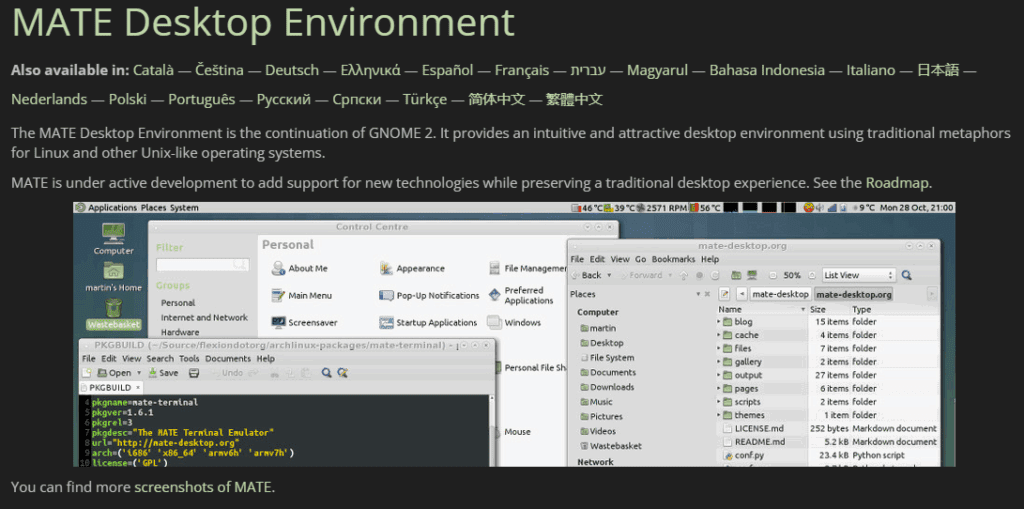
What is MATE Desktop Environment?
The MATE Desktop Environment is a continuation of GNOME 2. While GNOME has now evolved to GNOME 4x series, MATE maintains the traditional GNOME 2 layout and experience. It was developed by a community that valued the old GNOME 2 interface and decided to fork it to continue development independently.
MATE is not extremely lightweight, but it focuses more on being stable and user-friendly. Its design and appearance are reminiscent of older Windows systems, like Windows XP, and that nostalgia may appeal to users looking for a familiar and functional setup.
📌 Official website: https://mate-desktop.org
Login and Display Manager
MATE uses LightDM as its default display manager, which is known for its simplicity and compatibility with various desktop environments. After logging in through LightDM, you’re greeted with the classic MATE desktop.
Visual Layout & Appearance
Once logged in, the interface looks similar to the early 2000s operating systems. The panel, icons, and calendar widget echo the styling of Windows XP. However, while the outer visuals feel nostalgic, the backend remains modern and stable.
Customization Options
To customize your desktop:
- Go to System > Preferences > Look and Feel > Appearance.
- You’ll find several themes like:
- MATE
- BlackMATE
- TraditionalOK
- Submarine
- High Contrast
You can also change the wallpaper, though the system doesn’t offer extensive customization options like GNOME or KDE. Fonts and interface options are basic, catering to users who prefer simplicity.
Default File Manager: Caja
MATE uses the Caja File Manager, a fork of Nautilus, designed specifically for the MATE environment. It’s a lightweight and efficient tool for managing files and directories.
Pre-installed Applications
Here are some applications that come bundled with MATE on Debian 12:
- Web Browser: Mozilla Firefox (default)
- PDF Viewer: Atril Document Viewer
- Office Suite: LibreOffice
- Text Editor: Pluma
- Email Client: Not Thunderbird by default, though Thunderbird can be installed separately
- Games: A few basic games are pre-installed
The Atril PDF viewer is lightweight and visually similar to other viewers, though internal performance differences may vary.



Terminal and System Tools
The terminal looks a bit dated, but it’s fully functional. You can zoom in for better readability. APT commands work as expected. On a fresh install, around 1300 packages were found—decent, though fewer than in GNOME or KDE.
Multiple Workspaces & Window Management
MATE supports multiple workspaces, a feature useful for multitasking. For example, you can open Caja in one workspace and LibreOffice Draw in another. This feature is common in advanced Linux desktop environments and is a productivity booster.
Keyboard shortcuts are configurable, although not as easily discoverable. You may need to navigate through preferences or install a shortcut manager.
Accessibility Features
One standout feature in MATE is its accessibility support. It includes visual and auditory feedback for blind or visually impaired users. For example, when you hover over items, it gives voice or visual cues—something not commonly found in all desktop environments.
Default Software
- Image Viewer: Eye of MATE (EOM)
- Editor: Pluma
- System Settings: MATE Control Center
- App Launcher: Simple menu-based system
- Run dialog: Lightweight and functional
Final Thoughts
The MATE desktop is a solid choice if you want a stable, classic, and resource-friendly environment. It may not be as flashy or modern-looking as KDE or GNOME, but it delivers a reliable and responsive experience.
If you’re using Debian 12 and want something nostalgic yet functional, MATE is definitely worth exploring.
Tags:
MATE desktop, Linux desktop environments, Debian 12, MATE customization, Caja file manager, Linux user interface, GNOME 2 fork, LightDM, Linux themes, open-source desktop, lightweight Linux
Hashtags:
#MATE #LinuxDesktop #Debian12 #OpenSource #CajaFileManager #LinuxCustomization #LightDM #Gnome2 #LinuxTips #LibreOffice
Disclaimer:
This article is based on a real installation and usage experience of the MATE desktop environment on Debian 12. Software performance may vary depending on your hardware configuration. Always refer to the official website and documentation for the most accurate and up-to-date information.








