Linux Mint has long been the go-to choice for users seeking a clean, stable, and customizable desktop experience. With each release, the Mint team has proven that they are not just maintaining a distribution—they’re perfecting it. Now comes Linux Mint 22.2 “Zara”, an update that feels less like an incremental upgrade and more like a carefully curated step toward the future of desktop Linux.
This release isn’t just about bug fixes or minor polish. It’s about solving long-standing issues, introducing much-needed features, and refining the everyday experience in ways that feel both subtle and powerful. From patched GTK theming to native fingerprint login, from sticky notes syncing with your Android phone to a more cohesive login screen, there’s a lot happening under the hood and on the surface.
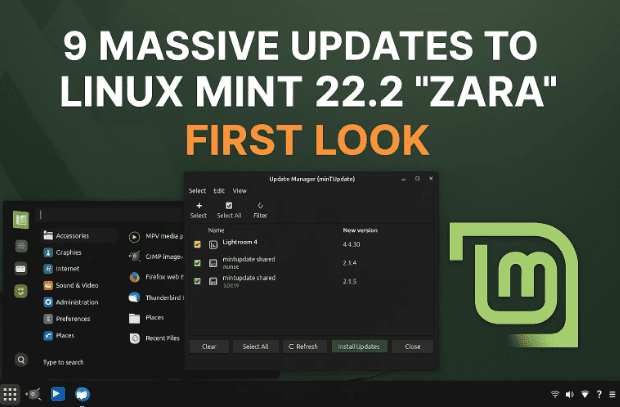
How to Download and Install Linux Mint 2025: Step-by-Step Guide
In this article, we’ll take a deep dive into everything new in Linux Mint 22.2, explaining the context behind each feature, why it matters, and how it will improve your daily workflow.
🖥️ Table of Contents
- Fixing GTK4 & LibAdwaita Theming Problems
- Mint-Y Theme Refresh with Modern Touches
- Native Fingerprint Authentication with FingWit
- Sticky Notes Sync Across Android and Desktop
- Polished Login Screen & User Avatars
- Hypnotix IPTV Upgrades
- Under the Hood – Ubuntu 24.04.3 Base & Linux Kernel 6.14
- Warpinator Comes to iOS
- Rapid-Fire Quality of Life Improvements
- Final Thoughts on Linux Mint 22.2 Zara
- Frequently Asked Questions
1. Fixing GTK4 & LibAdwaita Theming Problems
For years, one of the biggest annoyances on Linux desktops has been GTK4 apps built on LibAdwaita. These applications (commonly found in GNOME) often ignore system themes, making them look completely out of place on distributions like Linux Mint, Elementary OS, or others that prioritize cohesive design.
Mint previously had to hold back updates or rely on clumsy workarounds just to prevent mismatched UIs. But with Mint 22.2, the team has finally tackled this head-on by introducing LibAdapta, a patched and forked version of LibAdwaita.
What does LibAdapta do?
- Forces GTK4/LibAdwaita apps to respect system themes.
- Ensures Flatpak and other sandboxed apps visually match Mint’s Mint-Y, Mint-X, or Mint-L themes.
- Allows Mint to upgrade apps like GNOME Calendar, Simple Scan, and Disk Usage Analyzer without breaking UI consistency.
In other words, your desktop will look and feel seamless across native and Flatpak apps, solving a pain point that has frustrated users for years.
This is a bold move. While upstream GNOME is firm on enforcing its strict design guidelines, Mint has once again said, “Fine, we’ll fix it ourselves.” And the result is a massive win for users.
2. Mint-Y Theme Refresh with Modern Touches
At first glance, the Mint-Y theme refresh may look subtle, but spend some time with it and you’ll see why it matters.
The developers have adjusted the neutral grays toward cooler, blue-tinted tones, giving the entire UI a sleek, metallic vibe. This design trick, commonly used in modern UI frameworks, makes flat or dull areas appear more vibrant and professional.
- In the light theme, the changes are subtle but consistent.
- In the dark theme, the refresh is striking—UI elements feel smoother and less harsh on the eyes.
This refresh might sound minor, but combined with the LibAdapta theming improvements, Linux Mint now feels more polished and contemporary than ever before.




3. Native Fingerprint Authentication with FingWit
One of the biggest new features is native fingerprint authentication via a new app called FingWit.
Fingerprint login has existed in Linux before, but setting it up required third-party tools and messy configuration. Now, Mint brings it into the core system with full X-App integration.
What can you do with FingWit?
- Unlock your computer with your fingerprint.
- Run sudo commands in the terminal without typing your password.
- Authorize software installation and updates.
- Resume from screen lock instantly.
This feature is especially useful for laptops with built-in fingerprint readers, providing convenience without sacrificing security.
⚠️ Important Note: You cannot use fingerprint authentication for initial login if your home directory is encrypted. This isn’t a bug—it’s a deliberate design, since your password is required to decrypt personal files.
Still, this is a huge quality-of-life improvement for anyone tired of repeatedly typing their password.
4. Sticky Notes Sync Across Android and Desktop
Sticky Notes has always been a handy Mint app, but in 22.2, it becomes something much more powerful: a cross-platform note-taking system.
The app now supports syncing with Android devices via a companion app called Stinky Notes (yes, the name is quirky). It uses Syncthing to keep notes up-to-date between desktop and mobile.
Why this is useful:
- Write a shopping list on your desktop and check it on your phone in the store.
- Jot down quick ideas on your phone and instantly have them ready on your computer.
- Notes are automatically synced—no cloud account or third-party service required.
Add to this the rounded-corner redesign and Veent compatibility, and Sticky Notes now feels like a modern, future-ready app.
5. Polished Login Screen & User Avatars
The first thing you see after booting is the login screen, and Mint has given it a well-deserved polish.
- New blur effect: Backgrounds look elegant and help the login box stand out.
- User avatars: A personal touch that helps distinguish accounts on multi-user machines.
Small refinements like these may not sound major, but they set the tone for the entire OS experience. It feels modern, friendly, and premium right from startup.
6. Hypnotix IPTV Upgrades
Hypnotix, Mint’s IPTV app, gets several new features in 22.2 that make it much more enjoyable:
- 🎬 Theater Mode: Full video view, hiding menus and distractions (press F6).
- 🖼️ Borderless Mode: Perfect for multitasking, like picture-in-picture streaming (press F7).
- ⚡ Performance Boost: Faster startup and smoother channel browsing via lazy loading.
- 🎧 Bug Fixes: Volume settings persist, and screensavers no longer interrupt streams.
For casual entertainment, Hypnotix is surprisingly powerful. With free channels (including Pluto TV), it’s a great way to enjoy TV and movies without subscriptions.
7. Under the Hood – Ubuntu 24.04.3 Base & Linux Kernel 6.14
Linux Mint 22.2 Zara is based on Ubuntu 24.04.3 LTS, ensuring stability and long-term support until 2029.
But the real star here is the Linux Kernel 6.14 (HWE):
- Provides better hardware support for the latest CPUs, GPUs, and Wi-Fi chips.
- Eliminates the need for a separate “Edge” ISO (previously required for newer hardware).
- Simplifies installation across old and new devices alike.
For users with brand-new laptops, this is excellent news—compatibility headaches are now greatly reduced.
8. Warpinator Comes to iOS
Warpinator, Mint’s beloved local file-sharing app, now expands its reach to iOS devices.
Previously available on Linux and Android, it’s now officially in the Apple App Store, making it possible to seamlessly transfer files between:
- Linux ↔ iOS
- Linux ↔ Android
- Linux ↔ Linux
No more clunky USB cables or unreliable third-party apps. With iOS support, Mint finally closes the gap for users who work across multiple platforms.
9. Rapid-Fire Quality of Life Improvements
Beyond the big features, Mint 22.2 is packed with smaller refinements that make daily use smoother:
- Nemo File Manager: Bulk renamer improvements (leading zeros, custom increments, remembers last operation).
- Update Manager: Now clearly shows when a reboot is required.
- Shutdown Timer: Reduced from 90 seconds to 10 seconds.
- XViewer: More accurate color handling with corrections disabled by default.
- WebApp Manager: Edit descriptions for created web apps.
- Mate Menu Search: More accurate results.
- Music Thumbnails: AIFF files now show embedded cover art.
Each of these tweaks may seem small on its own, but together they form a noticeably more polished system.
10. Final Thoughts on Linux Mint 22.2 Zara
Linux Mint 22.2 Zara is more than just an update—it’s a statement. It shows that the Mint team is committed to solving user pain points and delivering features people actually want.
From fixing GTK theming headaches to adding modern conveniences like fingerprint login and cross-platform note syncing, this release feels thoughtful and pragmatic.
With long-term support until 2029, Mint 22.2 is shaping up to be one of the most polished, reliable, and user-friendly Linux distros available today.
🔍 Linux Mint 22.1 vs 22.2 “Zara” – Feature Comparison
| Feature / Area | Linux Mint 22.1 | Linux Mint 22.2 “Zara” |
|---|---|---|
| GTK4 / LibAdwaita Apps | Apps often ignored Mint’s themes; inconsistent UI; Mint held back app versions to maintain appearance. | LibAdapta patch introduced – all apps (including Flatpaks) respect system themes, consistent look across Mint-Y/X/L. |
| Mint-Y Theme | Traditional Mint-Y look with warm grays; no major visual updates. | Refreshed palette with cooler, metallic tones; especially noticeable in dark mode. |
| Fingerprint Support | No native support; required third-party tools and manual setup. | New FingWit app – fingerprint unlock, sudo authentication, software installation authorization. |
| Sticky Notes | Simple desktop notes, no cross-device syncing. | Rounded UI + Android sync via Syncthing/Stinky Notes; now a cross-platform solution. |
| Login Screen | Standard login, functional but basic. | Polished with blur effect + user avatars, modernized first impression. |
| Hypnotix IPTV | Basic IPTV support, no dedicated modes. | Theater mode, borderless mode, performance boost, bug fixes for volume/screensaver. |
| Base & Kernel | Based on Ubuntu 22.04.x, Kernel 6.8. | Based on Ubuntu 24.04.3 LTS, Kernel 6.14 HWE for modern hardware. |
| Warpinator | Available on Linux and Android only. | Now available on iOS, bridging the Linux ↔ iPhone/iPad gap. |
| Nemo File Manager | Bulk renamer had basic options, limited flexibility. | Enhanced renamer – leading zeros, custom start numbers, remembers last action. |
| Update Manager | Updates worked, but reboot requirement was not always clear. | Clear reboot button shown when needed (e.g., kernel updates). |
| Shutdown Timer | 90 seconds countdown. | Reduced to 10 seconds for quicker shutdown. |
| XViewer (Image Viewer) | Color correction sometimes conflicted with profiles. | Disabled by default, ensuring accurate colors. |
| WebApp Manager | Create web apps with basic descriptions. | Custom descriptions editable for web apps. |
| Mate Menu Search | Functional but less accurate. | Improved accuracy and responsiveness. |
| Audio Thumbnails | Limited formats supported. | AIFF audio thumbnails with embedded cover art supported. |
11. Frequently Asked Questions
Q1. Is Linux Mint 22.2 Zara stable enough to use daily?
Yes. Based on Ubuntu 24.04.3 LTS, it offers long-term stability with support until 2029.
Q2. Will LibAdapta break compatibility with apps?
No. It’s a soft fork of LibAdwaita and works as a drop-in replacement, ensuring apps look consistent while still receiving updates.
Q3. Does fingerprint login work on all devices?
It works on systems with supported fingerprint readers, but may not function if drivers are missing or if your home directory is encrypted.
Q4. How do I sync Sticky Notes with Android?
Install the companion “Stinky Notes” app (available on F-Droid) and enable Syncthing integration.
Q5. Do I need to install a separate Edge ISO for newer hardware?
No. The new HWE Kernel 6.14 provides broad hardware support out of the box.
Disclaimer
Some features (like fingerprint login) are still evolving. Hardware compatibility may vary, and users are advised to back up data before upgrading.
Tags
Linux Mint 22.2, Linux Mint Zara, Linux distro update, GTK4 theming fix, Linux fingerprint login, Sticky Notes sync, Warpinator iOS, Linux Mint review
Hashtags
#LinuxMint #LinuxMint22 #OpenSource #LinuxDesktop #LinuxNews #ZaraUpdate








