Since its release, Windows 11 has stirred strong opinions among users. While many appreciate the sleek interface and enhanced security, others have voiced their frustrations with certain design and policy decisions. Here are five of the most common issues people blame on Microsoft—and a breakdown of what’s really going on, along with some practical advice on how to handle them.
1. Forced Windows Updates
One of the biggest complaints users have is about automatic Windows updates. Many find it frustrating when updates install without their permission, often triggering unwanted restarts or causing issues with apps or drivers.
Why This Happens:
Windows is designed to push security patches and feature updates regularly. Microsoft does this to keep systems secure and up to date, but sometimes the updates are released without enough testing, leading to bugs or compatibility problems.
What You Can Do:
Fortunately, you can take control of your update preferences. By switching from automatic to manual updates and adjusting your active hours, you can prevent surprise reboots and install updates when it’s convenient for you. Head to Settings > Windows Update > Advanced options to configure this. This approach also gives you the chance to wait and see if others report problems with a new update before you install it yourself.
2. Telemetry and Data Collection
Another hot topic is the extent to which Windows 11 collects data from users. While Microsoft claims to be transparent about its telemetry and data collection practices, many people remain skeptical.
Why This Happens:
To improve user experience and maintain security, Microsoft gathers diagnostic and performance data from devices running Windows. This is standard practice across most operating systems today.
What You Can Do:
You can reduce the amount of data Microsoft collects by adjusting your privacy settings. Navigate to Settings > Privacy & security > Diagnostics & feedback to manage what’s shared. While you can’t disable telemetry completely on Home or Pro editions, you can significantly limit it. Users truly concerned about privacy might consider alternative operating systems, though they often come with a steeper learning curve.
For more information on what Microsoft collects, refer to their official Privacy Statement.
3. Bloatware and Pre-Installed Apps
Many users express frustration about unwanted pre-installed apps on their devices. Apps like Copilot, Xbox Game Bar, and other software may appear without consent during setup or updates.
Why This Happens:
Microsoft designs Windows 11 for a broad audience. What may be “bloat” to one person could be useful to another. Tools like Copilot might be indispensable to some users, while others see them as unnecessary.
What You Can Do:
Luckily, most of these apps can be uninstalled. Go to Settings > Apps > Installed Apps and remove what you don’t use. Additionally, tools like O&O AppBuster can help streamline the removal process.







4. Strict Windows 11 Hardware Requirements
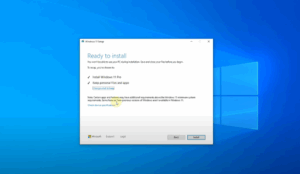
When Microsoft announced the system requirements for Windows 11—including TPM 2.0 and newer CPUs—many users were shocked to find their otherwise capable PCs ineligible.
Why This Happens:
Microsoft claims that these requirements improve system security and stability. However, the decision has alienated users with relatively new devices that still perform well but fall just short of the criteria.
The Problem with This Approach:
Some processors—such as Intel’s 7th Gen i7-7820HQ—run Windows 11 flawlessly but are officially unsupported. This leads to frustration and contributes to e-waste, as perfectly usable computers are prematurely retired.
What You Can Do:
There are unofficial workarounds to install Windows 11 on unsupported hardware, though they come with potential risks. Alternatively, users may choose to stay on Windows 10, which will be supported until October 14, 2025.
5. Microsoft Edge Enforcement
Another issue that frequently comes up is the inability to uninstall Microsoft Edge—except for users in the European Union. Microsoft has long maintained that Edge is deeply integrated into the operating system and therefore essential.
Why This Is Frustrating:
After a legal challenge in the EU, Microsoft added an uninstall option for Edge. This raises the question: If it’s possible in the EU, why not globally?
What You Can Do:
While you can’t officially uninstall Edge outside of the EU, you can change your default browser in Settings > Apps > Default Apps and ignore Edge altogether. For those who want to take it further, third-party tools can help disable Edge—but proceed cautiously, as this may affect system stability.
Bonus: User Interface Inconsistencies and Legacy Components
Despite its modern appearance, Windows 11 still contains remnants of older systems, including legacy icons and components like the Control Panel. This inconsistency can be jarring for users who expect a fully unified UI.
What This Means:
Microsoft has gradually been phasing out older components but hasn’t completed the transition. Over time, more legacy features will likely be merged into the new Settings app or removed entirely.
What You Can Do:
If you’re familiar with older Windows versions, you can still access many of these legacy tools. Just be prepared for the possibility that they may disappear in future updates.
Conclusion
Many of the frustrations users have with Windows 11 stem from Microsoft’s attempt to balance innovation with legacy support, security with flexibility, and privacy with system optimization. While some criticisms are valid, others can be mitigated by adjusting settings or using alternative tools. At the end of the day, no operating system is perfect—but with a bit of customization, you can make Windows 11 work better for you.
Have your own frustrations or solutions to add? Feel free to share them in the comments section below!
Tags
windows 11 complaints, forced updates windows 11, telemetry windows privacy, windows 11 hardware requirements, uninstall microsoft edge, microsoft bloatware, windows 11 problems and solutions, microsoft criticism, outdated UI in windows, windows update control
Hashtags
#windows11 #microsoft #technews #windowsupdate #privacy #bloatware #edgebrowser #techsupport #windowsproblems #osreview








