Have you ever wondered what lies beyond the Google Play Store? While millions of apps live inside Google’s curated ecosystem, some of the most clever, privacy-friendly, and surprisingly useful Android tools stay outside its gates. Whether because of policy restrictions, open-source independence, or the developer’s choice to skip analytics and ads entirely, these hidden apps are quietly reshaping how Android feels to use.
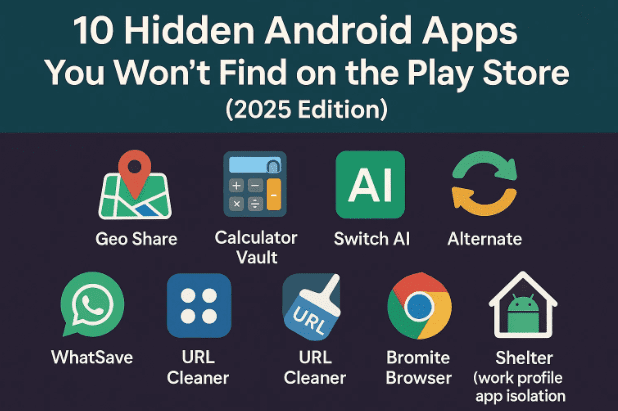
Today, we’ll explore ten remarkable apps that you won’t find on Play Store — from a “calculator” that hides private files, to an AI switchboard that lets you juggle multiple assistants, to minimalist launchers and privacy browsers. Each one solves a real-world problem beautifully and safely.
Let’s get started.
1. Geo Share – Universal Map Link Opener
Source: Geo Share on IzzySoft
Sometimes, the smallest friction can be the most annoying. You get a Google Maps link from a friend, but you’re loyal to OpenStreetMap or HERE WeGo. Normally you’d need to copy coordinates, open your preferred app, and paste them manually. That’s where Geo Share steps in like a universal translator for map links.
Instead of juggling URLs, simply share the map link to Geo Share. It automatically converts it so you can open that same spot in your favorite navigation app — whether that’s Apple Maps (beta), Magic Earth, OsmAnd, Waze, Yandex Maps, or Mapy.com.
Beyond that, it can:
- Extract and copy the exact coordinates of any map link.
- Paste or share cleaned geo links directly without tracking junk.
- Work offline once the link is processed.
Geo Share is perfect for travelers, delivery drivers, or anyone who switches between map ecosystems. It’s lightweight, GPL-licensed, and open-source. Once you use it, you’ll never go back to copy-pasting coordinates again.
2. Calculator Vault – Your Private Locker in Disguise
Source: Calculator Vault on IzzySoft
Imagine lending your phone to someone just to make a call — and suddenly remembering those personal photos in your gallery. We’ve all had that tiny panic moment. Calculator Vault solves it elegantly by pretending to be the world’s most boring app: a calculator.
At first glance, it works exactly like any other calculator. But type your secret passcode and hit = — suddenly, it opens a hidden, encrypted vault inside your device. From there, you can store photos, videos, PDFs, or private notes without root access.





Everything stays locally encrypted, meaning even if someone copies your app data, your files remain unreadable. It’s fast, clean, and doesn’t rely on cloud sync — ideal for people who prefer privacy over convenience. Think of it as a digital safe disguised in plain sight.
3. Switch AI – Turn Your Phone into an AI Command Center
Source: Switch AI on Telegram
Most of us depend on one AI assistant — Google Assistant, Gemini, ChatGPT, or another — even when it’s not best suited for the job. Switch AI changes that. It lets you manage and switch between multiple AI assistants seamlessly, depending on your task.
For instance:
- Brainstorm ideas with a creative model.
- Switch instantly to a data-driven AI for calculations or summaries.
- Assign shortcuts or gestures to open specific assistants.
You can even set which AI responds when you long-press your power button or trigger voice commands. It feels like having a team of specialists instead of one overworked intern. For creators and productivity geeks, this app feels revolutionary — almost like running your own “AI OS.”
4. Alternate – Temporary Contacts Made Easy
Source: Alternate on IzzySoft
Our contact lists often become graveyards of delivery drivers, service engineers, and “random guy 2023.” Alternate fixes that problem. It gives you a temporary, sandboxed address book where you can store short-term numbers without letting them spill into your main contacts.
So when that courier or plumber calls, you instantly know who it is — but once the task’s done, you can delete the entry without polluting your actual phonebook. Best of all, Alternate keeps these contacts private; they don’t appear on WhatsApp or Telegram unless you want them to.
Its minimalist Material Design interface makes it both functional and beautiful. Think of it as a “guest room” for phone numbers — neat, private, and under control.
5. Easy Launcher – Minimalism Meets Productivity
Source: Easy Launcher on F-Droid
Ever unlock your phone just to check the weather — and find yourself doom-scrolling fifteen minutes later? Easy Launcher offers digital detox in its purest form. It replaces flashy icons with clean text labels, showing only the essentials you actually use.
You can:
- Hide distracting apps like social media.
- Rename apps humorously (e.g., “YouTube → Focus Destroyer”).
- Lock apps behind a fingerprint gate for privacy.
- Customize font, alignment, and gestures to taste.
The result is a phone that feels calmer and faster. Opening your home screen becomes intentional again, not an invitation to distraction. It’s perfect for students, writers, and anyone who wants a clutter-free Android experience.
6. Call Limiter – End Long Calls Politely
Source: Call Limiter on F-Droid
We all have that one friend or relative who can turn a two-minute update into a TED Talk. Call Limiter is your polite escape hatch. It automatically ends calls after a preset duration — no awkward excuses required.
You can assign global or contact-specific limits (for example, five minutes for everyone, ten for family). Once the timer runs out, the call ends gracefully. There’s even an emergency buffer you can enable for last-minute details.
It’s open-source, battery-light, and works on any modern Android. Think of it as a personal assistant that values your time — and your sanity.
7. WhatSave – The WhatsApp Status Saver That Should Exist by Default
Source: WhatSave on F-Droid
WhatsApp never officially lets you download your friends’ statuses — but WhatSave does it effortlessly. This open-source app detects viewed statuses (photos or videos) and lets you save them straight to your gallery with one tap.
Extra features include:
- Viewing and saving deleted messages.
- Starting WhatsApp chats without saving the number.
- Modern Material 3 interface with dark-mode support.
No ads, no login, no shady permissions — just the functionality WhatsApp should have offered years ago. For meme collectors or quote hoarders, it’s a must-have.
8. URL Cleaner – Say Goodbye to Tracking Links
Source: URL Cleaner on F-Droid
Ever copied an Amazon or Instagram link only to realize it’s three lines long and filled with weird tracking codes? URL Cleaner automatically trims all that nonsense.
When you copy a link, the app intercepts it and removes unnecessary tracking parameters, leaving you with a neat, privacy-friendly version. It integrates directly into the Android Share menu, so you don’t even need to open the app.
It supports dozens of major domains — Amazon, YouTube, Twitter, Reddit, TikTok, and more — and is fully open-source. Perfect for privacy advocates, bloggers, and anyone tired of monstrous URLs.
9. Bromite – Privacy-Enhanced Chromium Browser
Source: Bromite Website
While technically a browser, Bromite deserves its spot here because Google Play banned it for doing what Chrome won’t: removing tracking and ads entirely. Based on Chromium, Bromite includes built-in ad-blocking, fingerprint-protection, and DNS-over-HTTPS — all without needing extensions.
It looks just like Chrome but performs faster due to less background tracking. You can also enable night mode, disable AMP pages, and choose custom search engines. Since it’s maintained outside the Play Store, updates are delivered manually or via F-Droid mirrors.
For anyone serious about privacy but unwilling to give up Chrome’s polish, Bromite strikes the perfect balance.
10. Shelter – Isolate Work and Personal Apps
Source: Shelter on F-Droid
Android’s “Work Profile” feature is powerful but mostly hidden. Shelter brings it to everyone. It lets you clone apps into a separate, sandboxed space where they can’t access your personal data.
Use-cases include:
- Running two copies of the same app (e.g., dual WhatsApp).
- Testing suspicious apps safely.
- Preventing cross-tracking between social and banking apps.
Shelter is fully open-source, requires no root, and feels surprisingly smooth. If you’ve ever wished for a “guest mode” or app isolation without extra bloat, this is it. Combined with Bromite and URL Cleaner, it completes your privacy toolbox.
Quick Comparison Table
| App Name | Primary Function | Stand-Out Feature | Source Type |
|---|---|---|---|
| Geo Share | Convert map links | Universal map translator | IzzySoft / F-Droid |
| Calculator Vault | File protection | Hidden vault behind calculator | IzzySoft |
| Switch AI | Manage AI assistants | Quick switch across models | External (Telegram) |
| Alternate | Temporary contacts | Local sandbox address book | IzzySoft |
| Easy Launcher | Minimal home screen | Text-only interface + gestures | F-Droid |
| Call Limiter | End calls automatically | Per-contact timers | F-Droid |
| WhatSave | Save WhatsApp statuses | Deleted-message recovery | F-Droid |
| URL Cleaner | Clean tracking links | Auto-cleans on copy | F-Droid |
| Bromite | Private browser | Built-in ad-block & AMP removal | Official Site |
| Shelter | App isolation | Work profile sandbox | F-Droid |
Frequently Asked Questions
Q1. Are these apps safe to install?
Yes. All the apps listed here are open-source and hosted on trusted repositories like F-Droid or IzzySoft. Their code is publicly auditable, and none include trackers or ad frameworks.
Q2. Why aren’t these apps on the Play Store?
Mainly because of Google’s policies. Many open-source apps avoid Play Store to skip forced analytics, advertising SDKs, or paid developer accounts. Others simply violate no rules but choose independent distribution to stay fully transparent.
Q3. How do I install them?
Download and install the F-Droid app (the open-source app store for Android) from https://f-droid.org/. Once installed, you can search for these apps directly or add additional repositories like IzzySoft.
Q4. Can I update them automatically?
Yes. F-Droid handles secure updates automatically. For apps downloaded manually (like Bromite), you’ll receive update notifications via their official website or RSS feed.
Q5. Do these apps require root access?
No. Every app mentioned here runs perfectly on non-rooted Android devices.
Final Thoughts
So there you have it — ten fantastic Android apps that prove the best software isn’t always on the Play Store. From protecting privacy and decluttering your workflow to improving everyday usability, these tools make your phone smarter, calmer, and more personal.
If you’ve ever felt your Android device could do more without giving away your data, this is your sign to explore the open-source world. Every app here is a labor of love from independent developers who care about control, simplicity, and transparency.
Which of these hidden gems will you try first?
Disclaimer
All apps listed here are open-source and available from trusted third-party repositories. Always verify links and permissions before installing. The author is not affiliated with any of the developers or repositories mentioned.
#AndroidApps #OpenSource #F-Droid #Privacy #BestApps #HiddenApps #TechGuide #2025