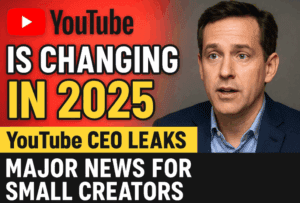
YouTube keeps evolving — and 2025 is no exception. This year, YouTube has introduced seven major updates that every creator and viewer should know about. These updates impact how you reply to comments, sell products, upload educational videos, manage collaborations, and even recover suspended channels.
Whether you’re a small creator or already monetized, understanding these new features can help you grow faster, increase earnings, and make your audience more engaged.
So, let’s explore each update one by one — and learn how to make the most of them.

🎤 1. Voice Reply in Comments
Let’s start with one of the most interactive updates — Voice Reply in Comments.
Until now, whenever someone commented on your video, you could only reply using text messages. But this new feature allows creators to reply using their voice. Yes, you can now record and send up to 30 seconds of audio as a reply to any comment.
For example, suppose someone asks on your video:
“What documents are required for YouTube monetization?”
You can tap the microphone icon in the comment reply section and record your answer:
“You don’t need any documents to monetize your channel. You’ll only need ID verification during AdSense setup.”
This reply will be posted as a playable audio comment, and anyone can listen to it.
Why This Matters
This small but meaningful update helps you:






- Engage better with your audience
- Add a personal connection through your voice
- Save time typing long answers
- Build trust with your subscribers
Over time, YouTube will likely expand this feature for creators who manage multiple channels or languages, making it an important engagement tool in 2025.
🎓 2. Ad-Supported Courses: A Big Win for Educators
The next update is for education and skill-based creators — YouTube is expanding the Courses feature globally.
The Courses tab allows creators to upload videos in a structured, chapter-based format (like lessons or tutorials). Think of it as YouTube’s built-in learning system.
For example:
- If you run a tech channel, you can create a “Complete AdSense Setup Course” with lessons like:
- Lesson 1: How to create an AdSense account
- Lesson 2: Identity verification
- Lesson 3: Submitting tax forms
Or if you’re teaching coding, design, or language skills — you can group lessons like:
“Python Basics – Part 1 to Part 10”
“Graphic Design in Canva – Module 1 to 5”
Each course can be ad-supported, meaning you’ll still earn from ads while offering a learning structure. This not only boosts watch time and viewer retention, but also helps your videos rank better in YouTube search results.
Benefits of Courses
- Easier content organization
- Playlists appear alongside videos in search results
- Viewers complete lessons sequentially
- More ad impressions → higher revenue
If your channel focuses on tutorials, tech, education, or how-tos, this update can multiply your growth.
🛍️ 3. Shopping Tag: Group and Brand Multiple Products
YouTube has also improved its Shopping Product Tagging system.
Previously, you could only tag individual products in your video — like a camera, tripod, or mic. But with this update, you can now:
- Tag multiple products together
- Add a brand tag (e.g., “Sony” or “Digitek”)
- Display entire brand collections under your video
For instance, if you’re reviewing filming gear, you can tag:
- Ring Light – Digitek
- Tripod – AmazonBasics
- Mic – Boya
When viewers click on these tags, they’ll see all the linked products and even browse through the brand’s full range.
Why It Matters
This new grouping system lets creators:
- Add multiple product links in one go
- Increase click-through rates
- Earn more affiliate or commission income
If you’ve already enabled YouTube Shopping or SpeedShop integration, this is a major advantage — you can now showcase full product sets instead of just one item per video.
🤝 4. Channel Insight Sharing Settings for Sponsorships
Moving on — this update benefits creators who want brand collaborations and sponsorship deals.
YouTube has reintroduced and expanded an older setting called Channel Insight Sharing (available on desktop).
When this setting is turned ON, brands and advertisers can view limited performance insights about your channel — such as engagement rate, audience location, or average watch time. This helps them decide whether to approach you for paid campaigns.
How to Enable Channel Insight Sharing
Let’s move step by step:
- Go to YouTube Studio on your desktop.
- Click on Settings (bottom-left).
- Select Channel → Advanced Settings.
- Scroll down and look for Channel Insight Sharing.
- Turn it ON.
Once enabled, your channel’s data becomes visible to YouTube’s brand partnership network. As a result, you might receive collaboration emails or sponsorship proposals directly in your inbox or YouTube dashboard.
Why It’s Useful
- Increases your visibility among brands
- Makes it easier to get sponsorships
- Builds credibility as a professional creator
If you’ve been waiting for brand deals or collabs, this simple switch can make a huge difference.
🎨 5. Visual Updates on YouTube Interface
Now let’s talk about Visual Updates, which directly affect how your viewers experience YouTube.
YouTube is redesigning how videos, buttons, and controls appear across all devices — TV, desktop, tablets, and smartphones.
The idea is to make YouTube’s watching experience consistent everywhere.
What’s Changing?
- The Play/Pause button may move slightly lower or become semi-transparent.
- The Like and Comment sections might adopt a cleaner, rounded UI.
- The video title and metadata could appear in a new location.
- Some menus, such as “Description” or “Related Videos,” may expand with smoother animations.
In short, the look and feel of YouTube are being refreshed for a modern, minimal interface.
If you’ve already received this update, you might have noticed a more polished layout while watching videos.
Why It Matters
- Easier navigation
- Better viewing experience
- Increased visual appeal for viewers
These interface updates may not affect monetization directly, but they play a big role in user engagement and watch duration — which indirectly helps your growth.
🔁 6. Pilot Program for Suspended Channels
This is one of YouTube’s most creator-friendly policies in recent years.
Previously, if your channel got terminated or suspended, YouTube would also remove any linked channels under the same Google account. Worse, you were permanently banned from creating new channels.
But in 2025, YouTube is testing a Pilot Program that allows some users to rejoin YouTube after one year.
Here’s How It Works
- The program applies only to creators whose channels were suspended or deleted.
- After 12 months, eligible users will get an email invitation or notification inside YouTube Studio.
- Once approved, they can create a new channel and start over — while agreeing to all community guidelines again.
This marks a huge shift in YouTube’s approach, offering creators a second chance instead of a lifetime ban.
Why It’s Important
- Encourages fairness and redemption
- Supports creators who made honest mistakes
- Reduces fear of permanent exclusion
If you’ve ever had your channel suspended, keep checking your YouTube Studio notifications — this could be your way back.
📡 7. Switch Public Livestreams to Members-Only Mode
Finally, the livestream update changes how you handle public and members-only streams.
Previously, you had to create two separate livestreams:
- One for the public audience
- Another exclusively for channel members
Now YouTube has made it easier — you can switch any live session from public to members-only (and back again) without restarting it.
How It Works
When you’re live (in horizontal 16:9 format, not Shorts), simply:
- Open your Live Control Room (LCR).
- In the stream settings, choose Audience → Members Only.
- YouTube will immediately restrict the stream to paid members.
This helps creators monetize live content in real-time. For example, if your stream is attracting high engagement, you can switch it to members-only mode and prompt users to join your channel for exclusive access.
Benefits
- Simplifies live management
- Increases channel memberships
- Encourages audience loyalty
This feature is now fully rolled out, so most monetized creators can use it right away.
❓ FAQs
Q1. Will Voice Reply be available to everyone?
Not immediately. YouTube is testing it with select creators first, but it’s expected to roll out widely in early 2025.
Q2. Can I earn money from Courses like regular videos?
Yes. Ad-supported courses include monetization, and watch time counts toward analytics.
Q3. Do I need an eCommerce store for Shopping Tags?
You can use free integrations like SpeedShop or connect an existing store from Shopify, Spreadshop, or Teespring.
Q4. What if I can’t find Channel Insight Sharing in settings?
Ensure you’re using YouTube Studio on a desktop browser. The option is not visible on mobile.
Q5. Can anyone join the Pilot Program for suspended channels?
No. YouTube decides eligibility case-by-case. Keep checking your email and Studio notifications.
🏁 Conclusion
So, these were the seven major YouTube updates of 2025 that every creator should be aware of.
From voice-based engagement and educational course monetization to shopping enhancements, collaboration tools, and livestream upgrades, YouTube is focusing on giving creators more control and more income opportunities than ever before.
If you’re serious about growing your channel, start exploring these updates right now.
Enable new features, test what works for your audience, and stay ahead of the curve.
Tags
YouTube updates 2025, YouTube new features, YouTube course monetization, voice reply YouTube, YouTube shopping tags, YouTube channel sponsorship, YouTube livestream tips, pilot program YouTube, YouTube visual redesign
Hashtags
#YouTubeUpdates #YouTube2025 #YouTubeTips #ContentCreators #YouTubeGrowth #YouTubeFeatures #YouTubeEarnings #YouTubeNews #YTStudio