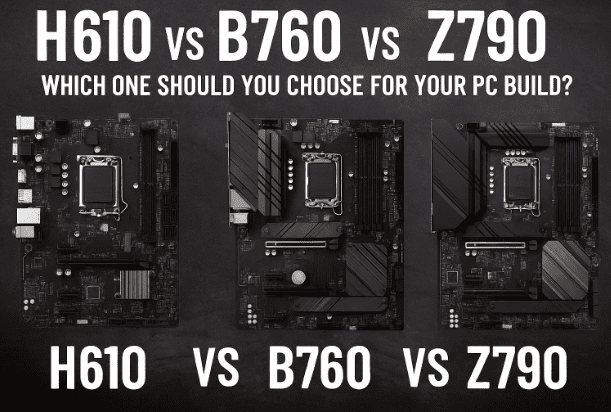
Building a PC is always an exciting journey, but it can also become overwhelming when technical terms like chipsets enter the picture. If you have been exploring Intel-based motherboards, you must have come across chipset names such as H610, B760, and Z790.
At first glance, these names can feel confusing. Which one is best for budget users? Which is better for gaming? Which offers extreme performance with full overclocking support? These are common questions every PC builder asks.
In this article, we’ll break down these three Intel chipsets step by step. You’ll learn what a chipset actually does, the key differences between H610, B760, and Z790, and which type of user each one is suited for. By the end, you’ll have a clear idea of which motherboard you should buy for your next build.
🧠 What is a Motherboard Chipset?
Before comparing these chipsets, it’s important to understand what a chipset actually is.
A chipset is essentially the brain of the motherboard. It manages communication between your CPU, RAM, storage devices, graphics card, and other components. Without it, the processor would have no way of interacting with the rest of the system.
Different chipsets come with different capabilities. Some allow overclocking, multiple graphics cards, or high-speed storage options, while others are limited to only basic connectivity. That’s why choosing the right chipset matters — it determines how powerful and future-ready your system can be.
All three chipsets we’ll discuss today — H610, B760, and Z790 — support Intel’s 12th, 13th, and 14th generation processors using the LGA 1700 socket. However, their features, expansion options, and performance levels differ significantly.
🔍 Intel H610, B760, and Z790 Overview
Intel uses different chipset tiers to cover different user categories:
- H-series (H610): Budget-friendly, entry-level motherboards for basic users.
- B-series (B760): Mid-range motherboards that balance performance and price.
- Z-series (Z790): Premium motherboards designed for enthusiasts and overclockers.
Now let’s dive deeper into each chipset and see what they offer.
💡 Intel H610 Motherboard: Budget-Friendly Option
Let’s start with the most affordable option: the H610 chipset. This is a great choice if your budget is tight or if your PC usage is limited to office tasks, browsing, light work, or entry-level builds.
✅ Key Features of H610
- Supports Intel 12th/13th/14th Gen CPUs (LGA 1700 socket)
- Usually comes with DDR4 RAM support (DDR5 is rare and not practical at this level)
- Limited to no CPU or RAM overclocking
- Typically has fewer USB ports
- 1× M.2 slot for NVMe SSDs (some boards may include 2, but uncommon)
- PCIe 4.0 lanes for GPU, sometimes PCIe 5.0 in premium models
- Basic VRM (Voltage Regulation Module), so not ideal for high-power CPUs
❌ Limitations of H610
- No CPU or RAM overclocking possible at all.
- Fewer connectivity options (USB, SATA ports, expansion slots).
- Limited future upgrade path — high-end processors like Core i7/i9 are not recommended.
👨💻 Best For
- Students or office workers who only need a basic PC for browsing, MS Office, and video streaming.
- Budget users building with Intel Core i3 or non-K series i5 processors.
- Situations where cost savings matter more than performance.
⚖️ Intel B760 Motherboard: Mid-Range Balance of Performance & Price
Moving up, we have the B760 chipset, which is widely considered the “sweet spot” for most PC builders. It balances cost and performance, making it ideal for mainstream gamers, content creators, and power users who want more than the basics without paying premium Z790 prices.






✅ Key Features of B760
- Supports Intel 12th/13th/14th Gen CPUs with LGA 1700
- Supports both DDR4 and DDR5 RAM (depending on the board you buy)
- Allows memory overclocking
- Multiple M.2 NVMe slots (usually 2 or more)
- More USB ports compared to H610
- PCIe 4.0 and PCIe 5.0 support in some models (useful for future GPUs)
- Better VRMs than H610, meaning higher-end CPUs can run more stably
❌ Limitations of B760
- While RAM overclocking is supported, CPU overclocking is limited compared to Z-series.
- VRMs may still struggle with i9 K-series CPUs under heavy loads.
- High-end B760 boards can become expensive, almost approaching entry-level Z790 pricing.
👨💻 Best For
- Mainstream gamers running Core i5 or i7 (non-K series).
- Content creators who want fast RAM and SSDs but don’t plan extreme overclocking.
- Users looking for future-proof connectivity (PCIe 5.0, DDR5).
🚀 Intel Z790 Motherboard: High-End Enthusiast Choice
Finally, let’s talk about the Z790 chipset, Intel’s flagship option for enthusiasts and professionals. If you want the maximum performance, full overclocking support, and advanced features, this is the chipset to go for.
✅ Key Features of Z790
- Supports Intel 12th, 13th, and 14th Gen CPUs (LGA 1700)
- Full CPU and RAM overclocking support
- Robust VRMs (Voltage Regulation Modules) for stable power delivery
- Multiple high-speed PCIe 5.0 lanes
- Up to 4 or more M.2 NVMe slots with Gen 4/5 speeds
- Maximum number of USB 3.2 Gen 2×2 ports for ultra-fast transfer
- Built for high-end GPUs, water-cooling setups, and extreme gaming rigs
❌ Limitations of Z790
- Very expensive — not suitable for budget users.
- Overkill if you don’t plan to use K-series CPUs or overclocking.
👨💻 Best For
- Enthusiast gamers running Core i7/i9 K-series processors.
- Professionals handling 4K/8K video editing, 3D rendering, AI workloads, or heavy multitasking.
- Builders who want a future-proof, no-compromise system.
📊 Comparison Table: H610 vs B760 vs Z790
Here’s a quick glance comparison to help you see the differences clearly:
| Feature | H610 (Budget) | B760 (Mid-Range) | Z790 (High-End) |
|---|---|---|---|
| CPU Support | i3 / i5 (non-K) | i5 / i7 (non-K, some K) | i7 / i9 (K-series) |
| RAM Type | DDR4 (some DDR5 models) | DDR4 / DDR5 | DDR5 (mainly) |
| RAM Overclocking | ❌ No | ✅ Yes | ✅ Yes |
| CPU Overclocking | ❌ No | ⚠️ Limited | ✅ Full |
| M.2 NVMe Slots | 1 (rarely 2) | 2–3 | 4+ |
| PCIe Support | 4.0 (some 5.0) | 4.0 + 5.0 | 5.0 |
| USB Ports | Few | Many | Maximum |
| VRM Strength | Basic | Mid | Strongest |
| Price Range | 💲 Cheapest | 💲💲 Mid | 💲💲💲 Expensive |
❓ Frequently Asked Questions (FAQ)
Q1. Can I use a Core i9 processor on an H610 motherboard?
Technically yes, but it’s not recommended. H610 boards have weak VRMs and no overclocking, so you won’t get full performance.
Q2. Is DDR5 necessary for gaming in 2025?
Not strictly. DDR4 is still very capable, but DDR5 offers better bandwidth and future-proofing. If budget allows, choose DDR5 with B760 or Z790.
Q3. Which chipset is best for long-term future-proofing?
The Z790 is the most future-proof, thanks to PCIe 5.0, DDR5, and stronger VRMs.
Q4. I don’t plan to overclock. Should I still buy Z790?
No. If you don’t plan overclocking, a good B760 board will save money and still offer excellent features.
🏆 Conclusion
Choosing between H610, B760, and Z790 ultimately comes down to your budget and usage needs:
- Go for H610 if you are a budget user, student, or office worker.
- Choose B760 if you are a mainstream gamer or creator looking for balanced performance.
- Pick Z790 if you are an enthusiast or professional who needs maximum performance and overclocking.
Remember, the right motherboard depends on what CPU you’re pairing it with, how much you want to spend, and whether you need extreme performance or just reliable day-to-day computing.
⚠️ Disclaimer
Overclocking can cause instability, overheating, and hardware damage if not done properly. Always check your CPU and motherboard specifications before attempting it, and ensure you have proper cooling solutions in place.
Tags
motherboard, intel chipset, h610, b760, z790, pc build, gaming pc, overclocking, ddr5 ram, pci express, vrm, budget pc, high end pc build
Hashtags
#Motherboard #PCBuild #IntelChipset #H610 #B760 #Z790 #GamingPC #Overclocking #TechGuide #DDR5








