When building or upgrading a PC, most people obsess over the CPU and graphics card. But there’s another unsung hero in your system that plays a massive role in performance and stability — RAM (Random Access Memory).
Now, here’s the tricky part: not all RAM is the same. If you’ve browsed PC components, you may have come across terms like ECC RAM and Non-ECC RAM. For a beginner, these sound confusing. Do you really need ECC RAM? Is it only for professionals, or can gamers and regular PC users benefit from it too?
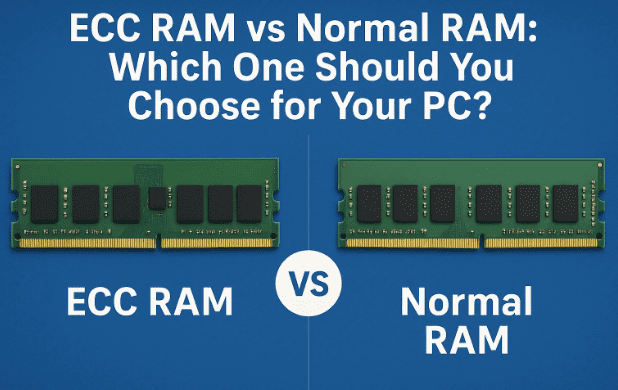
In this detailed guide, we’ll break down everything you need to know about ECC vs Non-ECC RAM — how they work, their pros and cons, where they’re used, and most importantly, which one you should buy.
Grab a coffee, because by the end of this article, you’ll have absolute clarity on this topic.
📖 Table of Contents
- What is RAM and Why Is It Important?
- What is ECC RAM?
- What is Non-ECC RAM?
- Why Do Memory Errors Happen in RAM?
- ECC RAM vs Non-ECC RAM: Key Differences (Comparison Table)
- Pros and Cons of ECC RAM and Non-ECC RAM
- Who Should Buy ECC RAM? Who Should Stick With Normal RAM?
- Bonus Tips to Optimize Your RAM Performance
- Frequently Asked Questions (FAQs)
- Final Thoughts: Making the Right Choice
1. What is RAM and Why Is It Important?
Before we dive into the ECC vs Non-ECC debate, let’s quickly refresh the basics.
RAM, or Random Access Memory, is your computer’s short-term memory. Unlike your hard drive or SSD, which stores data permanently, RAM temporarily holds the information your CPU needs right now.
Think of it like a desk:
- The larger and cleaner the desk, the more work you can spread out at once (more RAM = smoother multitasking).
- A cluttered or small desk makes you constantly shuffle papers (low RAM = lag and slowdowns).
That’s why upgrading from 4GB → 8GB → 16GB RAM can make your PC feel dramatically faster. But there’s more to RAM than just size and speed. The type of RAM — ECC or Non-ECC — determines how reliable your system will be.
2. What is ECC RAM?
ECC RAM stands for Error-Correcting Code RAM. As the name suggests, it’s a type of memory designed to detect and correct errors automatically.
Here’s how it works:
- Normal RAM modules usually have 8 memory chips.
- ECC RAM modules have an extra 9th chip, dedicated to error checking.
When data is stored in RAM, tiny errors can creep in — for example, a 0 may flip to a 1. While this seems minor, in critical applications, a single bit error can crash an entire system or corrupt sensitive data.











ECC RAM constantly checks for these bit errors. If it finds one, it fixes it instantly, ensuring the data remains accurate.
Where is ECC RAM used?
- Servers (where downtime is unacceptable).
- Databases (where corrupted financial or scientific data would be disastrous).
- Supercomputers and AI research (which process trillions of calculations).
- Mission-critical systems like aviation, banking, and space research.
In short, ECC RAM is about reliability and stability above all else.
3. What is Non-ECC RAM?
Non-ECC RAM, also known as standard RAM, is what you’ll find in almost every gaming PC, laptop, or home desktop.
Unlike ECC RAM, it does not detect or correct errors. If a bit flips, the system usually won’t notice — until it crashes or behaves strangely.
The upside?
- Cheaper (20–30% less expensive).
- Faster (since it skips the error-checking process).
- More compatible (supported by almost all consumer motherboards).
That’s why Non-ECC RAM dominates the consumer market. It’s fast, affordable, and good enough for everyday computing.
4. Why Do Memory Errors Happen in RAM?
You might be wondering: why do we even need ECC RAM? Are memory errors really that common?
Surprisingly, yes — though most of them go unnoticed. Errors happen due to:
- Electrical interference (power fluctuations inside your PC).
- Magnetic interference from nearby devices.
- Cosmic radiation — believe it or not, high-energy particles from space can flip bits in RAM. This is especially problematic in airplanes, satellites, or high-altitude regions.
For gamers and casual users, one or two flipped bits may just cause a program crash. But in banking, aviation, or scientific computing, even one error can have catastrophic consequences.
That’s why ECC RAM exists.
5. ECC RAM vs Non-ECC RAM: Key Differences
Let’s compare the two side by side for clarity.
| Feature | ECC RAM | Non-ECC RAM |
|---|---|---|
| Error Handling | Detects & corrects single-bit errors | Cannot correct (some can only detect) |
| Chips | 9 (extra chip for error correction) | 8 |
| Reliability | Extremely reliable, prevents crashes | Less reliable, higher risk of corruption |
| Speed | Slightly slower due to error checking | Slightly faster |
| Cost | 20–30% more expensive | Budget-friendly |
| Compatibility | Supported mainly by servers & workstations | Supported by all consumer motherboards |
| Use Cases | Servers, scientific computing, databases | Gaming PCs, home desktops, laptops |
6. Pros and Cons of ECC RAM and Non-ECC RAM
Let’s break it down further so you can decide.
✅ Pros of ECC RAM
- Super reliable: Failure rate as low as 0.09%, compared to 0.6% for Non-ECC.
- Data safety: Protects sensitive financial, medical, or scientific data.
- System stability: Prevents crashes during heavy workloads.
❌ Cons of ECC RAM
- More expensive (20–30% costlier).
- Slightly slower performance (error-checking adds overhead).
- Not supported by most consumer motherboards.
✅ Pros of Non-ECC RAM
- Affordable and widely available.
- Faster (no error-checking delay).
- Compatible with almost every PC build.
❌ Cons of Non-ECC RAM
- Less reliable (errors may cause crashes).
- Not suitable for servers or professional workloads.
- Higher risk of silent data corruption.
7. Who Should Buy ECC RAM? Who Should Stick With Normal RAM?
So, should you buy ECC RAM or not? It depends on your needs and budget.
💻 Non-ECC RAM is best for:
- Gamers who want maximum FPS and responsiveness.
- Casual users browsing, streaming, editing, or office work.
- Budget-conscious buyers who want fast, affordable memory.
Example: If you’re building a gaming PC with a Ryzen 5 CPU and RTX 3060 GPU, a 16GB Non-ECC kit is more than enough.
🏢 ECC RAM is best for:
- Server admins running websites, databases, or virtual machines.
- Researchers and scientists running heavy simulations.
- Finance professionals where one corrupted number could mean millions lost.
- Data centers where uptime is mission critical.
⚠️ Important Note: ECC RAM only works if both your CPU and motherboard support it. Many consumer motherboards disable ECC features, even if you install ECC RAM sticks. Always check your motherboard’s official specifications before buying.
8. Bonus Tips to Optimize Your RAM Performance
No matter whether you use ECC or Non-ECC RAM, here are a few tricks to get the most out of it:
- Enable XMP/DOCP in BIOS
- XMP (Intel) or DOCP (AMD) lets your RAM run at its advertised speed instead of the default slower one.
- Example: A 3200 MHz RAM stick may run at only 2133 MHz unless you enable XMP.
- Use Dual-Channel RAM
- Always install two identical RAM sticks (e.g., 2×8GB instead of 1×16GB).
- Dual-channel mode doubles memory bandwidth, boosting gaming and editing performance.
- Maintain Proper Cooling
- High-speed RAM can overheat. Ensure your PC has proper airflow and cooling fans.
- Check Compatibility Before Buying
- Even if RAM physically fits, features like ECC may not work unless supported by your motherboard.
These small tweaks can make your system faster, more stable, and longer-lasting.
9. Frequently Asked Questions (FAQs)
Q1: Can I use ECC RAM in a gaming PC?
You can physically install it, but most gaming motherboards will disable its ECC features. So it behaves like normal RAM.
Q2: Is ECC RAM slower for gaming?
Yes, slightly — but the difference is negligible. The real issue is compatibility and cost, not speed.
Q3: Why don’t laptops use ECC RAM?
Consumer laptops prioritize affordability and efficiency. ECC is mainly for servers and workstations.
Q4: Can cosmic rays really flip memory bits?
Yes. At higher altitudes (like planes or satellites), radiation can flip bits. That’s why aerospace systems always use ECC RAM.
Q5: Should professionals always use ECC RAM?
If you work in finance, healthcare, or scientific research, yes. Data corruption can be more expensive than the cost of ECC RAM.
10. Final Thoughts: Making the Right Choice
At the end of the day, the choice between ECC RAM and Non-ECC RAM comes down to your use case.
- For gamers, students, office workers, and casual users, Non-ECC RAM is the right pick. It’s faster, cheaper, and works with all motherboards.
- For professionals handling mission-critical data, ECC RAM is worth every penny. It ensures stability, reliability, and protection against errors that could otherwise cost millions.
Just remember: ECC RAM will only benefit you if your motherboard and CPU fully support it. Always check specs before buying.
And whether you go for ECC or Non-ECC, don’t forget to enable XMP, run dual-channel, and keep your system cool. These tweaks alone can give your PC a big performance boost.
So now the question is — which RAM are you using right now? Would you consider upgrading to ECC RAM, or is Non-ECC enough for your daily needs?
Tags
ECC RAM, Non ECC RAM, RAM comparison, PC building, gaming memory, workstation memory, data safety, server RAM, RAM optimization, XMP
Hashtags
#ECCRAm #NonECCRAm #PCBuild #GamingPC #ServerHardware #Workstation #DataSafety #ComputerTips #TechGuide #MemoryOptimization
⚠️ Disclaimer: This article is intended for educational purposes. Hardware compatibility varies, and performance may differ based on system configuration. Always check your motherboard and CPU specifications before purchasing RAM.








