Internal linking is a vital component of on-page SEO. It helps Google understand your website structure, spreads link equity, and boosts your content’s discoverability. But manually managing internal links can be time-consuming.
That’s where Link Whisper comes in — a powerful internal linking plugin that makes this process smarter and faster.
In this article, we’ll explore how free users can get started with Link Whisper, and for those who want to level up, we’ll also cover premium features that take your internal linking to the next level.
🧩 What Is Link Whisper?
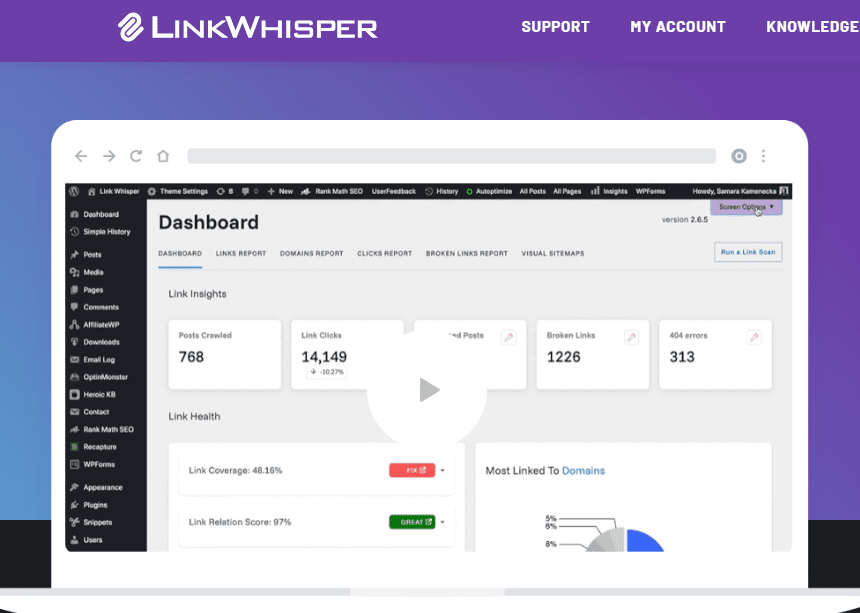
Link Whisper is an AI-powered WordPress plugin that automatically suggests internal link opportunities while you write or edit blog posts. It helps streamline your SEO workflow, ensuring your content is better connected and easier for search engines to crawl.
🆓 PART 1: Link Whisper for Free Users
The free version of Link Whisper is available on the WordPress Plugin Directory, and it offers core features for beginners and bloggers.
✅ Step 1: Install Link Whisper Lite (Free)
- Log into your WordPress dashboard.
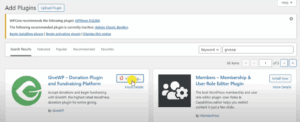
- Go to Plugins → Add New.
- Search for “Link Whisper Lite”.
- Click Install Now, then Activate.
You now have the Lite version running on your site.
🔍 Step 2: Get Internal Link Suggestions
- Open any existing post or create a new one.
- Scroll down to find the Link Whisper Suggestions section under the post editor.
- It will scan your content and suggest sentences where you can add internal links.
- You’ll see:
- Suggested anchor text (highlighted)
- Target internal pages/posts
- A checkbox to confirm each link
- Click Insert Selected Links to apply them instantly.
💡 Tip: The more content you have, the better suggestions Link Whisper can generate.
📊 Step 3: Basic Link Reporting (Free Version)
The free version includes a limited link reporting dashboard:
- Total number of links
- Posts with no internal links (called orphaned posts)
- Opportunity to manually add links to those orphaned posts
While limited, it still gives you a good overview of your internal link structure.
🔐 PART 2: Unlocking Link Whisper Premium Features
For users who want complete control and automation, the premium version of Link Whisper offers a robust set of features. Here’s how it enhances your internal linking strategy.
🚀 Premium Feature 1: Full Site Link Reports
With the premium version, your dashboard includes:





- Inbound and outbound link counts for every post and page
- Detailed view of orphaned content
- Easy navigation to add internal links directly from the dashboard
This gives you SEO clarity in one place.
⚙️ Premium Feature 2: Automatic Internal Linking
Link Whisper Premium allows you to set up auto-linking rules:
- Choose a target keyword and a target URL
- Link Whisper will automatically insert internal links for every matching keyword across your entire website
Perfect for affiliate marketers, niche bloggers, and product-focused websites.
✏️ Premium Feature 3: Edit & Add Links in Bulk
You can:
- Add, remove, or modify multiple links at once
- Use filters like post type, status, category, etc.
- Update dozens of posts in a few minutes instead of hours
🌎 Premium Feature 4: Smart Link Suggestions Across Posts
Instead of editing each post manually:
- Go to the Link Whisper dashboard
- Click “Add links” next to a post
- Instantly view smart suggestions from other posts that can link to this one
It’s like building reverse internal links at scale.
🧠 Premium Feature 5: URL Changer and Broken Link Fixer
- Automatically update old URLs across your website
- Fix or remove broken internal links with just a few clicks
🛡️ Premium Feature 6: Supports Multiple Languages and Custom Post Types
- Works with multilingual sites
- Supports WooCommerce, Custom Post Types, and more
- Seamless integration with themes and page builders
💡 Frequently Asked Questions
❓Is Link Whisper safe for SEO?
Yes. It only creates clean internal links and offers full control, so nothing is added without your approval.
❓Can I remove links later?
Absolutely. Whether you added links manually or via auto-linking, you can remove or edit them at any time.
❓Is the free version enough for small blogs?
For basic internal linking, yes. But as your site grows, the premium features can save you dozens of hours and improve SEO significantly.
🏁 Conclusion
If you’re serious about growing your WordPress site and improving your SEO game, internal linking is non-negotiable — and Link Whisper is the best plugin for the job.
Start with the free version to experience how it simplifies the process, and upgrade to Link Whisper Premium when you’re ready to take your content structure and rankings to the next level.
🔗 Useful Links
- 🔌 Download Link Whisper Free: WordPress.org Plugin
- 💼 Get Link Whisper Premium: Official Website
- 🛠️ Learn More About WordPress SEO: Yoast SEO
Tags:
link whisper, internal linking plugin, wordpress seo, on page seo tools, wordpress plugins
Hashtags:
#LinkWhisper #WordPressSEO #InternalLinking #SEOTips #WordPressPlugins #OnPageSEO #BloggingTools