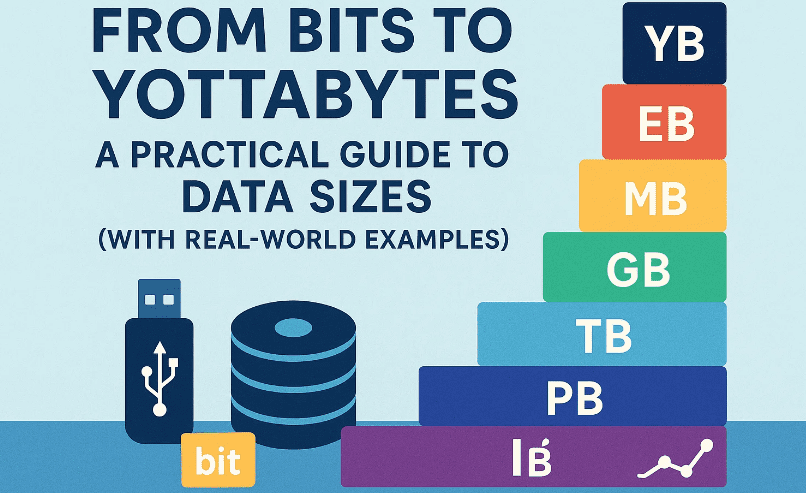
We talk about gigabytes and terabytes all the time—but what do they actually mean in everyday life? How many photos fit in a gigabyte? How much video can you store on a terabyte drive? And what on earth is a zettabyte?
In this detailed guide, we’ll translate every common (and not-so-common) data unit—bit, byte, KB/MB/GB/TB/PB/EB/ZB/YB—into plain-English comparisons you can relate to. We’ll also explain why storage makers say “1 TB” but your computer shows less, the difference between KB vs KiB (yes, that’s a thing), and how to estimate real storage for photos, music, and 4K video. Finally, we’ll answer frequent questions and give you a step-by-step framework to sanity-check sizes before you download, buy, or archive.
🌟 Why Data Units Are Confusing (and Why This Article Helps)
So far, most of us learned by osmosis: a gigabyte is “big,” a terabyte is “huge,” and a zettabyte is … science fiction? But when you actually need to plan—say, backing up phone photos, editing a 4K video, or buying cloud storage—hand-wavy intuition breaks down.
This article translates abstract units into relatable comparisons (books, photos, songs, movies) and gives you safe estimates with a little cushion. We’ll also explain the binary vs decimal mismatch that makes a “1 TB” drive appear as ~0.91 “TB” in your OS. By the time you’re done, you’ll be able to budget storage and bandwidth confidently—no guesswork, no surprises.
🔢 Bits vs Bytes: The Foundation You’ll Use Everywhere
Before anything else, lock this in:
- Bit (b): the smallest unit of digital information. It’s either 0 or 1.
- Byte (B): 8 bits. Historically the smallest “addressable” chunk in many systems.
You’ll see bits used mostly for network speeds (e.g., 100 Mbps), and bytes used for file sizes (e.g., 25 MB). That’s why a “100 Mbps” connection does not download at “100 MB per second.”
Conversion to remember:
- 1 Byte = 8 bits
- MB/s = (Mbps ÷ 8) approximately (ignoring overhead)
Example: 100 Mbps internet ≈ 12.5 MB/s maximum theoretical download speed.
🧮 1000 vs 1024: KB vs KiB (and Why Your Drive Looks “Smaller”)
Here’s where confusion begins. Two measurement systems coexist:
- Decimal (SI) – used by storage manufacturers and often in marketing
- 1 KB = 1000 bytes
- 1 MB = 1000 KB = 1,000,000 bytes
- 1 GB = 1000 MB = 1,000,000,000 bytes
- 1 TB = 1000 GB = 1,000,000,000,000 bytes
- Binary (IEC) – often used by operating systems and developers
- 1 KiB = 1024 bytes
- 1 MiB = 1024 KiB = 1,048,576 bytes
- 1 GiB = 1024 MiB = 1,073,741,824 bytes
- 1 TiB = 1024 GiB = 1,099,511,627,776 bytes
Result: A “1 TB” drive (decimal) shows up as ~0.91 TiB in your OS. Nothing is missing; it’s just different math. Knowing this helps you budget realistic storage.
📄 What 1 KB and 1 MB Look Like in Real Life
Let’s start small. We’ll use rounded, practical approximations.






1 Byte
- Roughly one character in simple text (ASCII).
- “A” or “z” = 1 byte in ASCII. (Note: emojis or non-Latin scripts can be multi-byte in UTF-8.)
1 KB (kilobyte ≈ 1000 bytes; 1 KiB ≈ 1024 bytes)
- ~a short paragraph of plain text (about 150–250 characters), depending on spaces and punctuation.
- A tiny JSON config, a small email without attachments.
Real-world feel: Think a couple of paragraphs of text.
100 KB
- A small low-resolution image (e.g., compressed 640×480 JPEG).
- A basic webpage’s HTML (without images/scripts) could be within this range.
1 MB (megabyte ≈ 1,000,000 bytes; 1 MiB ≈ 1,048,576 bytes)
- Text: ~500–1000 pages of plain text (varies wildly by encoding & formatting).
- Images: a mid-quality smartphone photo can be 1–3 MB (heavily depends on camera and compression).
- Audio: a 1-minute MP3 at 128 kbps ≈ ~1 MB (128 kbps ÷ 8 = 16 KB/s → 60 s ≈ 960 KB + overhead).
- PDF: a simple multi-page PDF (text-heavy) often sits around 0.5–3 MB.
The source script says “1 MB ≈ a short novel.” That can be true for plain text, but once you add fonts, images, or formatting, the file grows. Keep format in mind.
🎵📷📚 What 1 GB Looks Like (Books, Songs, Photos, Apps)
1 GB = 1000 MB (≈ 0.93 GiB). This is where phones and SSDs start talking.
Useful comparisons (approximate):
- Books (plain text): Up to thousands of pages—think hundreds of novels in raw text. But an EPUB/PDF with fonts and images will be larger.
- Photos (modern phones):
- Compressed JPEG/HEIC at 12–48 MP: 1–5 MB each → 1 GB ≈ 200–1000 photos.
- RAW photos: 20–80 MB each → 1 GB ≈ 12–50 RAW images.
- Music:
- MP3 @ 128 kbps: ~1 MB/min → 1 GB ≈ 16 hours (~960 minutes).
- MP3 @ 320 kbps: ~2.5 MB/min → 1 GB ≈ 6.5 hours.
- Apps/Games: Many mobile apps are 50–500 MB; PC/console games can be tens of GBs.
The source script says “1 GB = 1024 songs of 1 MB each.” That’s a simple, low-bitrate mental model. In 2025, many people use higher bitrates (thus fewer songs per GB). Use the bitrate-based estimate above for accuracy.
🎬🖼️📦 What 1 TB Looks Like (Videos, Photos, Libraries)
1 TB = 1000 GB (≈ 0.91 TiB). This is a common size for external drives, laptops, and NAS bays.
Everyday translations:
- Photos (compressed, phone):
- At 2 MB/photo → ~500,000 photos per 1 TB.
- At 4 MB/photo → ~250,000 photos per 1 TB.
- RAW photography:
- At 40 MB/photo → ~25,000 RAW images per 1 TB.
- Music:
- MP3 @ 320 kbps (~2.5 MB/min): 1 TB ≈ ~400,000 minutes ≈ ~6,600 hours.
- Video (very approximate; codecs vary):
- 1080p H.264 @ ~8 Mbps → ~1 GB per ~17 minutes → 1 TB ≈ ~280 hours.
- 4K H.265 @ ~25 Mbps → ~3.1 MB/s → ~11 GB/hour → 1 TB ≈ ~90 hours.
- High-bitrate 4K/ProRes/All-I can blow past these numbers—always check your camera’s data rate.
The script’s “1 TB = 300 hours of good-quality videos” is plausible for 1080p at moderate bitrates. For 4K, expect fewer hours unless you use very efficient codecs and lower bitrates.
🧠 Petabytes, Exabytes, Zettabytes, Yottabytes (Mind-Benders)
Once we leave TB, we enter data-center and internet-scale territory. But analogies help.
1 PB (Petabyte) = 1000 TB (≈ 0.89 PiB)
- Rough mental anchors:
- Photos @ 2 MB: ~500 million photos.
- 1080p video @ 8 Mbps: ~~280,000 hours (~32 years of continuous playback).
- “1.5 million CD-ROMs” (from the script) is a classic analogy; each CD at ~650–700 MB → order of magnitude checks out.
- “500 billion pages of text” is plausible assuming tight plain-text encoding and small page sizes; rich formatting would reduce the count.
1 EB (Exabyte) = 1000 PB (≈ 0.88 EiB)
- Imagine enterprise backups, cloud archives, or scientific datasets.
- The script says “11 million 4K movies” for 1 EB. Reality check:
- If one 4K movie averages 20–60 GB (highly variable), 1 EB (1,000,000 TB) could hypothetically store ~16–50 million movies at 20 GB each, or fewer at higher quality.
- Conclusion: The figure is plausible for highly compressed 4K; at premium bitrates, it would be lower. Treat any single number here as a rough orientation.
1 ZB (Zettabyte) = 1000 EB (≈ 0.86 ZiB)
- The script mentions “2 billion years of music” or “281 trillion MP3 files”—fun but extremely format-dependent.
- Historically, global internet traffic crossed the zettabyte-per-year range in the late 2010s; exact figures vary by methodology and year.
1 YB (Yottabyte) = 1000 ZB (≈ 0.85 YiB)
- The script cites “250 trillion DVDs” and “size of the entire web.” These are grand analogies—the actual web changes every second and includes dynamic content, duplicates, caches, and compression layers.
- “Downloading 1 YB at 1 Gbit/s would take ~2.6 billion years.”
- Quick sanity check:
- 1 YB (decimal) = 10²⁴ bytes.
- 1 Gbit/s = 0.125 GB/s (decimal) = 1e9/8 bytes/s ≈ 125 MB/s.
- Time = 10²⁴ / (1e9/8) seconds ≈ 8×10¹⁴ seconds ≈ 25 million years, not billions.
- The script’s figure is off by several orders of magnitude. Even with overhead or binary units, you won’t reach billions of years at 1 Gbit/s.
- Takeaway: Huge-number analogies are tricky—always recompute with units.
- Quick sanity check:
Tip: Whenever you see massive analogies online, verify the math with bits ↔ bytes, and decimal vs binary units.
🧭 Quick Rules of Thumb for Everyday Planning
We’ve covered a lot. Let’s pause and collect practical heuristics you can apply in seconds:
- Music (MP3/AAC):
- 128 kbps ≈ 1 MB/min, 320 kbps ≈ 2.5 MB/min.
- Phone photos (JPEG/HEIC): 1–5 MB each (daylight, modern phones).
- RAW photos: 20–80 MB per shot (sensor size & compression matter).
- 1080p H.264 video: ~8 Mbps ≈ 1 GB per ~17 min.
- 4K H.265 video: ~25 Mbps ≈ ~11 GB per hour (varies).
- 1 TB external drive:
- ~250k–500k phone photos, or
- ~90–300 hours of HD/4K (depending on bitrate), or
- 25k RAW photos (at 40 MB each).
Add 15–25% headroom for metadata, thumbnails, exports, and “just in case.”
✍️ Step-by-Step: How to Estimate Space for Your Project
Let’s move to a structured approach. So far, you’ve got the intuition; now we’ll use it.
Scenario A: Backing up a phone photo library
- Find average photo size: Open your gallery info on a sample of 100 photos. Suppose 3 MB each.
- Count photos: Say you have 50,000 photos.
- Compute: 50,000 × 3 MB = 150,000 MB ≈ 150 GB.
- Add headroom (25%): ≈ 190 GB.
- Pick storage: A 500 GB external SSD gives breathing room.
Scenario B: Recording a 2-hour 4K event
- Camera codec/bitrate: 4K H.265 at 50 Mbps (check your camera menu).
- Bytes per second: 50 Mb/s ÷ 8 = 6.25 MB/s.
- Per hour: 6.25 MB/s × 3600 ≈ 22.5 GB/hour.
- For 2 hours: ≈ 45 GB. Add 25% → ~56 GB.
- Card choice: Use a 128 GB card to be safe (room for retakes).
Scenario C: Archiving a podcast season
- Audio format: 192 kbps MP3 (often good for voice+music).
- Per minute: 192 kbps ÷ 8 = 24 KB/s → 24 KB/s × 60 = 1440 KB/min ≈ 1.4 MB/min.
- Episode length: 60 min → ~84 MB (plus cover art, metadata). Call it 90 MB.
- 20 episodes: 1.8 GB total.
- Add show notes, WAV assets, multitracks for editing → plan 10–20 GB.
🌐 Network Speeds vs File Sizes (Why Mbps Isn’t MB/s)
A common frustration: “I have 100 Mbps internet—why am I downloading at 10–12 MB/s, not 100?”
Because:
- Network is measured in megabits per second (Mb/s or Mbps).
- Files are in megabytes (MB).
- 1 Byte = 8 bits → MB/s ≈ Mbps ÷ 8.
- Then subtract protocol overhead, server limit, Wi-Fi conditions, etc.
Examples (max theoretical):
- 50 Mbps → ~6.25 MB/s
- 100 Mbps → ~12.5 MB/s
- 300 Mbps → ~37.5 MB/s
- 1 Gbps → ~125 MB/s
To improve real speeds: use wired Ethernet where possible, modern Wi-Fi (Wi-Fi 6/6E/7), keep your router firmware updated, and choose nearby servers/CDNs when offered.
🧩 Why Real Files Rarely Match “Ideal” Numbers
When people say “1 GB stores 1024 songs,” they’re simplifying. Real life varies because of:
- Encoding & compression: A “photo” can be 500 KB or 15 MB depending on light, motion, and compression.
- Containers & metadata: Thumbnails, previews, EXIF data, subtitles, album art, and indexes all add overhead.
- File system allocation: Small files may waste space due to minimum block sizes (allocation units).
- Decimal vs binary: Remember the KB vs KiB math—your OS may show less capacity than the drive’s label.
- Duplicates & edits: Photo bursts, video proxies, and multiple exports balloon storage silently.
Practical fix: Always plan 15–25% extra. For production work (video, RAW photo), give yourself 50% if you can—you’ll use it.
❓ FAQs
Q1: Is 1 KB 1000 bytes or 1024 bytes?
Both are used. In decimal (SI) it’s 1000. In binary (IEC) it’s 1024 (called 1 KiB). Storage vendors use decimal; many OS tools show binary. That’s why a drive looks “smaller” than the label.
Q2: Why does my “1 TB” drive show ~0.91 TB?
Because your OS is showing TiB (binary) while the drive is labeled in TB (decimal). 1 TB (decimal) ≈ 0.91 TiB. No space is missing.
Q3: How many photos fit in 128 GB?
Assume 3 MB per photo: 128 GB ≈ ~42,000 photos (decimal GB). Use 25% headroom → plan for ~31,000.
Q4: How much 4K video fits in 1 TB?
Totally depends on bitrate. For 25 Mbps H.265, 1 TB ≈ ~90 hours. For high-bitrate studio codecs, it can be just a few dozen hours or less.
Q5: Are “exabytes” and “zettabytes” real in practice?
Yes—cloud providers, hyperscalers, and global networks think in PB/EB and beyond. For home use, TBs and sometimes PB (NAS clusters) are the practical frontier.
Q6: Is “5 EB could store all words ever spoken” accurate?
It’s a popular thought experiment and depends on how you encode audio, sample rate, and compression. Treat such claims as fun approximations, not hard facts.
Q7: The script said downloading 1 YB at 1 Gbit/s takes 2.6 billion years. True?
No. Using decimal units, it’s on the order of tens of millions of years, not billions. Huge analogies are easy to miscalculate—always redo the math.
Q8: What’s the best way to avoid running out of space?
Adopt a 3-2-1 backup habit, prune duplicates quarterly, offload old RAW/video to archival storage, and add 25–50% buffer when budgeting.
🧾 Disclaimer
- All size translations here are approximations; real files vary by codec, bitrate, camera, compression, metadata, and file system overhead.
- Decimal (KB/MB/GB/TB) and binary (KiB/MiB/GiB/TiB) units are both used in the real world; we’ve noted the differences where relevant.
- Historical figures (like annual internet traffic in ZB) change over time and by methodology. Treat anecdotes as context, not guarantees.
- Product and standard names belong to their respective owners.
Useful standards references (optional reading):
- International Electrotechnical Commission (IEC) binary prefixes: kibi-, mebi-, gibi-, tebi-.
- The Open Group & NIST publications on units and measurement usage.
Tags: data units, bits vs bytes, kilobyte megabyte gigabyte, terabyte petabyte exabyte, zettabyte yottabyte, storage planning, network speed, file size estimation, binary vs decimal, KB vs KiB, photo storage, video bitrate, backup planning
Hashtags: #DataStorage #BitsAndBytes #Gigabytes #Terabytes #Petabytes #Exabytes #Zettabytes #Yottabytes #KBvsKiB #FileSizes #Backup #Networking








