Digital payments in India just took a futuristic leap forward. The National Payments Corporation of India (NPCI) has launched a new biometric UPI verification system that lets you make payments in seconds — without entering a PIN. Whether you’re using face recognition, fingerprint, or even voice commands on smart glasses, the new system brings security and convenience together like never before.
In this article, we’ll explore how biometric UPI works, how to activate and use it, its benefits, security layers, and limitations, and what this update means for the future of India’s digital payment ecosystem.
1. What Is the New Biometric UPI Feature?
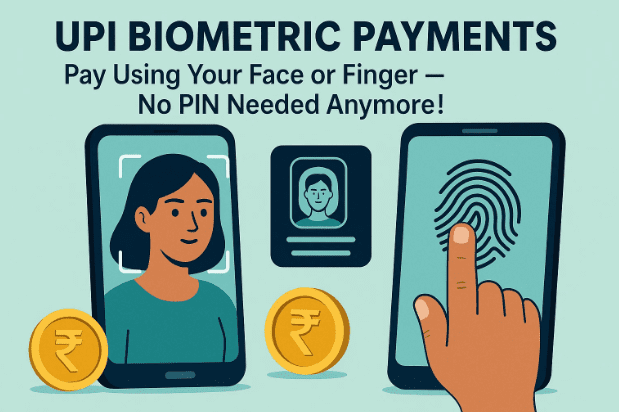
The National Payments Corporation of India (NPCI) has introduced a revolutionary upgrade to UPI (Unified Payments Interface) that allows users to verify payments using biometric data instead of typing their UPI PIN.
That means:
- No more typing 4- or 6-digit PINs each time you pay.
- You can use face recognition or fingerprint verification to complete transactions in seconds.
This new feature directly integrates your Aadhaar-linked biometric information with your bank account, providing an effortless, secure, and PIN-free way to make digital payments.
2. Who Launched It and When?
This update was officially launched by NPCI at the Global Fintech Fest 2025, held in Mumbai — an annual event where India showcases its fintech innovations to the world.
The system will first roll out through select banks and UPI apps like:
- BHIM UPI,
- Paytm,
- PhonePe, and
- Google Pay.
Initially, only limited users will get access as part of a controlled launch. But within a few months, it’s expected to be available across all UPI-enabled banks and apps.
3. How Biometric UPI Payments Work
Let’s break down how this futuristic system functions behind the scenes.
When you initiate a UPI payment — say through BHIM or Google Pay — you’ll now have an option to authenticate using biometrics instead of entering your PIN.
Here’s what happens technically:









- The app prompts for face or fingerprint verification.
- Your device scans your biometric data.
- That scan is then compared with your Aadhaar-linked biometric record stored securely with UIDAI.
- Once verified, the transaction is automatically approved.
The entire process happens in just 2–3 seconds and uses secure encryption layers, ensuring that no biometric data is ever shared or stored on the device or app.
4. Step-by-Step: How to Use UPI Face or Fingerprint Payments
Now let’s walk through how you’ll actually use this new feature. It’s incredibly simple once enabled.
🪜 Step-by-Step Guide
- Open your UPI app — such as BHIM, Paytm, or PhonePe.
- Scan the merchant’s QR code or select a contact to whom you want to send money.
- Enter the amount you wish to transfer.
- When prompted for verification, select either:
- Face Recognition, or
- Fingerprint Authentication.
- If you choose Face, your camera will open and scan your face.
- The system checks facial features like eyes, nose, and mouth alignment against your Aadhaar data.
- If you choose Fingerprint, simply place your finger on the sensor.
- Once verified, your payment is instantly processed — no PIN, no delay.
This biometric verification replaces the PIN entry step entirely.
💡 Note: Make sure your Aadhaar is linked to your bank account and biometric data is updated with UIDAI to use this feature.
5. Voice-Based UPI on Smart Glasses: A Glimpse of the Future
Now, here’s where things get truly exciting.
Alongside biometric verification, NPCI has also enabled UPI Lite on AI-powered smart glasses.
This means:
- You can scan QR codes using the built-in camera on smart glasses.
- Then, you can issue voice commands like “Pay ₹500” or “Send ₹200 to Rohan.”
- The transaction happens instantly — no phone required.
At the moment, this feature has a transaction limit of ₹1000 per payment, but it demonstrates India’s move toward hands-free, device-independent digital transactions.
So far, prototypes have been tested successfully in fintech events, and broader consumer availability is expected soon.
6. Top Advantages of the New UPI Biometric System
Now that you know how it works, let’s understand why this feature matters.
Biometric UPI isn’t just a convenience; it’s a major technological upgrade that brings multiple real-world benefits:
✅ 1. No More PIN Hassles
Entering a PIN multiple times a day can be tiring — especially for regular users or business owners. Biometric verification simplifies this completely.
✅ 2. Faster Payments
Transactions are processed within seconds. Ideal for crowded shops, metro stations, or quick-service counters.
✅ 3. Senior Citizen Friendly
Older adults often forget PINs or struggle with small smartphone keypads. Facial or fingerprint payments solve that problem instantly.
✅ 4. Boost to Digital India
According to NPCI data, digital payments in FY 2024–25 grew by over 35%. This biometric update will make adoption even stronger, especially in semi-urban and rural areas.
✅ 5. Enhanced Security
Biometric data can’t be stolen or guessed like a PIN. Your face and fingerprints are unique, making this system significantly more secure.
✅ 6. Perfect for Small Payments
Quick transactions like grocery bills or tea stalls now take seconds, making digital payments even more practical for everyone.
7. How Safe and Secure Is It?
Security is the number one concern in any financial innovation — and NPCI has addressed that thoroughly.
Here’s why biometric UPI is considered highly secure:
- Aadhaar-backed authentication: Verification happens via UIDAI’s secure servers.
- End-to-end encryption: Your biometric data never leaves your device unencrypted.
- No data storage: Neither NPCI nor the UPI app stores your face or fingerprint.
- Device-level isolation: Even rooted or modified phones can’t access this data directly.
So, while it feels effortless, the backend is robustly protected against tampering and unauthorized use.
8. When Will It Be Available for Everyone?
Currently, NPCI is working with selected banks and UPI apps for pilot implementation.
The rollout plan looks like this:
- Phase 1: Major apps like BHIM and Paytm (2025 Q4).
- Phase 2: Integration with Google Pay, PhonePe, and banking apps (early 2026).
- Phase 3: Expansion to regional cooperative banks and digital wallets.
As the pilot progresses successfully, the feature will gradually become available to all users nationwide.
9. Possible Limitations and Concerns
While the update sounds perfect, there are still some areas to keep an eye on.
⚠️ 1. Device Compatibility
Older phones without fingerprint or face unlock may not support biometric payments.
⚠️ 2. Aadhaar Link Requirement
Your bank account must be linked to Aadhaar with biometric data verified — which may limit accessibility for some.
⚠️ 3. Network Dependency
Just like standard UPI, stable internet is required for verification and transaction approval.
⚠️ 4. Privacy Concerns
Even though NPCI ensures no data misuse, users must still stay alert and use official UPI apps only — never third-party clones.
10. Impact on Digital India and the Payment Ecosystem
This update is a significant milestone in India’s Digital Public Infrastructure (DPI).
Here’s why:
- It eliminates PIN dependency entirely.
- Encourages inclusion for non-tech-savvy citizens.
- Strengthens India’s global fintech leadership.
- Makes payments faster, safer, and more intuitive.
From metro stations to local kirana shops, biometric UPI will make digital transactions a natural part of daily life — even for those who have never used a PIN-based payment before.
11. Frequently Asked Questions (FAQ)
Q1. Is biometric UPI available on all apps now?
Not yet. As of late 2025, only selected users in pilot programs can use it. Full rollout will happen gradually in 2026.
Q2. Do I need to link my Aadhaar to my bank account?
Yes. Since biometric data is verified using Aadhaar records, linking is essential.
Q3. Is there a risk of hacking or misuse?
No, because biometric data isn’t stored or transmitted in plain form. It’s encrypted and verified only with UIDAI.
Q4. Can I disable biometric payments if I prefer PIN?
Yes. Most apps will allow you to switch between PIN and biometric authentication in the security settings.
Q5. Will it work offline?
Currently, no. An active internet connection is required for Aadhaar verification.
Q6. What is UPI Lite on smart glasses?
It’s a new system allowing payments through AI-enabled glasses using QR scanning and voice commands — with a ₹1000 limit.
12. Conclusion: The Future Is Contactless and Seamless
With this new biometric authentication system, UPI is becoming faster, safer, and more accessible for every Indian. No more memorizing PINs or worrying about mistyping passwords — just your face or finger is enough.
It’s another step toward a cashless, PIN-less, and frictionless future — proving once again that India continues to lead the world in real-time digital payments innovation.
13. Disclaimer
This article is for informational purposes only. While all information is based on official NPCI announcements and publicly available data, users should verify specific rollout details with their respective UPI app or bank.
Always use official UPI applications and never share biometric data with unverified apps or individuals.
Tags:
UPI biometric payment, UPI face recognition, UPI fingerprint, NPCI update, digital payment India, Aadhaar linked UPI, BHIM biometric, UPI Lite, Fintech 2025, NPCI innovation
Hashtags:
#UPI #NPCI #DigitalIndia #Fintech #BiometricPayment #Aadhaar #UPIUpdate #CashlessIndia #Technology #SecurePayments








