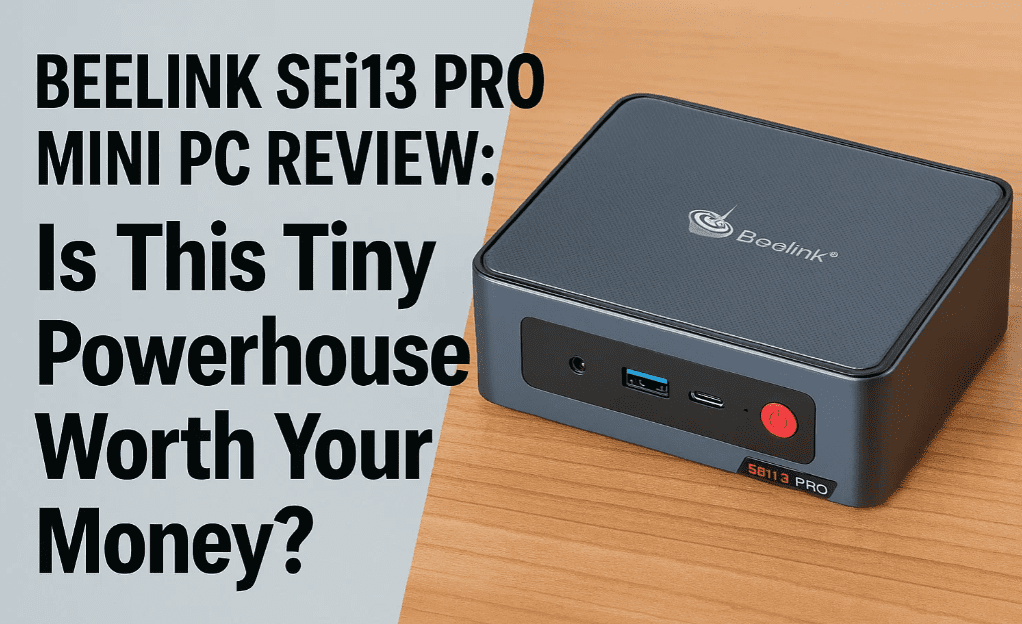
If you’re thinking about ditching your bulky old desktop for something modern, compact, and surprisingly powerful, the Beelink SEi13 Pro Mini PC might just be your perfect match. I recently got my hands on it, and after spending some serious time testing it out, here’s everything I found—broken down in the most real, no-nonsense way possible.
Let’s dive in.
📦 First Impressions – What’s Inside the Box?
When we open the box of the Beelink SEi13 Pro, here’s what we get:
- A user manual to guide you through the setup (nothing too fancy, but helpful)
- A high-quality HDMI cable to connect to your monitor or TV
- A power cable (UK plug included, but Beelink provides other region-specific options)
- A barrel jack power adapter and Huntkey adapter for power input
Honestly, everything you need to get started is right there. You could literally plug it in and be ready to go within minutes.
🖥️ Design & Port Overview – Simple Yet Packed with I/O
This little box has a clean matte finish, and though it’s plastic underneath, it doesn’t feel cheap at all. Here’s how the ports are laid out:
➤ Front Ports:
- Power button
- CMOS reset button (tiny but useful)
- 3.5mm audio jack
- USB-C (10Gbps, data only)
- USB-A 3.2 (10Gbps)
- Microphone array (360° voice capture — surprisingly decent)
➤ Rear Ports:
- 2 x USB 3.2 (10Gbps)
- 2 x USB 2.0 (480Mbps)
- HDMI 2.0 (supports 4K @ 60Hz)
- USB-C (data + video)
- 2.5Gbps Ethernet LAN
- Another 3.5mm audio jack
- DC power input
Both sides of the unit are clean—no extra ports there. The bottom houses dual speakers which are surprisingly loud for a mini PC. They’re boosted with DSP and a mini amplifier, so you can actually enjoy Netflix or YouTube without plugging in headphones.
🛠️ Let’s Open It Up – Internal Specs & Upgrade Options
Now if you’re the kind of person who likes to peek under the hood (like me), here’s what’s inside:
- Processor: Intel Core i9-13900HK
- 13 cores / 20 threads
- Turbo Boost up to 5.4GHz
- 24MB Smart Cache
- 65W TDP
- Memory: 32GB LPDDR5 (6000MHz, Dual Channel)
- Storage: 1TB Crucial P3 Plus NVMe SSD (PCIe 4.0)
- Graphics: Intel Iris Xe
You can actually upgrade the storage too! Just pop open the bottom by removing the rubber feet and unscrewing the mesh cover. It supports two M.2 2280 NVMe SSDs, up to 4TB each—so you can max it out to 8TB total. Not bad at all.
🌐 Connectivity & Extras
- Wi-Fi 6 via Intel AX200 card
- Bluetooth 5.2
- Windows 11 Pro pre-installed (no setup hassles)
- BIOS is unlocked, meaning you can tweak fan speeds, thermal settings, and boot order
🔥 Real-World Performance & Benchmarks
I ran a few common benchmarks and tests to see how it performs in day-to-day tasks and under pressure.
CPU & GPU Benchmarks:
- Geekbench 6 (CPU):
- Single-core: 274
- Multi-core: 7,132
- Geekbench 6 (GPU):
- Score: 12,946
- Cinebench R23:
- Multi-core: 14,830
- Single-core: 1,696
- 3DMark Time Spy: 1,263
- 3DMark Night Raid (GPU): 11,355
Thermal Performance:
Even after a stress test, the idle temperature stayed around 44°C, and under load, it maxed out at around 72°C. That’s impressive considering the size. No thermal throttling was observed.
⚡ Storage Speed Test
Using the built-in 1TB Crucial P3 Plus SSD, I got:










- Read Speed: ~4,984 MB/s
- Write Speed: ~4,680 MB/s
That’s more than enough for fast boot, file transfers, and loading heavy software. If you want more storage, add another M.2 SSD—it’s super easy.
🎞️ 4K Video Playback Test
I tested a 400Mbps 4K Ultra HD HEVC 10-bit file using Media Player.
- Result: Silky smooth playback
- No lag, no stutters
- Startup time was fast and responsive
- Ideal for Plex, media streaming, or even video editing tasks
🎮 Can It Handle Games?
Yes, but with expectations in check.
You won’t be playing AAA games on ultra settings. But it handles retro games, casual titles, and eSports games just fine. You can push 1080p or 720p on many modern games if you’re okay turning down settings.
🧠 Is a Mini PC Like This Worth It?
Let’s be honest—mini PCs used to be underwhelming. But not anymore.
This little guy absolutely destroys old-gen desktops—especially ones that can’t upgrade to Windows 11. For around $539, you get:
✅ A powerful 13th Gen i9 CPU
✅ DDR5 RAM
✅ NVMe SSD
✅ Wi-Fi 6 & BT 5.2
✅ Ultra-compact design
✅ Windows 11 Pro out of the box
If you need something for media, work-from-home, occasional gaming, or just want to replace your sluggish Windows 10 PC, the Beelink SEi13 Pro makes total sense.
🙋 Frequently Asked Questions
Q: Can I use this as a media server (like Plex)?
Absolutely. With 4K playback support and 8TB storage expandability, it’s a great fit.
Q: Can I upgrade the RAM later?
Unfortunately, RAM is soldered. But 32GB is more than enough for most users.
Q: Is it quiet under load?
Yes. Even under stress, fan noise is very manageable.
Q: Will it run Linux?
Yes, most major Linux distros should run smoothly. Ubuntu is a good pick.
💬 Final Thoughts
Beelink has really knocked it out of the park with the SEi13 Pro. It’s not just about the specs—it’s the whole experience. Easy to set up, smooth to use, and capable of handling almost everything you throw at it.
And the best part? It won’t take up much space on your desk, or your wallet.
🔗 Official Website
👉 Visit Beelink’s Official Site
🛍️ Suggested Tools & Accessories (Affiliate Links)
- High-Speed NVMe SSD (Upgrade to 4TB): Buy from Amazon
- 1080p Monitor for Compact Setups: Buy from Amazon
- USB-C Docking Station: Buy from Amazon
- 🎮 Want a mobile gaming controller for the best experience? Buy from Amazon
🏷️ Tags
beelink sei13 pro, mini pc 2025, compact desktop, intel i9 mini pc, best mini pc for media server, mini pc for gaming, windows 11 mini pc, tech review, home office setup, media center pc
🔖 Hashtags
#Beelink #MiniPC #Windows11 #CompactPC #TechReview #PlexServer #GamingMiniPC #HomeSetup #IntelCorei9 #MediaPC
Disclaimer: This review is based on actual hands-on use. While Beelink provided the unit for testing, this article reflects an honest and unbiased opinion. No payment or editorial control was involved.








