When you first step into the world of machine learning (ML) or artificial intelligence (AI), one question often pops up: “Do I really need a dedicated graphics card (GPU)?”
Everywhere online, people talk about GPUs like they’re absolute essentials. Forums, tutorials, and even some university peers may make you feel like without an NVIDIA RTX card, you can’t do real ML. But is that actually true? The answer is more nuanced than you think—it depends entirely on what stage of learning you’re in and what kind of work you’re doing.

So let’s break this down into three categories of students. By the end, you’ll know exactly where you fit and whether you should invest in a GPU right now—or save your money for later.
1. The Beginner Stage – Learning the Basics
At the start, your journey into ML usually involves:
- Cleaning CSV files.
- Writing simple Python scripts.
- Building data visualizations with libraries like Matplotlib or Seaborn.
- Training tiny models in scikit-learn (logistic regression, decision trees, Naïve Bayes, etc.).
👉 Do you need a GPU here? Absolutely not.
At this point, your focus is on understanding concepts and building logic. You’re learning how machine learning models actually work, not racing to train billion-parameter models.
Any decent CPU-based laptop or PC can handle this phase. Even integrated graphics laptops like a MacBook Air or a budget Windows machine will be fine.
💡 Tip: Spend your money on a comfortable keyboard, a bright display, and decent battery life instead of a GPU. These things will matter more for long study hours.
2. The Intermediate Stage – Coding Seriously but on the Cloud
Now let’s say you’ve moved beyond toy examples. Maybe you’re:
- Working on deep learning assignments for your coursework.
- Building larger projects in TensorFlow or PyTorch.
- Experimenting with convolutional networks (CNNs) for image data.
At this stage, you might feel you need a GPU. But here’s the truth: most of your heavy lifting will happen on the cloud.
Platforms like:






- Google Colab (free with limited GPU usage).
- Kaggle Notebooks (also free with GPU/TPU access).
- Your university’s own GPU servers (if they provide them).
In this case, your laptop just needs to:
- Handle multiple Chrome tabs without crashing.
- Support your coding environment (VS Code, Jupyter Notebook).
- Have at least 16 GB of RAM to avoid slowdowns.
👉 Verdict: Still no need for a dedicated GPU. Instead, prioritize RAM and storage speed (SSD) so you can code smoothly.
3. The Advanced Stage – Running Models Locally
Here’s where it gets interesting. Suppose you want to:
- Fine-tune a transformer model like BERT or LLaMA.
- Run Stable Diffusion for AI image generation.
- Train deep learning models offline before deploying them.
Now a dedicated GPU actually starts making a difference.
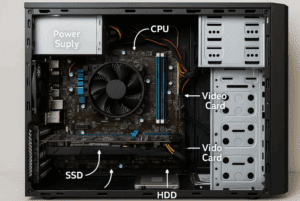
Why? Because these tasks involve billions of matrix operations. Your CPU can technically handle them—but it’ll take forever. A GPU, with thousands of parallel cores, cuts training time from days to hours.
💡 Even an entry-level RTX 2050/3050/4050 laptop GPU can handle these workloads decently. You don’t need an RTX 4090 to get started.
4. Why Training Needs GPUs – A Peek Under the Hood
At the heart of machine learning lies linear algebra—specifically, matrix multiplications.
When you train a neural network:
- Every neuron is doing repetitive multiplications and additions.
- With large datasets, this happens millions (or billions) of times.
CPUs are great for general work—browsing, coding, running apps—but they aren’t optimized for this kind of math. GPUs, on the other hand, are built for parallel processing, making them perfect for ML training.
5. CPU vs GPU – Where Each Shines
- CPU strengths: multitasking, running small models, logic building, writing code.
- GPU strengths: large-scale training, deep learning, computer vision, natural language processing.
💡 As a beginner, you’re on the CPU side of things. As you grow, you’ll gradually lean toward GPU usage.
6. The Role of VRAM and RAM
This is a detail most beginners overlook.
- RAM (System Memory): Used for everything else—Python environment, browser, datasets in Pandas, Jupyter.
- VRAM (GPU Memory): Dedicated to ML frameworks like PyTorch or TensorFlow.
Guidelines for students:
- 16 GB RAM: Bare minimum.
- 32 GB RAM: Ideal for bigger datasets and multitasking.
- 4 GB VRAM: Works, but tight for vision models.
- 6–8 GB VRAM: Much better for Stable Diffusion, CNNs, and transformers.
7. Can You Do ML on a MacBook?
This is a common question. With Apple Silicon (M1, M2, M3, M4), Apple has made impressive progress.
Pros:
- Unified memory gives fast access across CPU, GPU, and Neural Engine.
- Great for running small models like Whisper, small LLMs, and local experiments.
- Energy efficient and silent.
Cons:
- No CUDA support. This means PyTorch/TensorFlow CUDA libraries don’t work.
- Some advanced research workflows may fail.
👉 If you’re into light ML, design, and productivity, MacBooks are great. But for CUDA-heavy research or serious ML work, Windows + NVIDIA still wins.
8. Budget Options for Students
You don’t need to overspend. Student-friendly laptops with GPUs are now available under ₹70,000–85,000 (or around $900–1100):
- RTX 2050 (entry level).
- RTX 3050 (sweet spot).
- RTX 4050 (future-proof).
If you can’t afford one yet, start with cloud platforms first.
9. Cloud Platforms That Save You Money
If your budget is tight, leverage free and paid cloud services:
- Google Colab Free – great for small experiments.
- Google Colab Pro – higher GPU quota at ~$10/month.
- Kaggle Notebooks – completely free with NVIDIA GPUs.
- Paperspace / RunPod – affordable GPU rentals.
This way, you don’t need to invest in hardware until you truly need it.
10. Final Verdict – Should You Buy a GPU as a Student?
- Stage 1 (Beginner): No GPU needed. Focus on concepts.
- Stage 2 (Intermediate with Cloud): No GPU needed. Prioritize RAM.
- Stage 3 (Advanced Local Training): Yes, GPU helps a lot.
👉 Bottom Line: Don’t waste money on a high-end GPU when starting out. But once you’re running bigger models, even an RTX 2050 or 3050 can change the game.
11. Frequently Asked Questions (FAQ)
Q1. Can I do machine learning on a laptop without a GPU?
Yes. For 80–90% of beginner work (scikit-learn, basic TensorFlow, small datasets), a CPU is enough.
Q2. What’s more important—RAM or GPU?
Early on, RAM is more important. Once you move to deep learning, GPU VRAM becomes crucial.
Q3. Should I buy a MacBook or Windows laptop for ML?
If you want CUDA support and flexibility, choose Windows + NVIDIA. If you prefer Apple’s ecosystem and lighter ML, a MacBook works fine.
Q4. Can I use Google Colab instead of buying a GPU?
Yes, Colab gives you free GPU/TPU access. It’s perfect for students who can’t afford powerful hardware.
Q5. How much VRAM do I really need?
For most student projects, 4–6 GB VRAM is enough. For advanced image/video models, 8+ GB helps a lot.
Disclaimer
This article is for educational purposes only. Hardware recommendations are general guidelines and may vary based on specific course requirements, datasets, and software compatibility. Always confirm with your university or project needs before making a purchase.
Tags: gpu for students, machine learning hardware, deep learning laptops, macbook for ml, google colab, cloud gpu vs local gpu
Hashtags: #MachineLearning #GPU #StudentLife #DeepLearning #AI #Python #DataScience








