Google continues to push the boundaries of artificial intelligence with its Gemini ecosystem. Recently, Gemini rolled out four groundbreaking updates that promise to change the way we interact with AI tools—whether for work, education, or creativity.
From giving Gemini the ability to see your screen in real time, to helping students learn with personalized lessons, to designing apps at lightning speed, these updates show how fast AI is becoming more integrated into everyday workflows.
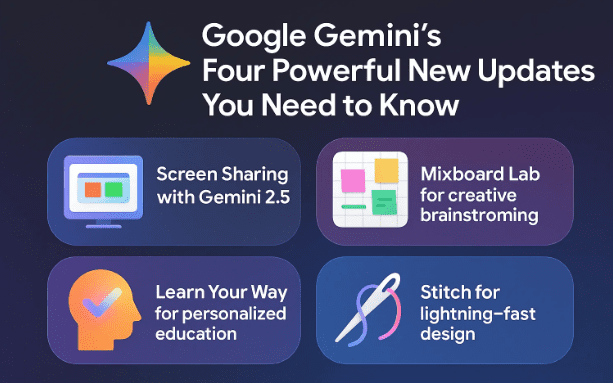
In this article, we’ll take a detailed look at all four updates:
- Screen Sharing with Gemini 2.5
- Mixboard Lab for creative brainstorming
- Learn Your Way for personalized education
- Stitch for lightning-fast design
We’ll also explore how you can use each feature, potential use cases, and tips for getting the most out of them. By the end, you’ll know exactly what these updates mean for you—and how to take advantage of them.
1. Why These Updates Matter
Before diving into the technical details, let’s pause and consider why these updates are so significant.
AI has already proven it can generate text, code, and images, but most tools remain somewhat siloed. They excel at one task but struggle to adapt to real-world workflows where people need flexibility—sometimes writing, sometimes designing, sometimes analyzing data.
These Gemini updates are important because they:
- Bring AI closer to real-time collaboration (screen sharing, live voice, webcam input).
- Enhance creativity and exploration with customizable brainstorming boards.
- Transform education by adapting textbooks and lessons to a student’s interests.
- Revolutionize design by automating prototypes while still letting you refine the details.
Taken together, they represent a shift from AI as a static assistant to AI as a dynamic partner in daily work.
2. Screen Sharing in Gemini 2.5
One of the most exciting new features is the ability to share your screen with Gemini directly from your computer. This is part of the Gemini 2.5 update, available at Google AI Studio.
Imagine this scenario: instead of explaining a problem in words, you simply show Gemini your browser tab, a PDF document, or even your webcam feed. The model can then analyze what it sees and provide step-by-step guidance.
Key Functions Available
- Screen sharing: Show Gemini any open tab or application window.
- Webcam sharing: Present documents or physical items to the AI.
- Voice input: Use natural speech to ask questions or provide instructions.
- System instructions: Define roles, such as “You are a helpful tax assistant.”
- Dialogue controls: Adjust how Gemini responds based on tone, background noise, or context.
Example Use Case: Filling IRS Form 8802
Anyone who has ever filled out IRS forms knows how frustrating the process can be. With this update, you can display the form to Gemini, ask a question like “What does the appointee section mean?”, and get an immediate, clear answer.









Gemini not only explains the section but also clarifies whether you can leave it blank or must provide details. This transforms tedious paperwork into an interactive, guided experience.
Advanced Features
- Proactive dialogue: Gemini filters irrelevant background noise.
- Grounding with Google Search: The AI can pull in live search results for more accurate help.
- Function calling: Developers can define custom functions Gemini can trigger during interactions.
- Automatic responses: For faster workflows when integrated with apps.
This update bridges the gap between AI’s raw intelligence and the messy realities of day-to-day tasks.
3. Mixboard Lab: Your AI Brainstorming Board
The second update introduces Mixboard, available in Google Labs. Think of it as a supercharged, AI-driven inspiration board—a bit like Pinterest, but infinitely more customizable.
How It Works
- Open a new project.
- Give Gemini a prompt (e.g., “Plan a Halloween party in my living room”).
- Mixboard instantly generates a curated visual board with ideas, decorations, activities, and more.
From there, you can refine, remix, or expand any element. For example, you can remove backgrounds, duplicate items, add text, or request alternative variations.
Use Cases for Mixboard
- Event planning: Parties, weddings, or office events.
- Creative projects: YouTube thumbnails, school flyers, or social media posts.
- Advertising and marketing: Brainstorming ad concepts with quick visual references.
- Personal hobbies: Designing crafts, DIY projects, or interior decoration ideas.
Unlike static platforms, Mixboard is dynamic—you’re not locked into existing images. You can actively guide the board to better fit your unique vision.
4. Learn Your Way: Reimagining Education
Perhaps the most transformative update is Learn Your Way, a tool that personalizes learning material to each student’s preferences.
At its core, this feature lets you upload a PDF (like a textbook or lecture notes) and have Gemini reformat the material into different learning modes:
- Immersive text explanations
- Slides with narration
- Audio lessons
- Mind maps
What makes it remarkable is the personalization factor. You can define the learner’s grade level and interests, and Gemini adapts the teaching style accordingly.
Example
Let’s say you’re trying to understand economic systems. Instead of reading a dry textbook chapter, you can ask Gemini to explain it as if you’re a high school student who loves movies. Suddenly, capitalism, socialism, and mixed economies are explained through film analogies, making the lesson both engaging and memorable.
Who Benefits Most?
- Students: Get tailored study aids that match their interests.
- Teachers: Quickly repackage course content for different audiences.
- Parents: Help children grasp difficult topics in fun, relatable ways.
- Lifelong learners: Explore complex subjects with customized perspectives.
Currently, this feature is in limited preview with a waitlist, but you can learn more at Google Labs.
5. Stitch: Design at the Speed of Thought
The fourth update comes from Stitch, a tool that helps you design applications, websites, and user interfaces in minutes.
Instead of spending hours prototyping in design software, you simply describe what you want and Stitch creates mockups instantly.
Example
You could tell Stitch:
“Design an app that takes a TikTok link and provides a transcript.”
Within moments, Stitch generates:
- Screens for different app states
- A full design flow
- Options to tweak themes (light/dark)
- Figma files or raw code to integrate into your project
You can then iterate by chatting with the AI: “Make this darker,” “Add a search bar,” or “Show mobile layout.” Stitch handles the design while you focus on the big picture.
Benefits of Stitch
- Speed: Prototypes in minutes, not days.
- Flexibility: Adjust visuals, layouts, and flows with natural language.
- Compatibility: Export to Figma or code platforms.
- Collaboration: Share designs with teams and refine in real time.
This update is particularly valuable for developers, startups, and designers who need to move quickly.
6. Real-World Applications
With these four updates combined, Gemini is evolving into a multifunctional assistant. Here are some concrete examples of how they might fit into daily life:
- Business owners: Use screen sharing to fill out tax forms, Mixboard to create marketing visuals, and Stitch to design an app interface.
- Students: Upload textbooks into Learn Your Way for personalized study sessions.
- Event planners: Use Mixboard to plan themes, Stitch to design invites, and Gemini voice to keep track of logistics.
- Developers: Prototype quickly with Stitch, then debug live web apps by sharing the browser screen with Gemini.
7. Frequently Asked Questions (FAQ)
Q1. Are these features free?
Some are available in free previews (like Mixboard and Stitch), while others may require sign-ups or waitlists.
Q2. Can Gemini screen sharing work on mobile devices?
Currently, it’s optimized for desktop browsers via Google AI Studio. Mobile integration may come later.
Q3. Is my data safe when I share my screen?
Screen sharing always carries risks. Be cautious not to display sensitive information. Google provides documentation on how data is handled during sessions.
Q4. Do I need design experience to use Stitch?
Not at all. That’s the point—Stitch is built for beginners and pros alike.
Q5. Can Learn Your Way be used for subjects outside school?
Yes. You can upload any PDF, including professional training material, and Gemini will adapt it.
8. Final Thoughts
Google Gemini’s latest updates are more than incremental improvements—they mark a shift toward integrated, multimodal AI experiences.
- Screen sharing turns Gemini into a live collaborator.
- Mixboard makes brainstorming visual and interactive.
- Learn Your Way reshapes how people absorb knowledge.
- Stitch speeds up design workflows from days to minutes.
Whether you’re a student, entrepreneur, developer, or creative professional, these updates offer powerful ways to save time, boost productivity, and unlock creativity.
It’s clear that AI is moving from being a helper in isolated tasks to becoming a partner across your entire workflow. The question now is: how will you use these tools to your advantage?
Tags
google gemini updates, gemini 2.5 features, gemini screen sharing, google labs mixboard, stitch with google, learn your way ai, ai productivity tools, google ai studio
Hashtags
#GoogleGemini #AIUpdates #ScreenSharing #Mixboard #Stitch #AIProductivity #EdTech #DesignAI