The GNOMEdesktop environment has long been one of the most popular and polished graphical interfaces in the Linux world. From Ubuntu and Fedora to Endless OS, GNOME powers millions of systems with its modern design and simplicity.
Now, with the release of GNOME 49, users are getting a minor yet meaningful update — one that may not drastically change the experience, but certainly polishes the edges and improves performance where it matters.
At first glance, GNOME 49 might look similar to its predecessor, but the details tell a different story. From refreshed animations to a brand-new video player and better system utilities, this update refines what GNOME does best: elegance, consistency, and usability.
So let’s take a deep dive into what’s new, what’s changed, and why it matters for both everyday Linux users and developers.
🌍 Overview: GNOME 49 in Context
Before diving into specific features, it’s worth noting that GNOME 49 isn’t a revolutionary update — it’s what developers often call a maintenance release. The GNOME team is preparing for the upcoming GNOME 50, a milestone version expected to include bigger interface overhauls and possibly new core libraries.
In other words, GNOME 49 sets the stage. It focuses on smooth transitions, performance improvements, and replacing older GTK3 apps with GTK4-based ones. This direction is clear: modernize the stack while maintaining stability.
Even though it’s not flashy, there’s a lot of polish under the hood. Let’s start with what you can actually see right away.
✨ Visual Tweaks: Animations and UI Transitions
One of the first things users notice in GNOME 49 is the smoother animation flow. The notification panel and quick settings center now use more refined, natural transitions.
When you open or close the menu, you’ll notice it glides into view with subtle easing — nothing exaggerated, but enough to make the interface feel modern and lively.
This small change makes a surprisingly big difference for daily users. The desktop feels more fluid, less abrupt, and more “alive.”
In short: GNOME 49’s updated animations give it the polish users expect from premium desktop environments like macOS or KDE Plasma 6.
Let’s move to one of the most practical updates. The “Do Not Disturb” toggle — previously located inside the notification/calendar panel — has now been relocated to the Quick Settings menu.
This is a thoughtful decision. It makes sense to have it beside Wi-Fi, Bluetooth, and power controls since it affects system-level notifications rather than just the calendar area.
The whole panel uses new icons and smoother hover effects.
It’s a small but welcome quality-of-life improvement that simplifies daily usage, especially for people who often present, stream, or just want fewer distractions.
🔐 Lock Screen and Login Screen Refinements
GNOME’s lock screen and login screen have received some subtle but practical updates.
When you’re playing media (music or videos), media controls now appear directly on the lock screen, allowing you to pause, play, or skip tracks without logging in.
Additionally, the accessibility menu on the login screen has been redesigned. The layout is more intuitive, featuring clearer icons for features like:
On-screen keyboard
Screen reader
High contrast mode
Zoom and large text options
These are essential for users with specific accessibility needs, and it’s nice to see GNOME giving them more attention in visual design.
The new layout isn’t just aesthetic — it’s functional. Everything feels where it should be.
🎬 New Video Player: Showtime Replaces Totem
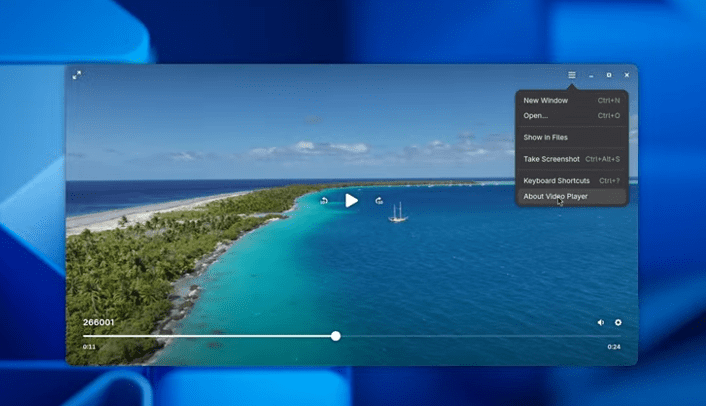
One of the standout changes in GNOME 49 is the replacement of the default video player Totem with a completely new app called Showtime.
Built with GTK4 and libadwaita, Showtime is sleek, responsive, and finally feels like a modern media player.
Key Features:
Clean, minimalist design aligned with GNOME’s UI philosophy.
Ability to take screenshots directly from videos (saved automatically in your Pictures/Screenshots folder).
Improved playback performance and hardware decoding support.
However, it’s worth noting that some codec support issues remain, particularly with certain proprietary video formats.
💡 Recommendation: Install the Flatpak version of Showtime from Flathub to ensure you get full codec compatibility and regular updates.
This change symbolizes GNOME’s broader transition to GTK4 applications — modern, lightweight, and visually consistent across the desktop.
📄 New Document Viewer: Papers Replaces Evince
Another long-standing GNOME app has been replaced — Evince, the default PDF/document viewer, has been succeeded by Papers.
While Papers inherits most of Evince’s core features, it introduces a cleaner UI and uses the latest GTK4 toolkit for smoother rendering and better performance.
Key improvements include:
Faster PDF rendering with better text clarity.
Improved dark mode handling.
Touch-friendly interface for tablets or hybrid devices.
The overall user experience feels modernized, though longtime Evince users will still feel right at home.
📁 Improved File Manager (Nautilus)
No GNOME release would be complete without tweaks to its beloved file manager, Nautilus.
This time, the search filter menu has been redesigned. The functionality remains the same — you can still filter files by type, date, and size — but the layout is cleaner and more intuitive.
You’ll also notice small UX refinements, such as:
Sharper icons.
Smoother transitions when entering folders.
Faster search indexing (thanks to underlying performance fixes).
It’s not a major redesign, but it reinforces Nautilus as one of the most user-friendly file managers in the Linux ecosystem.
🖼️ New Default Wallpapers
Of course, what’s a GNOME release without new wallpapers?
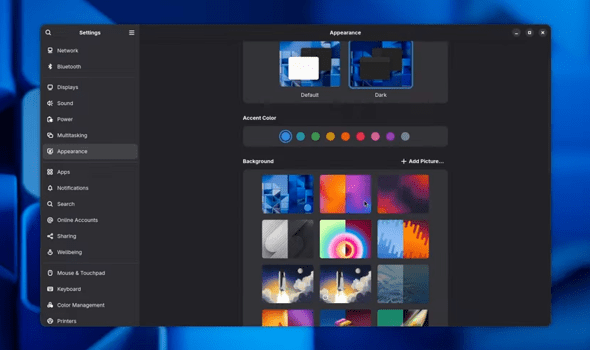
GNOME 49 includes multiple new background sets — not just one or two images. Each version brings a mix of abstract patterns, soft gradients, and nature-inspired designs.
These wallpapers complement GNOME’s flat aesthetic and adapt beautifully to both dark and light themes.
A fun detail: GNOME wallpapers always subtly match the new version’s visual language. The GNOME 49 set feels airy, geometric, and professional — perfect for minimalists.
⚡ Performance Boosts in GNOME Software (App Store)
Now for a major under-the-hood improvement.
The GNOME Software Center — known for being sluggish in past versions — has finally received significant performance optimization.
In GNOME 49:
Data parsing from Flatpak repositories (like Flathub) is now faster.
The app list loads more quickly.
The interface is less likely to freeze during updates.
This is especially helpful for users who install apps via the GUI rather than the terminal. Previously, the store could hang for 10–20 seconds before responding — now, it feels snappy and responsive.
So far, early users report noticeably smoother app browsing and installation experiences.
🔧 Other Hidden Changes and Improvements
GNOME 49 also includes a variety of small refinements that you might not immediately notice but will appreciate over time.
Here’s a quick rundown of what’s new under the hood:
GTK app image loading now happens in a sandboxed environment using Glycin, enhancing security.
Keyboard shortcut search is now available across more apps — useful for power users who like key combos.
New battery icons indicate when a laptop is plugged in but not charging.
Quick Settings now support brightness control for all displays when HDR is enabled.
Each of these changes contributes to a smoother, safer, and more cohesive desktop experience.
♿ Accessibility and Usability Improvements
GNOME has always been praised for its accessibility features, and version 49 continues to strengthen that foundation.
The Accessibility (Universal Access) menu in the login screen now features clearer icons and grouping. The on-screen keyboard is more responsive and visually consistent, ensuring that users who rely on assistive tools have a reliable experience.
These improvements may seem small, but for users with physical limitations or temporary keyboard/mouse issues, they can make a world of difference.
🖥️ Remote Desktop Enhancements
The Remote Desktop feature in GNOME has also been enhanced.
It now supports:
Multitouch input for touchscreen devices.
The ability to add virtual monitors for remote sessions — useful for developers and IT administrators.
These features expand GNOME’s professional capabilities, making it more versatile for modern hybrid work environments.
🔮 Final Thoughts and Expectations for GNOME 50
So, is GNOME 49 worth upgrading to?
Absolutely — especially if you value stability, smoother performance, and an overall more refined experience. While it’s not a groundbreaking release, it’s a critical bridge toward the highly anticipated GNOME 50.
From a refreshed interface to new GTK4-based core apps, GNOME 49 shows the project’s steady march toward modernization.
The next version, GNOME 50, is rumored to include deeper integration with Wayland, enhanced gesture support, and potentially a refreshed shell design. For now, though, GNOME 49 delivers exactly what it should — a clean, reliable, and efficient desktop experience for Linux users.
💬 Frequently Asked Questions (FAQ)
Q1: When will GNOME 50 be released? GNOME 50 is expected to arrive in 2025, marking a major milestone with new shell features and possibly deeper Flatpak integration.
Q2: Can I upgrade to GNOME 49 right now? Yes. Users on Fedora 41, Arch Linux, or openSUSE Tumbleweed can get it via official repositories. Ubuntu users may need to wait for PPA or 24.10 builds.
Q3: Is GNOME 49 more resource-hungry? No, in fact, it’s better optimized than version 48. Memory and CPU usage are slightly reduced thanks to GTK4 efficiency improvements.
Q4: What’s the best way to experience GNOME 49? Try it on a Fedora Workstation live session or install it on a secondary system. It’s stable enough for daily use.
Q5: Are third-party extensions still compatible? Most are, though a few older GNOME Shell extensions may require updates due to animation and menu layout changes.
Disclaimer: This article is for informational purposes only. All product names and trademarks belong to their respective owners. GNOME is an open-source project licensed under GPL and LGPL. Users are encouraged to back up data before upgrading their desktop environments.
Tags: GNOME 49, Linux desktop, GNOME Shell, GTK4, Wayland, Fedora, Nautilus, Papers, Showtime, GNOME update, open source software
Arjun is a seasoned Linux enthusiast and open-source contributor. He has worked with multiple distributions including Debian, Fedora, and Arch-based systems, and regularly tests new desktop environments and community projects. With over a decade in IT system administration, Arjun brings practical, hands-on insights to Linux tutorials and reviews.