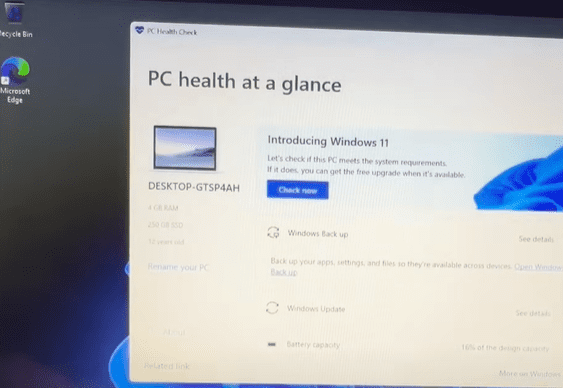
If you’ve ever installed Windows 11 on an older, unsupported laptop using a custom ISO or tools like Rufus, you’ve probably wondered: “What happens if I reset the PC? Will Windows 11 still work?”
That’s a great question—and today, we’ll explore exactly that. In this article, we test whether resetting an unsupported laptop running Windows 11 (specifically the preview build 24H2) will keep the system running, or if you’ll run into issues.
Let’s dive in!
🧪 Test Setup: Windows 11 on an Unsupported Laptop
We’re using an old laptop that does not meet Windows 11’s official hardware requirements. This includes the lack of TPM 2.0, an unsupported processor, and limited RAM.
We installed Windows 11 24H2 preview build using the official ISO available from Microsoft. The installation was done via USB with no bypass tools or unofficial hacks—everything was done using Microsoft’s own tools, making it an officially sanctioned test environment.
Now comes the real test—what happens when we reset the PC?
🔁 Reset Method 1: Local Reinstall
Step-by-Step
- Go to Settings > System > Recovery > Reset this PC
- Choose Remove Everything (this deletes all files and apps)
- Select Local Reinstall
- Confirm and start the reset process
The system began the reset and went through the process without any errors. After approximately 10 minutes, the laptop rebooted and continued with the standard Windows setup steps.
What Happened?
✅ Success – The laptop booted back into Windows 11 without any issues
✅ No USB or ISO needed after the reset
✅ Setup completed with standard language and region selections
✅ No Microsoft account required (using “Set up for work or school” and “Domain join instead”)
✅ Everything worked smoothly—including Windows Updates and the Insider Preview settings
🌐 Reset Method 2: Cloud Download
To test the second option, we reset the PC again, this time choosing:
- Remove Everything
- Cloud Download
This option downloads a fresh copy of Windows 11 directly from Microsoft’s servers and reinstalls it.
What Happened?
✅ Download went smoothly (about 10 minutes on a decent connection)
✅ No bypass needed—Windows reinstalled perfectly
✅ Setup experience was the same as before
✅ Windows version remained the same (24H2 Preview Build)
✅ Windows Updates and Insider Preview options were intact









Both methods—Local Reinstall and Cloud Download—worked perfectly, even on an unsupported laptop.
🔍 What This Means
If you’ve installed Windows 11 on an unsupported machine, you can safely reset it using either local or cloud reinstall without needing to go through the bypass process again.
This is excellent news for users who:
- Want a fresh start without reinstalling from USB
- Have older hardware
- Are unsure whether the system will keep working after a reset
Microsoft’s evaluation versions and preview builds are fairly lenient on hardware requirements—especially the Windows 11 IoT Enterprise LTSC and 24H2 Preview Build.
✅ Final Thoughts
- Yes, you can reset Windows 11 on unsupported hardware
- Both reset methods work
- No bypass or CMD tools required
- Windows Update and Insider Programs still function post-reset
If you’re still on Windows 10, now is a great time to consider upgrading to Windows 11 23H2 stable or even 24H2 beta, especially with how smooth this process is.
For those worried about performance, there are tons of optimization tricks to boost speed—check out other articles about speeding up Windows 11 and what to do after installation.
Have questions or thoughts? Drop a comment below and let’s chat!
Tags: Windows 11, unsupported laptop, Windows 11 reset, Windows 11 installation, Cloud reinstall, Windows 11 24H2, Insider Preview, Microsoft ISO, Rufus, local reinstall, PC reset, old laptops, Windows 11 LTSC
Hashtags:
#Windows11 #Windows11Reset #UnsupportedLaptop #PCReset #CloudReinstall #Windows11LTSC #Microsoft #InsiderPreview #WindowsTips #TechGuide #OldLaptopUpgrade #Rufus #WindowsInstallation








